





Recently, the ButterflyMX data team made the decision to replace a growing collection of CRON jobs with a centralized orchestration platform. As our reporting, modeling, and third-party integrations expanded, coordinating jobs across systems required more structure than CRON could reliably provide.
We selected AWS Managed Workflows for Apache Airflow (MWAA) for its managed infrastructure and Python-native extensibility. However, as we began designing our environment, we faced an immediate tradeoff: running separate DEV and PROD instances would significantly increase our cloud spend. For a lean team with relatively low pipeline complexity, that cost required scrutiny.
This post covers:
- The problem: CRON is great, until it is not
- The problem: MWAA is expensive, and two instances are twice as expensive
- The solution: separation by flags
- Evaluating the single instance for DEV and PROD environments: Upsides
- Evaluating the single instance for DEV and PROD environments: Downsides
- Conclusions: an effective solution for small deployments
The problem: CRON is great, until it is not
The lean data team at ButterflyMX had identified a need for introducing an orchestration tool into our workflows. We wanted something flexible and extensible, but also a tool we could subscribe to as a managed service, to offload infrastructure management and allow our data engineering team to focus on writing data pipelines rather than maintaining servers.
Airflow remains the gold standard for orchestration. Flows are written in Python, a language in common use among data professionals, making it easy to customize; a large number of vendors maintain their own libraries extending Airflow to interact with their APIs; it has a large and active community; and several vendors provide managed versions, including AWS, which is what we chose.
Managed Workflows for Apache Airflow (MWAA) offers several advantages over user-managed instances.
While it will typically cost more in cloud fees than a server for running a user-managed instance, it has several advantages:
- Less maintenance overhead.
- Stand-up is quick and painless.
- Granting access to other AWS services is performed in the managed IAM role.
- We can rely on AWS to limit service outages and correct them when they occur.
Given the small size of our data team and the low complexity of our Airflow project, we believed the extra bill was worth the reduction in dev-hours, especially unexpected dev-hours, and began setting up our MWAA instance.
The problem: MWAA is expensive, and two instances are twice as expensive
We wanted to move mission-critical systems into Airflow – its value is essentially proportional to how many systems it can orchestrate and how reliably it can perform. But of course, we’re always adding new pipes and systems, and would like to add them and other performance improvements without risk to production systems.
A simple solution to this problem would be to spin up a new copy of the infrastructure for testing and validation of changes before deploying them to the production environment. But unfortunately, MWAA does not currently have an option to pause the whole instance. To have a separate DEV instance, we would have to either leave it running all the time, or delete it when we’re done with it and completely stand up and reconfigure it from scratch when we want to do development. Neither of these was an attractive option, so we needed to get creative.
The solution: separation by flags
We settled on an imperfect but workable solution: DEV and PROD copies of each data flow in the form of a directed acyclic graph (DAG) in the same MWAA instance, with both deployments controlled by CI/CD.
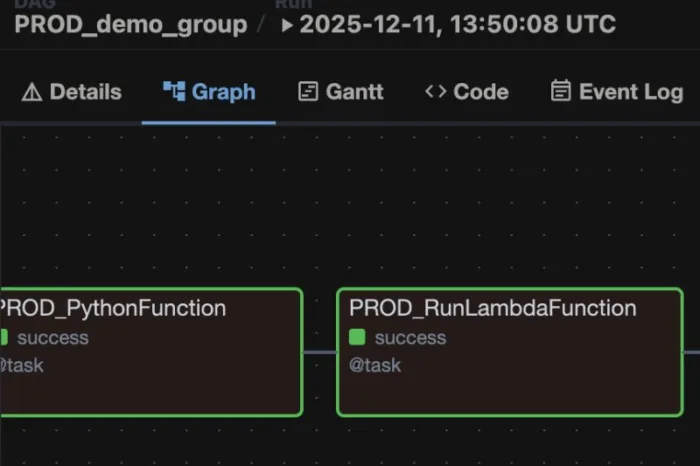
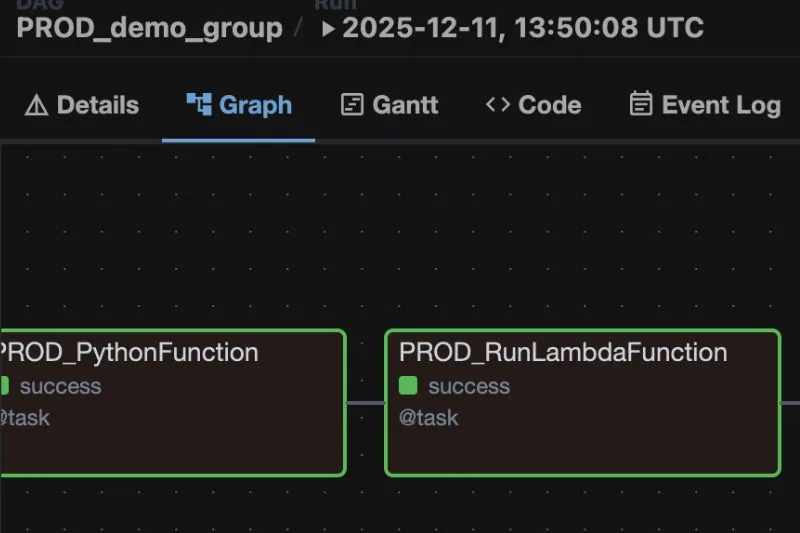
All the DAGs are named and written agnostic of environment. A boolean variable DEV controls the assignment of a prefix string, and is always set to TRUE by default. This boolean flag will later be overridden by CI/CD to control the environment, described below. The prefix is inserted into the task ID for each operator (Fig. 1), and the name of the DAG itself (Fig. 2), so it’s clear within the DAG and from the list of DAGs which “environment” is which:
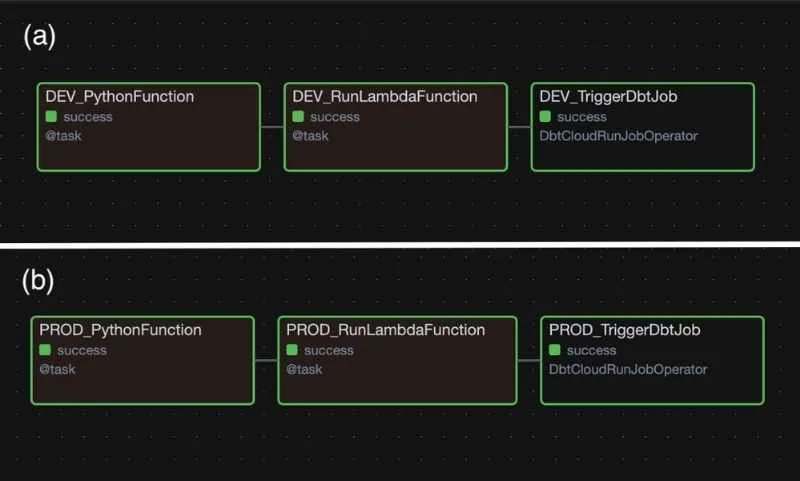
Fig. 1. a. DAG graph with DEV operators. b. DAG graph with PROD operators.

Fig. 2. DEV and PROD DAGs with the same names from the DAGs list.
Code Block 1. Setting the DEV/PROD variable and directing traffic.
   # DEV/PROD flag by default is DEV; changed to PROD by CI/CD on a pull into main branch
DEV = True

if DEV:
    dev_prod_flag = 'DEV'
    aws_etl_pipe=
else:
    dev_prod_flag = 'PROD'
    aws_etl_pipe=
dbt_job_id=
Code Block 2. Separating DAG and task names with dev_prod_flag.
with DAG(
    dev_prod_flag + "_demo_group",
    # These args will get passed on to each operator
    # You can override them on a per-task basis during operator initialization
    default_args={
        "depends_on_past": False,
        "email_on_failure": False,
        "email_on_retry": False,
        "retries": 0,
    },
    description="Demo DAG",
    schedule_interval=None,
    start_date=datetime(2026, 1, 1),
    catchup=False,
    tags=["Demo", dev_prod_flag],
    max_active_runs=1,
    max_active_tasks=10,
) as dag:

    run_dbt_job = DbtCloudRunJobOperator(
        task_id=dev_prod_flag + '_TriggerDbtJob',
        dbt_cloud_conn_id=,
        job_id=dbt_job_id
    )
For all of this to work reliably, we need to have separately stored DEV and PROD files in the S3 bucket that MWAA reads the DAGs from. And the file names and DEV boolean in each file should be controlled programmatically, so that once testing of changes and code review is complete, deployment proceeds without any further human intervention, where unintended change is always a risk. GitHub Actions will manage all of these tasks for us.
Code Block 3. GitHub Action config for editing and uploading files. The “upload files” STEP here should be added after all other steps in your CI/CD workflow.
name: Airflow Prod Deploy Dags
on:
  push:
    branches: [ main ]

jobs:
  airflow-prod-deploy-dags:
    steps:
      - name: upload files
        run: |
          echo 'uploading files to s3'
	   # Use sed to change the DEV boolean to False:
          for filename in ./bucket_contents/dags/*.py; do sed -i -e 's/DEV = True/DEV = False/g' $filename; done;
	   # rename all the python files so that they have a "PROD_" prefix:
          for filename in ./bucket_contents/dags/*.py; do mv "$filename" "${filename/dags\//dags/PROD_}"; done;
	   # Upload everything to your S3 bucket:
          aws s3 cp ./bucket_contents s3:// --recursive
          echo 'done uploading'
	   # And we're done. We don't need to reset the files because they were changed in the Github runner, and will be discarded when the Action finishes.
Deployment happens only on a merge into the story branch (DEV) or into the main branch (PROD). When a merge into a story branch is triggered, a loop changes the DEV boolean variable in each DAG file, and then adds the “DEV_” prefix to each filename. All the files in the directory are then uploaded to the S3 bucket. Once uploading is complete, the DEV flag is set back to TRUE, and finally, the filenames are reset by removing the prefix.
A similar process happens in the main CI/CD flows – the boolean and file names are edited for each file, the modified files are uploaded to the same bucket, and then the files are reset to the default state.
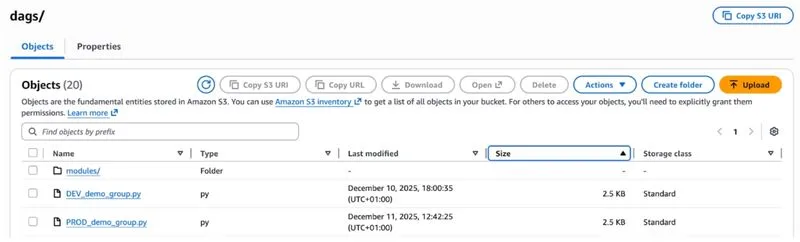
Fig. 3. DEV and PROD files in S3.
By leveraging parameters and GitHub Actions, we get the desired result – fully separate DAGs for DEV and PROD, so we can build on what we have without risking disruption to systems that the team and broader company rely on to make decisions.
Evaluating the single instance for DEV and PROD environments: Upsides
We have noted several advantages of the single-instance formulation.
First of course is cost. It’s much cheaper (exactly 50% cheaper!) to run a single instance of MWAA than two instances.
Dev and prod are also visible in a single Airflow UI, rather than having to log out and log in to another instance of MWAA or a whole separate AWS account. We have the convenience of seeing everything in one place, and not having to provision two sets of credentials for every user, while separation of environments is handled in a fully automated manner.
We also don’t have to worry about differences in MWAA configuration – DEV and PROD environments are the same, and we don’t have to worry about different defaults at standup time, or forgetting to add credentials for a new connection. The environmental variables are definitionally identical. There are associated risks here, of course, which will be discussed in the next section.
Finally, and most importantly, as long as dependencies remain the same (more on that below, too) and we don’t touch that DEV/PROD flag, DAGs are kept in their own silos, and we can have development fully separated from production, just as we would with two fully disjoint instances of MWAA.
Evaluating the single instance for DEV and PROD environments: Downsides
There are also some imperfections in this arrangement that could be eliminated by running truly separate DEV and PROD MWAA instances.
The most dangerous is in dependency management. Because the environment is shared, if you want to add new dependencies in DEV, there is no way to test them before they are added to PROD as well.
If you are careful, and if your DAGs aren’t so large that they are continuously running on the instance, major problems can be avoided. MWAA is configured such that all DAGs running when an update is received must complete before the update is applied. Editing and restarting the MWAA instance takes about 10-15 minutes to complete, so if there is a gap this size between triggers and there are no mistakes in the changeset, updates are fairly painless.
However, a typo in requirements.txt, or attempting to add a library or version of a library that has not yet made it into the approved list of MWAA dependencies, can bring down the whole instance. Updating dependencies on the instances takes between 10-15 minutes from time of manually triggering the reread, plus time to actually diagnose, update, and move the updated requirements.txt through GitHub CI/CD. A severe enough issue can bring down all your DAGs and they will be unavailable for this whole length of time. DAGs can be configured to rerun over a backlog of missed runs, but this is additional architectural overhead that must be taken into account.
The other drawback we have experienced using this combined system is that having to have all development go through a full CI/CD slows down development time compared to just dropping a new python DAG file into the dev bucket. Clicking through the full PR workflow and waiting for CI/CD to warm up and deploy for every small change adds up.
Conclusions: an effective solution for small deployments
We have found using this methodology to separate DEV and PROD deployments in a single MWAA instance to be a cost-effective and elegant solution. It is not without its risks, but given the small size of the data team and the nature of our particular workflows managed in Airflow, all of which can be fully backfilled in the event of an outage, the cost-benefit analysis comes out quite positive.
If your team is on a budget, extra attention to changes to dependencies and a little extra time in GitHub might be worth the cash savings and elegance of having all your DAGs in a single list with a consistent configuration.


Author’s Bio:
Sean Smith is a data engineer at ButterflyMX, breaking down data silos using Python and SQL. He was until recently skeptical about dbt, but is now an evangelist.