





Key takeaways:
- A working intercom call does not prove that the lock will release or the door will close and secure again.
- Existing locks and wiring may stay after a qualified assessment confirms that they suit the replacement system and entrance.
- Compare the work and responsibilities in each proposal before comparing totals, and treat unspecified items and charges as unresolved.

An intercom door release system lets an authorized resident or staff member answer a visitor and send an unlock command to an electrified lock. In a relay-based system, a controller or relay switches the lock circuit to release the door. But a successful call is only the start: the lock must release, the visitor must open the door, and the entrance must close and secure again.
If you’re replacing your building’s intercom, some existing locks, wiring and door hardware may be able to stay. The key is finding out which parts suit the replacement and what work they still need. Understanding the whole entrance helps you request the right assessment and compare complete apartment intercom door release proposals, rather than treating a panel price as the cost of a working door.
This guide will answer:
- How an intercom door release system works
- What lock behavior and exit requirements mean for reuse
- Can the existing lock, door and wiring stay?
- Choose how residents answer and authorize entry
- Document what happens during each outage
- Why the intercom buzzes but does not unlock
- Compare complete proposals with one entrance record
Watch how ButterflyMX works:
How an intercom door release system works
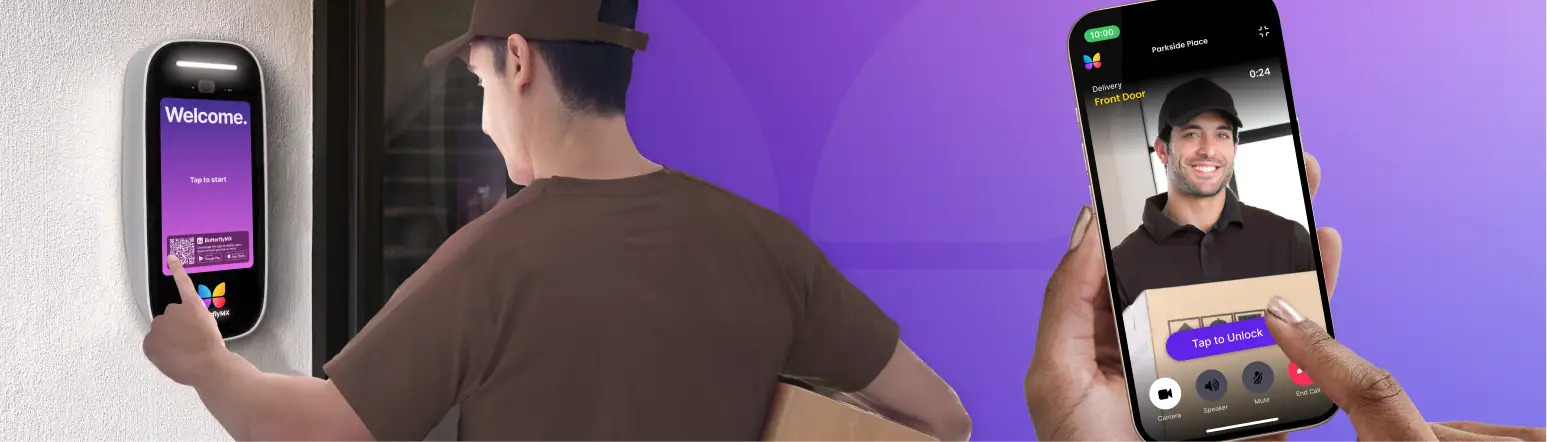
An intercom door release system connects a visitor’s call with a way to approve entry. The entrance panel starts the call, and a phone, in-unit station or other answering device lets a resident or staff member respond. Approving entry sends an unlock command toward the lock; it does not physically open the door.
You may know this equipment as a buzzer, buzz-in system, door phone or call box. Those names describe familiar entry systems, but they don’t guarantee the same features. The important distinction is between the calling path and the release path, which can work or fail separately.
In the generic relay-based arrangement described in the ButterflyMX door-release guide, entry follows this sequence:
- The visitor calls from the entrance panel.
- An authorized resident or staff member answers and approves entry.
- A controller or door-release relay changes the lock circuit in response.
- The electrified lock releases so the door can be opened.
- The visitor opens the door. Automatic movement requires a separate door operator.
- The door closes and secures again. The closer brings the door back, and the locking hardware returns to its secured condition.
Each step matters. You might hear a visitor clearly while a fault in the release command, lock power or door hardware prevents entry. Likewise, a door that unlocks but doesn’t close and secure afterward is not a fully working entrance.
A relay switches the lock circuit, not the power source
A dry contact acts as a switch. It does not supply the lock’s operating power. In a separately powered lock circuit, the relay changes the electrical path, while the lock power supply provides the energy the hardware needs.
The Aiphone RY-18L instructions illustrate this distinction with a specific relay module and separate lock power. They also show why relay contacts must be suitable for the electrical load they switch. This is a model-specific example, not a universal wiring diagram or a ButterflyMX specification.
Ask your installer to document three roles: what sends the release command, what switches the lock circuit and what powers the lock. You don’t need to choose terminals or perform electrical checks. You need a clear account of how the proposed intercom will work with the lock already at your entrance.
What lock behavior and exit requirements mean for reuse
Before deciding what can stay, separate two questions: what happens to entry when lock power is lost, and how people leave from inside. A lock can remain secure against entry while still allowing mechanical exit. Its power-loss label alone does not tell you whether the complete entrance is suitable.
Electric strikes, magnetic locks and power loss
An electric strike sits at the door frame and works with the door’s latch. Releasing the strike allows the latch to pass so the door can open. A magnetic lock, often called a maglock, holds the door closed through electromagnetic force.
Allegion defines fail-safe and fail-secure by what happens on the secure side, usually outside, when lock power is removed. Fail-safe means unlocked; fail-secure means locked. Electric strikes are available in either mode. Maglocks are fail-safe and lose their holding force when power is removed.
Fail-secure does not automatically mean people are trapped inside. With ordinary mechanical locksets or panic hardware, the inside lever or bar can work independently of the strike. A fail-secure strike can therefore remain locked outside while allowing free egress, meaning people can leave from inside. Have the actual lock and exit hardware assessed, because this distinction does not apply to every locking arrangement.
Neither fail mode is a universal recommendation. For reuse, your installer needs to identify the installed model, its power-loss behavior and how people exit. A strike also depends on the latch and frame working together, while a maglock needs a suitable release arrangement. These differences matter even if both locks previously worked with an intercom.
Exit arrangements and fire-rated openings
Permission to enter does not settle whether an entrance is suitable for exit. An NFPA staff explanation of egress locking describes the general principle that leaving should not require a key, tool or special knowledge or effort, while some recognized locking arrangements have specific conditions. The blog is explanatory, not controlling code text or an official NFPA position.
For maglocks, the release method changes the review. The 2021 iDigHardware commentary on auxiliary push buttons distinguishes sensor-release arrangements, which detect an approaching occupant, from door-hardware-release arrangements, which use hardware mounted on the door. Different conditions apply to each. A sensor, exit button and fire-alarm connection are not a universal recipe for every maglock or electric strike.
Fire-rated openings need a separate check of the listed door assembly and its latching. Allegion’s strike-specific guidance explains that fail-secure strikes preserve the positive latching required for applicable fire-door assemblies, unlike fail-safe strikes. Positive latching means the door is held closed by its latch. The assessment must account for the assembly listing, adopted NFPA 80 edition and local interpretation; this is not a rule that every electrified lock must be fail-secure.
Have a qualified door-hardware or life-safety professional assess these questions and coordinate with the authority having jurisdiction, the local body that interprets and enforces the applicable requirements. Occupancy, door location, adopted code and listed hardware can change the answer. An existing installation is not proof that its whole arrangement can transfer unchanged to a replacement intercom.
Entry communication accessibility
The intercom’s communication features also need review. The U.S. Access Board guidance on entry communication states that applicable two-way systems used to gain entry require visual and audible signals. Controls and other operable parts at accessible entrances have additional requirements. Adding video alone does not establish accessibility.
An accessibility professional should determine what applies to your property and assess the complete entrance. This ADA guidance does not settle every multifamily, Fair Housing, state or local obligation. Together, lock behavior, inside exit, fire-rating conditions and accessibility set the boundaries for deciding what can stay.
Can the existing lock, door and wiring stay?
Potentially, but not automatically. Existing electrified hardware may reduce the replacement work if it suits the proposed system and entrance. The fact that the old buzzer opened the door does not prove compatibility. A photograph or model number can help an assessment, but neither is enough to approve reuse.
Gather available equipment records and service history for your installer. The assessment should consider the lock, its electrical needs, wiring and physical door together. What happens next depends on what is already installed.
If an electric strike is already installed
Ask the installer to identify the strike model and fail mode, then assess how it works with the latch and inside exit hardware. The inspection should cover door and frame condition, alignment, pressure on the latch and closer performance. Where applicable, it also needs a listing and fire-rated assembly review.
A suitable strike may still need door adjustment, power-supply changes or control-interface work before it can work with the replacement intercom. The proposal should separate the hardware being retained from the work needed to make it function in the new setup.
If a magnetic lock is already installed
Have the installer document the maglock model, electrical requirements, release arrangement and power-loss behavior. A qualified door-hardware or life-safety professional must also assess inside exit, opening restrictions and applicable approvals.
A working maglock does not prove that its entire control and release arrangement can remain unchanged. If the review is pending, the proposal should name the unresolved work and the person responsible for deciding what stays.
If there is no suitable electrified lock
A replacement intercom panel cannot, by itself, release a purely mechanical entrance. The project must include suitable release hardware and any associated door or frame work, power and control connections.
The right lock depends on the complete entrance assessment, not a standard choice for every building. Ask the provider to spell out this work rather than leaving it implied by the panel description.
Verify power and wiring separately
In all three cases, request documentation of the required voltage, AC or DC power type, current, relay contact rating and power source. Qualified personnel should confirm that the proposed contacts can switch the lock’s electrical load. As the Aiphone example shows, a suitable switching interface and a suitable power supply are separate requirements.
Existing wiring needs its own assessment of condition, gauge, or wire size, and run distance. Keeping the lock does not establish that the old supply or cable can stay. These electrical checks also don’t replace the inspection of the door, frame, latch and closer.
Carry the documented basis for each retained component into the entrance record below. If compatibility is unknown, keep any assessment, interface or replacement work marked as unresolved. That way, an upgrade to resident calling won’t be mistaken for a fully planned entrance replacement.
Choose how residents answer and authorize entry
Once the lock-side needs are clear, compare how residents will receive calls and approve entry. These are related choices, but a new answering method does not remove the need for a suitable lock interface.
Vendor guidance groups several calling and authorization paths. These are useful descriptions, not rigid product classes, and real systems can combine them.
In a cloud/mobile setup, residents may answer through an app or browser and send an approved release command toward the entrance. An IP/SIP intercom routes calls over a network to configured devices, such as in-unit monitors. Ask how the proposed design depends on local networking and outside services rather than assuming its outage behavior from the label.
Telephone entry calls a resident’s phone through a telephone connection, which may use cellular service. In a configured system, pressing a key can authorize release. For example, “press 9” uses DTMF, the tones produced by telephone keys, to signal approval. A legacy in-unit buzzer instead connects the visitor with an installed station whose release control sends the command.
Video adds a way to view the visitor; it is not the lock release itself. The Avigilon video intercom guide notes that some systems require a separate access controller. Ask which proposed component performs release and how it connects to the lock.
Also consider whether residents can use the answering method, what connection it needs and how visitors find the right person. A directory helps route calls, but public resident listings raise privacy questions. Confirm the available listing and routing options instead of assuming every resident must appear publicly.
Wireless commonly describes the answering or command path, not a wire-free entrance. The panel may still need power, networking and a wired lock interface. For more detail about those connections, see the guide to a wireless video intercom with door release. Those remaining dependencies are also why outage behavior needs a system-specific answer.
Document what happens during each outage
Building power, lock or controller power, internet and carrier service can fail independently. A lock’s fail mode answers only what happens at the lock when its power is removed. It does not tell you whether visitor calls connect, remote commands arrive or the controller remains available.
Following the configuration-specific outage approach, ask your supplier to document each relevant failure separately. For each one, record what happens to:
- Visitor calls and resident answering.
- Local authorization at the property.
- Remote authorization and remote door release.
- Lock release and subsequent securing.
- Mechanical exit from inside.
For every function, get the promised fallback or limitation in writing, along with the power or service it depends on. If backup power is included, request its stated operating conditions and duration. Don’t assume continued calling or release from a general “works offline” claim.
Use those written expectations to agree on acceptance demonstrations. Qualified personnel should arrange safe, approved scenarios and verify the promised behavior. Don’t disconnect life-safety equipment or improvise power-loss tests yourself. Checking each function separately also helps explain a common problem during normal operation: the call works, but the door stays locked.
Why the intercom buzzes but does not unlock
If the intercom buzzes but does not unlock, the sound alone does not identify the failed link. Authorization, the controller or relay, lock power, wiring, lock operation or physical door conditions may still prevent entry.
The documented professional diagnostic sequence follows the same release chain:
- Confirm that the release command was authorized.
- Verify that the controller or relay changed state.
- Check for correct lock-circuit power, including the required voltage.
- Inspect wiring and connections.
- Assess lock operation.
- Inspect latch alignment, pressure on the latch, the frame and the closer.
Pressure on a latch can stop a strike from releasing even when the electrical command arrives. Replacing the intercom panel alone may therefore leave the original fault unresolved.
You can help by recording whether calls connect, whether the unlock command is acknowledged, whether a sound occurs and when the problem appears. Arrange qualified service for electrical testing and adjustments. Don’t open electrical boxes, test live circuits or alter exit arrangements. Carry any identified repair work into the replacement proposal. For apartment-specific operating detail, consult the guide to an apartment intercom system with door release.
Compare complete proposals with one entrance record
An intercom door release quote should describe the entrance project, not just the panel. Separate intercom equipment, lock and door work, power and network connections, labor and approvals, and ongoing operations. A kit price and an installed proposal may cover very different work.
Use one entrance record for each proposal, then compare matching rows. Record the stated work and charges, using these four statuses:
- Retained: existing equipment is proposed to stay and needs a documented basis for reuse.
- New: equipment or work will be supplied or installed.
- Excluded: the proposal does not cover the item, so identify an owner or separate provider where needed.
- Unresolved: a decision, assessment, charge or scope detail is still outstanding.
An unmentioned item is unresolved, not evidence of zero cost or no need. The record below brings the assessment questions into one place. Its entries are prompts to complete, not findings about your entrance.
Swipe to compare →
The rows depend on one another. Evidence that a strike can stay does not settle the power-supply or control-interface row. If the supply has not been assessed or relay suitability is unspecified, lock-side work remains unresolved. Retained is not the same as verified, and excluded is not the same as unnecessary. Assign each unknown to a named person before comparing totals.
A conditional proposal example
Suppose Proposal A says to retain the electric strike but says nothing about the power supply or relay suitability. Mark those two items unresolved. The provider has stated an intention to keep the strike, but has not established that no additional lock-side work is needed.
Now suppose Proposal B includes an assessment, names the person who will establish compatibility and explains how any resulting work will be handled. Its scope is clearer, but reuse is still unproven until the assessment is complete. This example does not show which proposal costs less. It shows why the totals alone cannot settle the decision when essential work remains unspecified.
Settle operations and acceptance as well as installation
Keep ongoing operations separate from installation. Request the applicable service, support, integration, network and carrier charges, along with who pays them and what is excluded. An omitted recurring charge does not mean no charge applies.
Before accepting the work, agree who will demonstrate authorized release, subsequent securing, inside exit and approved outage scenarios for the documented system. Those demonstrations do not replace required professional reviews or approvals.
The record organizes decisions; it does not certify compatibility or code approval. Use it to settle exclusions and unknowns, match proposal scope and make acceptance responsibilities clear before judging the totals.
Frequently asked questions
Does door release make the door open automatically?
No. Door release unlocks or releases the hardware so the door can be opened. Automatic movement requires a separate door operator. A release feature alone does not establish operator compatibility or accessibility compliance.
Does every video intercom include the controller needed for door release?
No. Some video intercoms need a separate access controller. Confirm which component performs release in the proposed system and whether its connection to the lock is documented.
Should every resident appear in the entrance directory?
Not necessarily. A directory helps visitors find residents, but public listings raise privacy questions. Ask about the proposed system’s actual routing and listing options before deciding how residents will appear.
Can a photo or lock model number confirm that existing hardware can stay?
No. These details can help an assessment, but they do not establish electrical compatibility, cable condition, door operation or suitability for the entrance. Request a documented basis for reuse that covers the complete entrance and proposed system.
Some existing locks, wiring and door hardware may stay when you replace an intercom. But past operation is not enough: the decision needs documented compatibility, working door hardware and suitability for the entrance.
Take the entrance record to your installer. Have each provider identify what stays, what changes, who resolves unknowns and what is excluded. Then compare matching scope and agree on acceptance demonstrations, rather than treating a panel price as the cost of a working entrance.
Get your free quote!
Fill in the form below, and we'll email you right back.
Want a free quote?
Fill in the form below, and we'll email you right back.
Redirecting you in 5 seconds.