
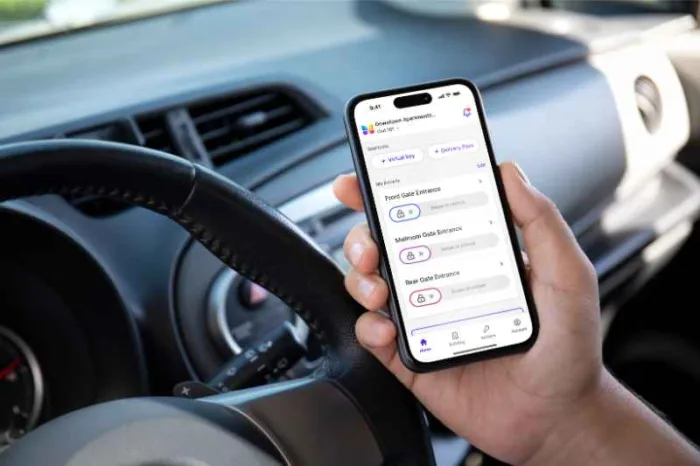





Key takeaways:
- Gate Sentry supports guard-assisted visitor processing at staffed entrances, while Sentry Solo provides mobile and QR-based access for unmanned gates, doors, elevators, and amenities.
- Gate Sentry does not publish standard pricing; a third-party benchmark estimates $30–$300 per location per month, plus possible implementation and integration costs.
- Mobile-app ratings are strong, but much of the detailed B2B feedback dates to 2019–2020 and predates Sentry Solo and August 2026 Visitor Self-Registration.
Disclaimer: ButterflyMX provides these blog posts to help our customers and potential customers make the right business decisions. Our blog posts are based on the information available to us at the time of writing.
Gate Sentry is a cloud-based visitor management and access control platform for properties with staffed gates, unmanned entrances, or both. HOA boards, property managers, security teams, and multifamily operators may consider it when replacing paper logs, shared gate codes, callboxes, or physical credentials.
This Gate Sentry review explains how Gate Sentry and Sentry Solo differ, what the platform costs, what each entrance needs, and what customers say. It also covers key limitations, alternatives, and how Gate Sentry compares with ButterflyMX.
This guide will answer:
- What is Gate Sentry?
- How Gate Sentry and Sentry Solo work
- Gate Sentry features and access methods
- How much does Gate Sentry cost?
- Installation, hardware, and internet requirements
- Gate Sentry reviews and customer feedback
- Gate Sentry pros, cons, and best-fit properties
- Gate Sentry alternatives
- Gate Sentry vs. ButterflyMX
- Gate Sentry FAQs
- Final verdict on Gate Sentry
Watch how ButterflyMX works:
What is Gate Sentry?
Gate Sentry is a cloud-based visitor management product for staffed entrances. Its companion product, Sentry Solo, provides self-service access for unmanned gates, doors, elevators, and amenities.
The Gate Sentry product family serves gated communities, multifamily properties, self-storage facilities, commercial sites, and hospitality properties. A property can use Gate Sentry, Sentry Solo, or both, depending on how each entrance is staffed.
Gate Sentry describes the platform as hardware-free because it replaces traditional callboxes, keypads, and fob readers as primary credentials. That does not mean a property needs no equipment: staffed entrances use a tablet, unmanned entrances use QR signage, and both rely on existing gate or door systems.
How do Gate Sentry and Sentry Solo work?
Gate Sentry handles guard-assisted check-in, while Sentry Solo handles mobile and browser-based access at entrances without a guard. The distinction matters because the products use different credentials, equipment, and offline workflows.
Gate Sentry for staffed entrances
Gate Sentry for staffed gates gives guards a tablet for visitor lookup, ID or plate-data capture, entry logging, and pass scanning. Residents can send a SentryPass to a guest or vendor by text or email, and guests can save the pass in Apple Wallet or Google Wallet.
Gate Sentry says a SentryPass scan takes about three seconds. The guard tablet can also keep processing check-ins during an internet interruption and sync its activity after service returns.
Sentry Solo for unmanned entrances
Sentry Solo uses different credentials for different users. Residents use VirtualKey for phone-based entry, guests receive SoloPass credentials, and vendors can scan a SentrySign QR code to open a browser-based VirtualKeypad and enter a time-limited code.
Unexpected visitors can use Intercom to call a resident by address. The workflow is designed to keep the resident’s name and phone number private while allowing the visitor to request access.
Gate Sentry features and access methods
Gate Sentry combines digital passes, mobile credentials, visitor records, scheduling, and centralized administration. The most useful features depend on whether a property needs guard-assisted check-in, unattended access, or both.
Mobile credentials and visitor access
- SentryPass: A wallet-compatible pass that a guard scans at a staffed gate.
- VirtualKey: Phone-based entry for residents at authorized Sentry Solo access points.
- SoloPass: A one-time, temporary, or ongoing guest credential tied to the guest’s phone.
- VirtualKeypad: A browser-based keypad opened by scanning SentrySign QR signage, so vendors do not need the resident app.
- Intercom: Address-based calling for an unexpected visitor without a pass or code.
Residents use the app to manage guests and access, while visitors and vendors can use digital passes or browser links without downloading the resident app. ButterflyMX also supports mobile access, visitor access, and wallet-based credentials, so buyers can compare the resident, guest, vendor, and guard workflows that matter at each entrance.
Administration and security tools
Gate Sentry and Sentry Solo provide searchable access records, user and credential management, scheduling, reporting, and ban lists. Administrators can manage multiple properties through one login, and can search records by name, date, company, or license plate.
Visitor Self-Registration, introduced in August 2026, lets visitors submit required ID, vehicle, document, or signature information from their phone before arrival. That can reduce the information guards need to collect at the entrance.
Audio, video, and vehicle-security capabilities
Sentry Solo Intercom provides address-based calling, but the available product materials do not present a video-calling or video-intercom function. Properties that need visual visitor screening may also consider a platform such as ButterflyMX, which supports video intercoms.
Gate Sentry can capture license plate information during staffed check-in. However, an industry buyer guide on Gate Sentry distinguishes that workflow from a dedicated automated license plate recognition or vehicle-intelligence system. Buyers seeking investigative vehicle data should ask what is captured automatically, what a guard must enter, and how records can be searched.
How much does Gate Sentry cost?
Gate Sentry does not publish standard subscription pricing. Buyers receive a property-specific quote after a demo, so the final cost may depend on the number of entrances, selected products, equipment, support, and integration scope.
For early budgeting, third-party Gate Sentry pricing listings estimate software at $30–$300 per location per month. This is not an official Gate Sentry price list or a guaranteed quote.
What to include in a total-cost comparison
Compare the subscription, implementation, tablets or signage, optional support, and any custom data or integration work. Don’t compare only the estimated monthly software fee.
Gate Sentry does not publish a named list of property management system integrations or APIs. Buyers with integration-dependent portfolios should ask which systems are supported, whether data moves automatically or through manual imports, who maintains the connection, and whether custom work adds recurring fees.
Installation, hardware, and internet requirements
Gate Sentry works with a property’s existing gate and entry equipment instead of requiring proprietary gate operators. Staffed entrances need a guard tablet, while unmanned Sentry Solo entrances use SentrySign QR signage.
The manufacturer says most properties go live within 30 days or less, including data migration and training. Treat that figure as a planning benchmark, not a guaranteed schedule, because the number of properties, entrances, users, and custom requirements can affect rollout time.
The central hardware question is not whether the property needs equipment. It is which legacy devices can be removed, which gate components remain, and what tablets, signage, networking, or optional devices each entrance needs.
What happens when the internet goes down?
At a staffed entrance, the Gate Sentry guard tablet can continue check-ins offline and sync later. Live notifications and dashboard updates wait for connectivity to return.
The risk differs at an unmanned entrance. Sentry Solo functions such as VirtualKeypad and Intercom require a live connection, so buyers should assess internet reliability and the fallback process at every unattended gate or door.
What do Gate Sentry reviews say?
Gate Sentry ratings are generally positive across mobile app stores and B2B software directories. The scores are more useful when you consider the size and age of each review sample.
Common praise and complaints
Positive feedback often focuses on easier guest-list management, arrival notifications, faster entry than paper or phone-based processes, and helpful support. The large iOS and Android rating samples suggest many residents find the core mobile workflow useful.
Reported friction includes guest or vendor records not appearing as expected, guards having trouble finding approved visitors, login or password issues, and interface elements that some older reviewers described as dated. A small amount of newer Android feedback also mentions notification trouble after an update and requests for larger controls.
These are customer-reported experiences, not proof that every property will have the same issues. Guard training, entrance procedures, configuration, and the software can all affect how smoothly a visitor moves through the gate.
Why review dates matter
Much of the detailed B2B feedback describes an earlier version of Gate Sentry. Buyers should not automatically apply a 2019 interface or synchronization complaint to every part of the 2026 product family.
Gate Sentry review: pros, cons, and best-fit properties
Gate Sentry may be a strong fit for properties that want digital visitor management at staffed gates, phone-based access at unmanned entrances, or both. The main tradeoffs are pricing transparency, connectivity, integration detail, and the breadth of security functions required.
Who may find Gate Sentry a good fit?
- Gated communities with staffed entrances that want to replace paper visitor logs and resident phone calls.
- Properties with unmanned gates, doors, elevators, or amenities that want mobile and QR-based access.
- Mixed properties that want guard-assisted and self-service workflows under one product family.
- Teams willing to request custom pricing and discuss integrations directly with Gate Sentry.
Properties seeking a broader access and security platform may compare Gate Sentry with ButterflyMX. ButterflyMX combines video intercoms, access control, vehicle access control, elevator controls, security cameras, package rooms, and smart lock integrations alongside mobile and visitor access. The decision is less about a universal winner and more about whether the property wants a focused gate workflow or a wider set of access products in one platform.
Questions to ask during a Gate Sentry demo
- Which entrances need Gate Sentry, Sentry Solo, or both?
- What is included in the recurring quote, and what costs extra?
- Which tablets, signs, optional devices, and network connections are required?
- How does each entrance operate during an internet outage?
- Which property management systems or APIs can connect to the platform?
- How are existing resident and visitor records migrated and maintained?
- What training is provided for guards, administrators, and residents?
- What tools are available for video screening, plate automation, deliveries, and incident workflows?
Gate Sentry alternatives
The right Gate Sentry alternative depends on whether the main need is mobile access, commercial visitor registration, or broader community security. Review platforms list several products buyers commonly compare in these categories.
- Swiftlane: Consider it when mobile credentials and access control are the main buying priorities.
- Envoy Visitors: Relevant for commercial and office buyers focused on lobby visitor management.
- The Receptionist for iPad: A visitor management option with published starting pricing and strong review-platform ratings.
- Visitly: Another visitor management option for buyers who want public pricing context during early comparisons.
- Elite Gates: Online retailer and distributor of third-party gate, intercom, and access-control hardware.
- Proptia: Relevant to communities evaluating broader LPR, incident, and security-operations workflows beyond visitor management.
Capterra comparisons and the Software Advice Gate Sentry profile can provide additional category context. Compare current feature sets, required equipment, integrations, and total costs rather than relying on star ratings alone.
Gate Sentry vs. ButterflyMX
Gate Sentry focuses on staffed visitor processing and phone- or QR-based access for unmanned entrances. ButterflyMX covers mobile and visitor access while also bringing video intercoms and other property access and security products into one platform.
Neither approach is right for every property. Compare the entrances you need to control, the visitor experience you want, the role of guards, internet reliability, integration needs, and whether video or broader property-wide access functions are part of the project.
Gate Sentry FAQs
What is the difference between Gate Sentry and Sentry Solo?
Gate Sentry is designed for staffed entrances where guards use a tablet, while Sentry Solo provides mobile, pass, QR-keypad, and Intercom workflows for unmanned access points. A mixed property may use both.
How much does Gate Sentry cost?
Gate Sentry uses custom property-specific quotes and does not publish standard pricing. One third-party benchmark estimates $30–$300 per location per month, plus possible implementation and integration costs, but those figures are not official Gate Sentry prices.
Does Gate Sentry require new gate hardware?
Gate Sentry works with existing gate and entry equipment rather than requiring proprietary gate operators. Staffed entrances still need a guard tablet, while unmanned Sentry Solo entrances use SentrySign QR signage.
Does Gate Sentry work without on-site security?
Yes. Sentry Solo is designed for unmanned gates, doors, elevators, and amenities using mobile credentials, guest passes, browser-based vendor codes, and address-based calling.
What happens if the internet goes down?
Gate Sentry guard-tablet check-ins can continue offline and sync later. Live functions such as VirtualKeypad, Intercom, notifications, and dashboard updates require connectivity.
Does Gate Sentry support license plate recognition?
Gate Sentry can capture plate information during staffed check-in, but it is not positioned as a dedicated automated LPR or vehicle-intelligence platform. Buyers should ask how plate information is collected, searched, and used.
Does Gate Sentry have a video intercom?
Gate Sentry product materials describe Sentry Solo Intercom as address-based calling but do not present a video-calling function. Properties that need visual visitor screening should include that requirement in product comparisons.
Does Gate Sentry integrate with property management software?
Gate Sentry does not publish a named list of property management system integrations or APIs. Buyers should ask which systems are supported, how data is exchanged, and whether custom work affects cost.
What is new in Gate Sentry?
Gate Sentry introduced Visitor Self-Registration in August 2026. The feature lets visitors submit required ID, vehicle, document, or signature information from their phone before arrival.
Final verdict on Gate Sentry
Gate Sentry may fit communities and other properties that need guard-assisted visitor processing, unmanned mobile access, or both. Its strongest points include distinct workflows for staffed and unattended entrances, fast digital-pass scanning, offline guard check-in, and broadly positive mobile-app ratings.
The biggest buying questions are the property-specific price, internet reliability at unmanned entrances, PMS compatibility, guard procedures, and whether the project also needs video screening or broader security tools. Compare a detailed Gate Sentry quote with alternatives using the same entrances, equipment, integrations, and operational requirements.
For properties considering a broader access and security platform, ButterflyMX offers video intercoms, mobile and visitor access, access control, vehicle access control, elevator controls, cameras, package rooms, and smart lock integrations. Explore ButterflyMX alongside Gate Sentry to decide which workflow and platform scope best match your property.

Get your free quote!
Fill in the form below, and we'll email you right back.
Want a free quote?
Fill in the form below, and we'll email you right back.
You’ll be redirected shortly...