




Key takeaways
- Unlock doors and gates directly from your vehicle using the ButterflyMX CarPlay widget for a safer, phone-free arrival experience.
- Update to iOS 26 to enable CarPlay widgets and integrate building access directly to your car’s dashboard.
- Control up to five different access points from your display, making entry into parking garages and gates as simple as a single tap.
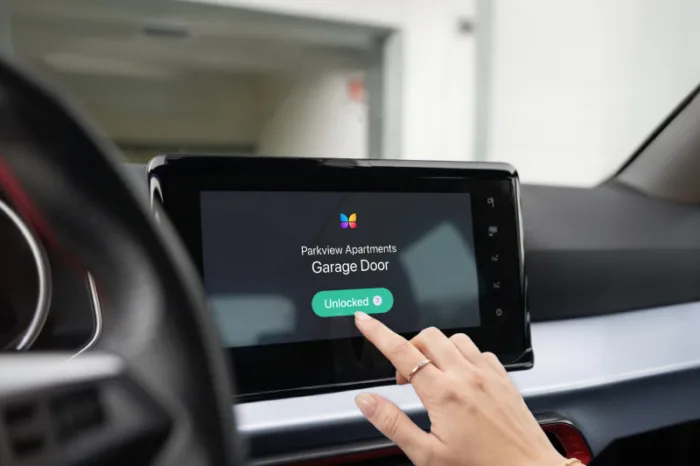
In recent years, CarPlay has transformed how we interact with our vehicles by bringing our favorite apps safely to the dashboard. Now, ButterflyMX is bringing that same convenience to your property access. Instead of fumbling for your phone as you pull up to your building, you can now open gates and garage doors directly from your car’s touchscreen.
With ButterflyMX for CarPlay, you can add widgets to your vehicle’s display so you can unlock doors faster and more safely from your dashboard. Read this post to learn how to set up ButterflyMX widgets for your car.
Navigate this post:
Features
- Open your parking garage or gate with just a tap on your dashboard.
- Add up to five unique widgets for the doors, gates, or garages you use most often.
Prerequisites
- A ButterflyMX account is required
- iPhone 5 or newer (iPhone XS or later recommended).
- iOS 26 or later is required for CarPlay widgets
- Any vehicle with wired or wireless CarPlay support (standard in most 2016+ models).
How to add ButterflyMX widgets to Apple CarPlay
- Open ‘Settings’ on your iPhone
- Go to ‘General’ and select ‘CarPlay’
- Select your vehicle
- Tap ‘Customize’
- Turn on ‘Show Widgets’
- Add and organize your access
Step 1: Open ‘Settings’ on your iPhone
Navigate to the ‘Settings’ app on your iPhone.
Step 2: Go to ‘General’ and select ‘CarPlay’
Scroll down to ‘General,’ then tap ‘CarPlay.’
Step 3: Select your vehicle
Choose your car from the list of connected vehicles.
Step 4: Tap ‘Customize’
Within your car’s settings menu, look for the ‘Customize’ or ‘Widgets’ section.
Step 5: Turn on ‘Show Widgets’
Toggle the ‘Show Widgets’ switch to the ‘on’ position. This allows CarPlay to display app-specific shortcuts on your vehicle’s dashboard.
Step 6: Add and organize your access
Select ButterflyMX from the list of available apps. You can add up to five widgets. If you have multiple properties or entry points, choose the specific gate or garage entrance you use most frequently.
Pro Tip: Larger vehicle displays give you more flexibility in how your widgets are laid out on the CarPlay home screen.
And that’s it! The next time you pull up to your property, your ButterflyMX widget will be waiting on your CarPlay screen. Just tap, enter, and enjoy the seamless experience.