





Key takeaways:
- Accessible entry works best when visitors have more than one way to request or receive access, not just a touchscreen directory.
- Remote staff support, live video, QR codes, and temporary PINs can help unstaffed government buildings assist first-time visitors more reliably.
- When evaluating intercoms, look at the full entrance workflow, including physical controls, communication options, visitor instructions, and centralized management.
A first-time visitor arrives at an unstaffed government office for an appointment, but the lobby has only a touchscreen intercom. If that visitor cannot easily read the screen, hear the prompts, or confirm that someone is responding, entry becomes stressful fast.
An intercom system for blind and deaf visitors should offer more than one path to the door. That may include remote staff assistance, visual communication, pre-issued Visitor Passes, QR codes, temporary PINs, and clear instructions that do not rely on a single sense or a single device interaction.
For government buildings with limited on-site staff, the goal is not to solve accessibility with one feature. It is to create an entry workflow that gives visitors practical ways to identify themselves, get help, and enter the building with less confusion and more control.
This guide covers:
- How an intercom can support blind and deaf visitors
- Features to consider in an accessible entry workflow
- How remote staff can assist at unstaffed entrances
- Can Visitor Passes, QR codes, and PINs improve accessibility?
- How ButterflyMX supports flexible visitor access workflows
- FAQs
How an intercom can support blind and deaf visitors
The short answer is this: an accessible visitor entry system should support multiple ways to request entry, communicate with staff, and unlock the door. That matters even more in unstaffed government buildings, where a visitor may have no receptionist nearby to step in and help.
Some visitors may benefit from a visual interface. Others may need tactile controls, braille labels, a simpler credential, or remote help from staff who can see what is happening at the entrance. The best workflow does not assume every visitor will use the same method.
Why touchscreen-only entry can create barriers
A touchscreen can be useful for some visitors, but it can also create friction. A blind visitor may not be able to navigate a visual directory without assistance. A deaf visitor may not be able to rely on audio prompts or spoken instructions alone. A first-time visitor with limited familiarity with the building may not know which office, department, or tenant name to search.
Even a well-intentioned setup can fail in the moment if the screen has unclear prompts, the directory is hard to locate, or there is no obvious backup method. That is why the entrance should be viewed as a full workflow, not just a piece of hardware mounted at the door.
Why unstaffed lobbies need a backup access workflow
In a staffed office, a receptionist might notice a confused visitor and offer help right away. In an unstaffed lobby, that safety net is gone.
A better approach is to plan for what happens when the standard intercom interaction does not work. That could mean remote staff using live video to identify the visitor, a pre-issued Visitor Pass sent before the appointment, a QR code that works at the door, or a temporary PIN that avoids the directory altogether.
For example, if a blind visitor arrives for a scheduled meeting at a county office, a QR code sent in advance may be much easier than finding the right department on a screen. If a deaf visitor reaches the entrance unexpectedly, remote staff may be able to use live visual context and established procedures to verify the visit and grant access.
Features to consider in an accessible entry workflow
If you are choosing an intercom system for blind and deaf visitors, do not treat the evaluation as a simple feature checklist. You need to think about the visitor experience before arrival, at the door, and during remote assistance.
Accessibility requirements vary by building, use case, and jurisdiction, so this is also the point where facilities teams should consult qualified accessibility professionals, installers, and local authorities when compliance or design questions arise.
Physical accessibility features such as tactile buttons and braille
Some buildings may specifically look for an intercom with tactile buttons and braille or other physical cues that help visually impaired visitors interact with the entrance. Those features can play an important role, especially when a visitor needs a non-visual way to locate and use a call function.
But physical controls alone do not solve the whole problem. A visitor may still need a clear way to know they reached the right destination, understand what happens next, or use an alternative method if the main interface is difficult. That is why tactile and braille considerations should be part of a broader access plan, not the entire plan.
Visual, audio, and remote communication options
Video intercom accessibility for visually impaired visitors and deaf visitors depends on how many communication paths the building supports. A deaf visitor may need visual confirmation that someone is responding. A blind visitor may need a simpler interaction than a visual directory. In both cases, remote assistance can help bridge the gap when the entrance is not intuitive.
As you evaluate systems and workflows, ask practical questions such as:
- Can staff identify who is at the door without being physically present?
- Can the building offer a backup entry method for scheduled visitors?
- Are visitor instructions clear before the appointment and at the entrance?
- Can permissions be managed centrally so temporary access does not remain active longer than needed?
How remote staff can assist at unstaffed entrances
Remote assistance is often what turns an unstaffed entrance from a barrier into a workable process. If staff can see the entrance, identify the visitor, and control access from another location, they can step into the role a front desk would normally play.
Using front desk live view for intercoms
Live view gives remote staff visual context. Instead of guessing who is outside or relying on incomplete information, they can review the entrance feed and decide how to respond based on what they see.
That matters in government offices where visitors may be arriving for appointments, permit applications, records requests, or public meetings. If someone appears to be struggling with the intercom, remote staff can follow a defined workflow to verify the visit and help move things forward. The interaction becomes more manageable because staff are not working blind from an audio-only call.
For a deaf visitor, visual awareness can also help confirm that the request has been noticed and is being handled. For a blind visitor, live monitoring can help staff identify when the visitor has arrived and assist through a pre-arranged process rather than expecting the visitor to complete every step on the intercom itself.
Using a mobile app and dashboard to manage access
Remote help works better when staff are not piecing information together from multiple places. A centralized system can help teams review visitor activity, issue temporary credentials, and adjust access without manually tracking every appointment in separate tools.
For example, an operations team managing several municipal offices may need to coordinate entry across more than one building. A mobile app and property management dashboard can support that workflow by giving authorized staff one place to monitor requests, manage permissions, and respond when a visitor needs assistance. That reduces back-and-forth and makes it easier to keep short-term visitor access organized.
Can Visitor Passes, QR codes, and PINs improve accessibility?
Yes, often they can. Pre-issued access methods can reduce the need for a first-time visitor to navigate an intercom directory at the door, which is especially helpful in unstaffed buildings.
They are not the only answer, but they can be a strong part of an accessible entry strategy because they give visitors another way in when the standard call flow is not ideal.
Visitor Passes and QR codes for unstaffed buildings
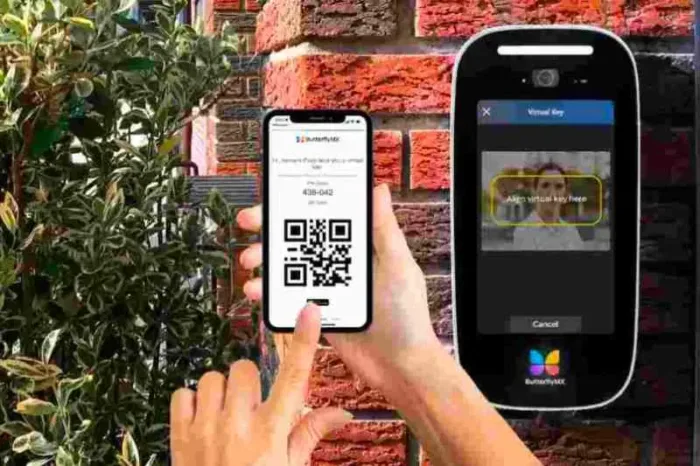
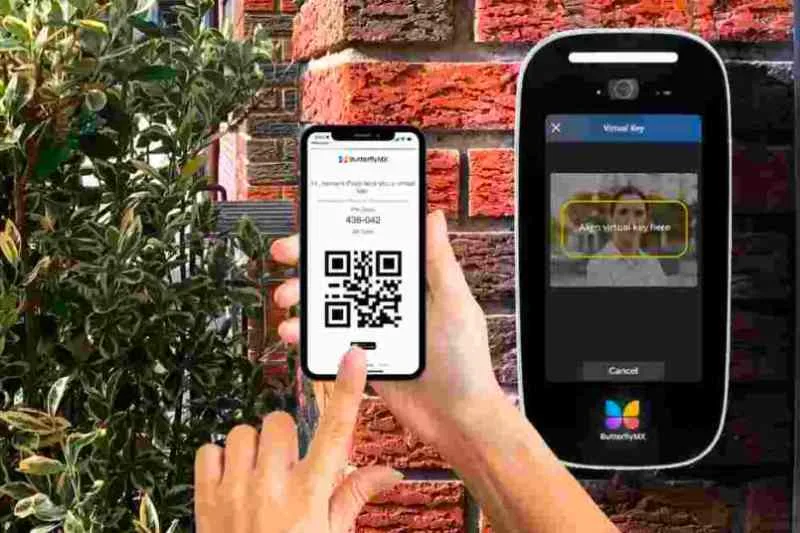
If a government office knows a visitor is coming for a scheduled appointment, sending a Visitor Pass in advance may simplify the arrival experience. A QR code can let the visitor use a straightforward credential instead of searching a touchscreen directory or waiting for someone to notice them remotely.
This can be useful for a blind first-time visitor who may prefer a pre-arranged access method with clear instructions sent ahead of time. It can also help a deaf visitor who wants a less audio-dependent interaction at the entrance.
The details matter here. Instructions should be written clearly, sent before the visit, and matched to the actual arrival process. If a visitor still needs help after reaching the building, there should be a backup path rather than an assumption that the QR code solves every scenario.
Temporary PINs for scheduled visits
Temporary PIN codes can offer another practical option. In some cases, a short-term PIN may be easier for a visitor to use than a directory or call flow, especially if the visit is scheduled and the access window is limited.
For property teams, the value is not just convenience. A temporary PIN can support a more controlled workflow because staff can issue access for a defined purpose and manage it centrally. That helps reduce the chance that visitor credentials remain active longer than intended.
For example, a public agency hosting a benefits appointment could send a same-day PIN with arrival instructions. The visitor gets a simpler path at the entrance, and the office keeps the access window tied to that visit.
Discover how ButterflyMX works:
How ButterflyMX supports flexible visitor access workflows
ButterflyMX can help unstaffed government buildings create more flexible entry workflows by combining Video Intercoms, remote assistance tools, Visitor Passes, and centralized access management. The value is not in any one feature by itself. It is in giving staff and visitors more than one workable path at the entrance.
Video Intercoms, Front Desk Station, and Visitor Passes
With a ButterflyMX Video Intercom, staff can manage visitor entry with more visual context than an audio-only workflow. A Front Desk Station or remote team can use live view to see who is at the entrance, verify the visitor, and respond based on the building’s process.
Visitor Passes with QR codes and PINs can also help reduce reliance on the intercom directory for first-time visitors. If an office knows someone is arriving for a hearing, records appointment, licensing visit, or administrative meeting, staff can provide an access method in advance instead of making the visitor figure everything out at the door.
Behind the scenes, the ButterflyMX mobile app and property management dashboard can help authorized teams manage permissions, review activity, and coordinate access across entrances. For lightly staffed public buildings, that supports a clearer day-to-day process.
Choosing an accessible entry strategy for your building
If you are evaluating options, start with the real visitor journey. Ask what happens when a person cannot use the touchscreen easily, cannot rely on audio prompts, arrives outside a fully staffed window, or needs a simpler credential for a scheduled visit.
A practical strategy often includes a few layers working together:
- A clear entrance interface
- An alternative method such as a Visitor Pass, QR code, or temporary PIN
- Remote staff visibility at the entrance
- Documented instructions for visitors and staff
- Centralized management of short-term access
Accessibility and compliance requirements vary, so building teams should review plans with qualified accessibility professionals, installers, and local authorities where appropriate. But from an operations standpoint, the direction is clear: offer more than one entry path, and make sure your staff can support visitors even when the lobby is unstaffed.
FAQs
How can blind or deaf visitors use a video intercom?
They may use it in different ways depending on the system and the building workflow. The most effective setups offer more than one path, such as remote staff assistance, visual confirmation, pre-issued credentials, and clear instructions that do not rely only on audio or only on a touchscreen.
Are there intercoms with tactile buttons or braille for visually impaired visitors?
Some intercom systems may include tactile controls, braille labels, or other physical accessibility features. If those elements are important for your building, confirm the hardware details with the manufacturer and installer and review any compliance questions with qualified professionals.
How can unstaffed government buildings assist visitors remotely?
Remote teams can use live video, front desk tools, mobile access management, and defined visitor workflows to identify a visitor, verify the reason for the visit, and grant entry when appropriate. This is especially helpful when no receptionist or guard is stationed in the lobby.
Can QR codes or PINs make visitor entry easier?
Yes. For scheduled visits, a QR code or temporary PIN can reduce the need to navigate a directory at the entrance. These options work best when they are paired with clear pre-arrival instructions and centrally managed access permissions.
What should government offices consider before choosing an accessible intercom system?
Focus on the full entrance workflow, not just the intercom screen. Consider physical interaction options, remote assistance, alternative entry methods, visitor communication, and how staff will manage permissions. Compliance and accessibility requirements can vary, so involve qualified professionals during planning.

Get your free quote!
Fill in the form below, and we'll email you right back.
Want a free quote?
Fill in the form below, and we'll email you right back.
You’ll be redirected shortly...