
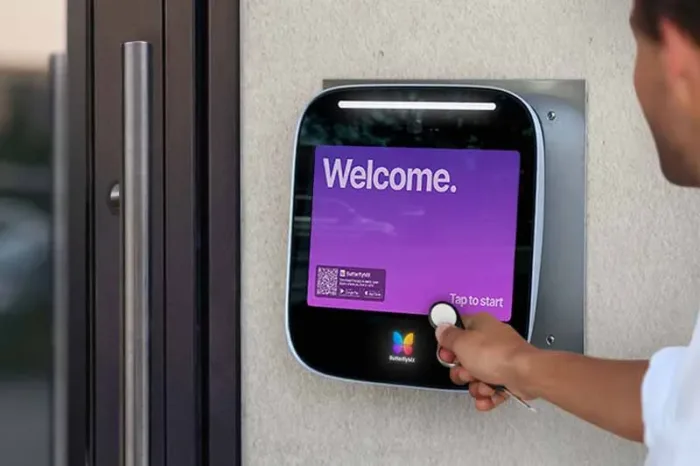





Key takeaways:
- An outdated apartment fob system is usually a system problem, not just a broken credential. Watch for weak security, manual updates, limited audit trails, poor integrations, and repeated entry issues.
- The best replacement path depends on your property’s doors, residents, staff, credentials, software, visitor needs, and backup-access plan.
- A smoother upgrade starts with a site audit, clear vendor criteria, resident communication, staff training, testing, and a rollout plan that limits lockouts and confusion.
If you need to replace an outdated apartment fob system, don’t start by shopping for a new key card or key fob system. Start by asking what your current access control system can no longer do well.
For many properties, the problem shows up slowly. A resident loses a fob, and deactivation takes longer than it should. A reader fails again. Staff spend too much time programming credentials onsite. Move-ins and move-outs create access headaches. Visitor entry, amenity access, and audit trails live in separate systems that don’t work together.
At that point, replacing the system becomes more than a hardware swap. You’re deciding how residents, staff, vendors, visitors, and delivery drivers should enter the property — and how your team should manage that access every day.
The right upgrade may be an encrypted fob system, mobile credentials, cloud-based access control, a video intercom with access features, smart lock integrations, or a hybrid setup. This guide explains how to tell whether your current fob system is truly outdated, how to compare replacement options, what cost factors to plan for, and how to manage the rollout without disrupting resident access.
This guide will answer:
- Signs your apartment fob system is outdated
- Why legacy fob systems create security and operational risk
- What to replace it with: your main access control options
- How to compare system types before you buy
- What it may cost to replace an apartment fob system
- The upgrade process from assessment to rollout
- Planning the resident transition
- Choosing the right solution for your property type
- When ButterflyMX is a strong fit
- FAQs
Watch how ButterflyMX works:
Signs your apartment fob system is outdated
An apartment fob system is outdated when it creates avoidable security, management, or entry problems that a newer access control setup could handle more effectively. Age alone doesn’t make a system obsolete. The better test is whether the readers, controllers, credentials, and software still support the way your property operates.
The clearest warning signs tend to show up in daily work:
- Credentials fail often or need frequent replacement.
- Staff must handle most access changes manually or onsite.
- Lost fobs are hard to deactivate quickly.
- Access audit trails are limited, hard to search, or tied to onsite software.
- The system doesn’t connect well with property management software, visitor entry, smart locks, or other access tools.
- Residents run into friction at shared entrances, amenities, gates, or package areas.
- Your team keeps repairing parts of the system, but the same access problems return.
Those signs help separate a repair issue from a replacement issue. One broken fob, damaged reader, or faulty door contact may only need service. Repeated problems across doors, credentials, users, and administrative tasks usually point to a system-level decision.
Repair or replace?
Repair makes sense when the issue is isolated, the system still meets your security needs, and staff can manage access without unusual effort. Replacement becomes more reasonable when the system limits credential control, slows move-ins and move-outs, lacks useful audit history, or can’t support the integrations your team needs.
The same logic applies to hardware reuse. Keeping existing readers, controllers, or door hardware may lower upfront costs, but it can also carry old limits into the new system. A good assessment should identify what can stay, what should be replaced, and what would become a bottleneck later.
How apartment fob systems work at a basic level
A typical key fob access control system has four core parts: a credential, a reader, a controller, and software. The credential may be a fob, card, mobile pass, or another approved access method. The reader scans that credential. The access controller decides whether the connected door should unlock. The software stores users, permissions, and access events so administrators can manage the system.
Many apartment key fobs use RFID, or radio-frequency identification, to communicate with a reader at short range. Some newer systems also use NFC, or near-field communication, especially for smartphone-based credentials. In simple terms, RFID and NFC describe how the credential communicates. Encryption, software controls, and credential lifecycle management determine how safely and easily that credential can be issued, changed, revoked, and reviewed.
It also helps to distinguish passive building credentials from active remotes or clickers. A passive fob or card is usually presented to a nearby reader. A remote or clicker actively sends a signal to open something like a gate. Both may be part of a property’s access strategy, but they create different compatibility, security, and rollout questions.
Why legacy fob systems create security and operational risk
Legacy fob systems become risky when they make access hard to control, hard to review, or hard to update quickly. The issue isn’t that older technology is automatically unsafe. It’s that many older proximity systems were designed for simpler credentials, local administration, and fewer connected tools.
Credential cloning is one common concern. Basic proximity credentials may offer less protection than encrypted credentials, which can make unauthorized duplication a more serious risk in some environments. Not every legacy system has the same exposure, so the right question is specific: What credential technology do you use, and what controls exist behind it?
Lost or outdated credentials create another problem. When a resident moves out, a staff member leaves, or a vendor no longer needs access, the delay between the event and the access change matters. If revocation is slow or inconsistent, the property may be carrying active credentials that no longer belong in the system.
Visibility matters too. A useful access audit trail helps administrators see which credential was used, where it was used, and when. Older systems may store limited logs, require onsite review, or make it difficult to connect an event to a specific user and door. That makes everyday management harder and can slow down incident review.
Then there is the staff burden. Move-ins, move-outs, amenity changes, temporary vendor access, and replacement credentials all take time when every update requires local programming or manual tracking. That hidden work is often what pushes a property from patching the old system to planning a real apartment fob system upgrade.
Convenience and security are not the same thing
A newer access method may feel easier, but convenience alone doesn’t prove stronger security. Mobile credentials can reduce some lost-fob problems, and remote management can speed up permission changes. Still, you need to evaluate credential controls, audit trails, backup access, admin permissions, and how access is assigned across entrances, amenities, units, and gates.
What to replace it with: your main access control options
Most apartment access control replacement projects fall into a few practical categories. The right choice depends on whether you want to keep physical credentials, add mobile access, manage credentials in the cloud, improve visitor entry, connect to smart locks, or use a mix of methods.
Encrypted physical credentials
Encrypted fob systems keep the familiar card-or-fob model while improving credential protection compared with basic legacy proximity credentials. They can work well for properties that want stronger physical credential control without requiring every resident to use a smartphone.
This is often a practical middle path, especially where resident familiarity matters. But the credential is only one layer. You still need to review reader compatibility, access control software, audit trails, and how much manual work the system leaves for staff.
Mobile credentials
Mobile credentials let residents or staff use a smartphone-based pass instead of, or alongside, a physical fob. Depending on the system, administrators may be able to issue or revoke credentials remotely, which can reduce the back-and-forth of lost fobs and in-person handoffs.
Mobile access can be useful for high-turnover multifamily properties, student housing, and buildings where residents expect phone-based entry. It is not a universal replacement for every credential. Residents can lose phones, run out of battery, have setup trouble, or prefer a physical backup, so the rollout plan must account for those cases.
Cloud-based access control
Cloud-based access control is a management model, not just a credential type. Instead of relying only on onsite software or a local database, cloud-based systems use internet-connected management tools so administrators can update users, review events, and change permissions remotely.
This distinction matters because a cloud-based system can still support physical credentials. It may also support mobile credentials, visitor access, or integrations with property management systems. Capabilities vary by vendor and configuration, so compare how the software, readers, controllers, locks, and network connections work together.
Video intercom-led entrance upgrades
Some properties aren’t only replacing resident fobs. They’re trying to improve what happens at the front entrance: resident entry, visitor access, deliveries, vendors, staff access, and after-hours entry. In that case, a video intercom with access control features may be a better path than a one-for-one fob replacement.
This approach is especially relevant when shared-entry friction affects several user groups. The question changes from “Which fob should we issue?” to “How should people request, receive, and manage access at this entrance?”
Smart lock integrations and hybrid systems
An apartment fob system upgrade may also need to connect with unit doors, amenity spaces, package rooms, staff-only areas, or other controlled openings. Smart lock integrations and hybrid credential setups can help when the property needs more than one access method.
Hybrid systems are common because they give property teams flexibility. A resident may use a mobile credential, another resident may prefer a physical fob, a vendor may receive temporary access, and staff may keep approved backup credentials for exceptions.
Biometric systems
Biometric access systems may fit some environments, but they are usually a more specialized choice for apartment communities. They can raise privacy, policy, and compliance questions, which makes them less straightforward than fobs, cards, mobile credentials, or intercom-based access for many managed properties.
How to compare system types before you buy
Before you buy, compare replacement options against the way your property actually runs. A system can look strong on a feature list and still be the wrong fit if it doesn’t match your staffing, entry points, resident habits, visitor volume, or integration needs.
The table below compares common replacement paths. No option wins in every situation. Use it to narrow the field, then evaluate each vendor against your building’s doors, credentials, access policies, and support needs.
Two distinctions are especially important. First, cloud-based does not mean mobile-only. A cloud-based access control system may support physical credentials, mobile credentials, or both. Second, a physical credential is not automatically less useful because it is physical. For some communities, encrypted fobs paired with better software may be a better fit than a mobile-only approach.
Think carefully about on-premise versus cloud-based management, too. On-premise systems may require more onsite administration. Cloud-based systems can make remote updates easier, but they also require you to review connectivity, backup access, admin permissions, and vendor support. The tradeoff is not simply old versus new. It is local control and existing infrastructure versus remote management and broader integration potential.
Questions to ask when comparing vendors
- Can the system support physical and mobile credentials if we need both?
- How are lost credentials deactivated and new credentials issued?
- What access audit trail is available, and how easy is it to search?
- How does the system handle resident entry, visitor access, staff access, vendors, amenities, and gates?
- Which property management system integrations are available?
- What existing readers, controllers, locks, or door hardware can realistically stay in place?
- What backup access methods are available during outages, phone problems, or rollout issues?
- How does the system manage multiple buildings, entrances, or user groups from one interface?
- What support is available during installation, resident onboarding, and the first weeks after launch?
These questions keep the conversation grounded in operating needs. A good vendor comparison should cover total cost of ownership, security features, ease of administration, integration capabilities, scalability, resident access, and support — not just the price of credentials.
What it may cost to replace an apartment fob system
The cost to replace an apartment fob system varies widely, so a cost framework is more useful than a universal number. The budget may include credentials, readers, controllers, access control software, door hardware updates, network work, installation, training, and ongoing administration.
Credential price is only one piece. If you move from basic fobs to encrypted fobs, mobile access, or cloud-based access control, the larger cost questions often involve the supporting system. Do you need new readers? Can existing controllers stay? Does the software support your access policies? Are you modernizing only the main entrance, or every controlled opening?
Older buildings may need more physical work to support newer readers, connected management tools, or reliable network connections. A phased upgrade can spread costs over time, but it may also create a period when old and new systems both need support.
Total cost of ownership matters more than sticker price. If your current system creates constant staff work, frequent credential replacement, poor visibility, or resident complaints, those costs belong in the decision. A lower upfront price may not be the better value if it preserves the same manual work that made the old system frustrating.
The upgrade process from assessment to rollout
The safest way to replace an outdated apartment fob system is to follow a clear sequence: assess the current system, define requirements, compare vendors, plan the rollout, install, test, launch, and refine. That order helps you avoid buying new credentials before you understand your doors, hardware, software, and resident access patterns.
- Audit the current system. Inventory every controlled entrance, credential type, reader, controller, door condition, and recurring pain point. Include shared entrances, amenities, staff areas, gates, package rooms, and other controlled openings.
- Define your requirements. Decide what the new system must handle, such as resident entry, staff access, visitor entry, amenity control, audit visibility, remote administration, mobile credentials, physical backup credentials, or property management system integration.
- Determine what can stay and what should go. Review readers, controllers, locking hardware, and network infrastructure. Identify what is compatible, what is near end of life, and what would limit the new system if reused.
- Compare vendors against real use cases. Ask each vendor how the system handles credential provisioning, revocation, visitor access, reporting, integrations, outages, support, and phased rollout needs.
- Choose a rollout strategy. Decide whether a full replacement or phased upgrade makes more sense. Some properties test one entrance, building, or user group first, then expand after the process is proven.
- Install and configure the system. This includes hardware work, software setup, user records, permission mapping, admin roles, and access rules for residents, staff, vendors, and visitors.
- Test before full go-live. Validate credentials, door behavior, audit trails, admin permissions, backup access, visitor entry, deliveries, contractor access, and after-hours scenarios.
- Train staff and launch carefully. Leasing, maintenance, concierge, and security teams should know how to issue credentials, revoke access, respond to lockouts, and explain the change to residents.
- Monitor after launch. Early review helps catch permission errors, door-specific problems, resident confusion, and admin issues before they become larger access problems.
Phased upgrade vs full replacement
A phased rollout can reduce disruption in an occupied property. It may let you modernize the main entrance first, confirm resident adoption, and then extend the upgrade to other doors, buildings, amenities, or gates. This can be useful when budgets, infrastructure constraints, or communication needs make an all-at-once change risky.
A full replacement may be cleaner when the current system is unreliable across the property or when running old and new systems in parallel would create too much confusion. Neither approach is automatically better. The right choice depends on entry count, building layout, staff availability, resident volume, and how much technical debt remains in the existing system.
After you understand the project scope, it may make sense to request an access control assessment for your property. A focused assessment can clarify hardware reuse, rollout sequencing, integration needs, and whether a mobile, cloud-based, physical-credential, or hybrid approach fits your entrances and staffing model.
Planning the resident transition
Even a well-chosen access control system can fail in practice if residents don’t know how to use it. The transition plan should answer four questions clearly: what is changing, when it changes, how residents will enter, and what backup access exists if something goes wrong.
Start communication early enough for residents to prepare, but keep the message practical. Tell residents which entrances are changing, whether they need to pick up a credential or enroll a mobile credential, whether visitor entry is changing, and whether old and new credentials will overlap for a short period.
Resident transition checklist
- Notify residents before installation, enrollment, or credential pickup begins.
- Explain which entrances, amenities, gates, or common areas are changing.
- Provide clear steps for mobile credential setup or physical credential pickup.
- Tell residents what backup access exists if their phone is unavailable or enrollment is incomplete.
- Train onsite teams before residents begin asking questions.
- Decide how long old and new credentials will overlap, if overlap is possible.
- Provide a clear support path for lockouts, visitor entry questions, activation issues, and special access needs.
Backup access deserves special attention. Mobile credentials can be convenient, but residents still need a plan for dead batteries, lost phones, setup delays, or personal preference. Depending on the system, that may mean temporary physical credentials, onsite support, approved staff assistance, or another fallback method during the changeover.
Staff preparation is just as important as resident communication. Leasing teams, maintenance staff, concierges, and security personnel should understand how permissions are assigned, how visitors enter, how exceptions are handled, and how early problems should be documented for vendor follow-up.
Choosing the right solution for your property type
The best way to replace an outdated apartment fob system depends on how the property is used. Turnover, visitor volume, staffing, resident needs, vehicle access, and infrastructure limits all affect the right upgrade path.
Multifamily apartment buildings
Multifamily properties often need to balance resident convenience with frequent access changes. Move-ins, move-outs, amenities, package areas, staff access, and visitor entry can put pressure on systems that are too manual. Mobile credentials, centralized administration, and better audit visibility may be useful, as long as backup access is planned.
Condos and HOAs
Condo and HOA communities may need more stakeholder alignment before making a change. Boards, committees, budgets, resident preferences, and community rules can all shape the final choice. In these settings, clear policy decisions around credentials, visitors, common areas, and support may matter as much as the hardware itself.
Student housing
Student housing usually has frequent turnover and large credential-change periods. Fast provisioning, quick deactivation, and clear permissions across shared entrances and amenities become especially important. Support planning also matters because many residents may need onboarding help within a short window.
Senior living communities
Senior living communities often place a higher priority on simplicity, accessibility, and predictable backup methods. A newer system should make entry clear for residents, staff, and approved visitors without adding unnecessary complexity for the people who use or manage it.
Mixed-use and commercial properties
Mixed-use and commercial properties may have more complex access needs than a standard residential building. Residents, office tenants, retail staff, vendors, visitors, and delivery drivers may need different credentials, schedules, and permissions. In these cases, the upgrade often extends beyond resident fobs into broader entrance and visitor management.
Gated communities
Gated communities may need to coordinate pedestrian and vehicle access. That can make resident credentials, guest access, vendor entry, and gate rules more complex than a single front-door replacement. If a gate is involved, remember that access control technology manages entry authorization; it does not replace the mechanical gate operator.
Once you understand the property type and access patterns, the replacement decision becomes clearer. Some properties need a simpler credential upgrade. Others need a more connected system that handles entrances, visitors, remote administration, and multiple user groups from one place.
When ButterflyMX is a strong fit
ButterflyMX is worth evaluating when the replacement decision is really about improving how people enter the property and how staff manage that entry. That is often the case in multifamily, mixed-use, senior living, student housing, HOA, and gated community environments where shared entrances, visitor access, mobile access, and remote administration matter.
For properties that want cloud-based management, smartphone-based entry, visitor access, and a more connected way to manage shared entrances, ButterflyMX can be a relevant alternative to simply issuing newer fobs. It may be especially useful when staff want to manage access remotely, reduce manual credential handling, and connect resident and visitor entry to a broader access control plan.
ButterflyMX is also relevant when a property is comparing a narrow key fob system upgrade with a more complete entrance modernization project. In some buildings, the old fobs are only part of the problem. The larger issue is that the entrance creates friction for residents, guests, deliveries, vendors, and staff.
If that sounds like your property, a ButterflyMX consultation can help you assess rollout scope, decide where mobile or physical credentials make sense, and understand whether a phased upgrade is more practical than a full rip-and-replace approach.
Frequently asked questions
How long does it take to replace an apartment fob system?
It depends on the size and complexity of the property. The timeline can change based on the number of entrances, whether existing hardware can stay, how many residents need credentials, what integrations are required, and whether the rollout is phased or completed all at once.
Can I upgrade my fob system without replacing all the hardware?
Sometimes yes, if the existing readers, controllers, locks, and door hardware are compatible with the new access control system and still meet your security needs. A site assessment should confirm what can stay and what should be replaced so you don’t carry old limitations into the new system.
What happens to resident access during the transition?
Resident access should continue through a planned overlap period, backup credentials, or another approved fallback method while the new system is installed and tested. The safest transition plan assumes that some residents will need extra help and builds support around that reality.
Do cloud-based access systems work during power outages?
Sometimes, but outage behavior depends on the system design, power backup, network setup, and door hardware. Ask vendors how their system behaves during power or network issues before installation, not after the first outage.
Replacing an outdated apartment fob system is really a decision about control: who can enter, how quickly access can change, what staff can see, and how residents and visitors move through the property. The right choice is not simply the newest credential. It is the system that fits your entrances, staffing, resident needs, integrations, and backup-access plan.
If your building needs more than a one-for-one fob swap, ButterflyMX may be worth evaluating as part of a broader entrance upgrade. Request a ButterflyMX consultation to assess your current system, compare replacement paths, and see how modern property access could work for your building.

Get your free quote!
Fill in the form below, and we'll email you right back.
Want a free quote?
Fill in the form below, and we'll email you right back.
You’ll be redirected shortly...