





Key takeaways:
- Choose an intercom around visitor flow, answering responsibility, door hardware, network conditions, and fallback procedures, not a generic list of system types.
- Door release requires configuration-specific review of egress, accessibility, listed components, and local requirements.
- Compare total ownership costs, outage behavior, security controls, and recurring terms instead of relying on a universal price range.
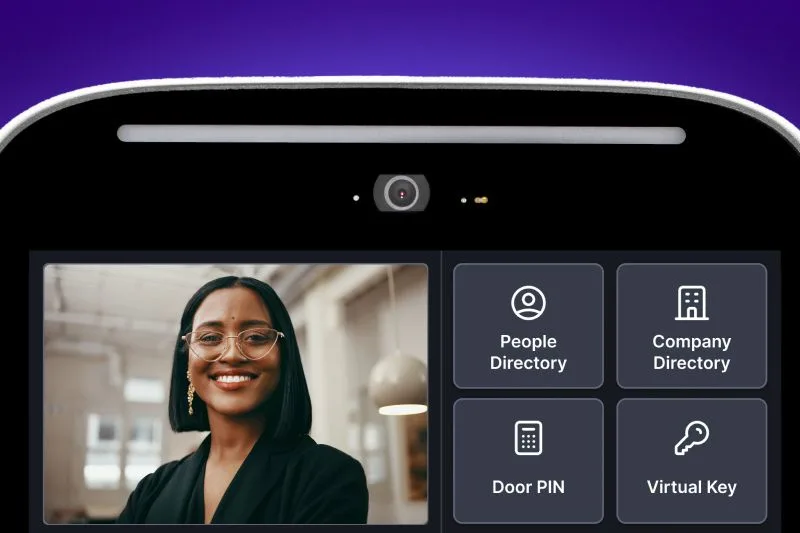
Choosing a commercial intercom system is really about designing an entry workflow. A visitor needs a clear way to call for help, the right person needs to answer, and the door must operate safely within the building’s approved hardware and access design.
The right commercial intercom system for business matches your visitor volume, answering model, entrances, locks, network, integrations, risk tolerance, and total cost scope. This guide focuses on visitor-entry intercoms, including systems that may support remote door release, rather than internal paging or office-to-office communication.
This guide will answer:
- What is a commercial intercom system for business?
- How the call-to-unlock workflow works
- Compare commercial intercom options by independent dimensions
- Match the answering model to the property
- Assess every entrance before selecting a system
- Plan door release, life safety, and accessibility
- Design for outages, network security, and privacy
- Plan integrations without creating unnecessary lock-in
- Migrate from legacy telephone entry and POTS
- Build a complete total cost scope
- Compare vendors and quotes with a decision checklist
- When ButterflyMX may fit the entry workflow
- FAQs
Watch how ButterflyMX works:
What is a commercial intercom system for business?
A commercial entry intercom is a system that lets a visitor communicate with someone inside or responsible for a property. Depending on the system and door design, the person who answers may also be able to authorize a door release. The intercom manages the conversation and call routing; the lock, relay, door hardware, and access-control equipment handle the physical entry action.
That distinction matters. Credential-based access control governs how employees, residents, or approved users enter with a credential. An entry intercom supports visitor communication and verification. Internal paging, meanwhile, is used for announcements or office-to-office communication. A building may need all three, but one does not automatically replace the others.
Video can add useful context to a visitor interaction, but it does not prove identity or stop tailgating. The practical question is not which label sounds best. It is whether the complete entry workflow works for each door and the people who use it.
How the call-to-unlock workflow works
A reliable entry workflow should be mapped before anyone compares feature lists. In a typical call-to-unlock sequence, the visitor selects a directory entry or presses a call button. The system routes the call to a staffed desk, a fixed station, a tenant, a remote team, or an approved mobile device. The recipient communicates with the visitor and, where the installed design allows it, sends a release command. A relay and the approved locking hardware then carry out the door action.
- The visitor finds the right directory entry or call button.
- The intercom routes the call according to the property rules.
- A designated person answers and assesses the visit.
- If appropriate, that person sends an unlock command through the configured system.
- The relay and door hardware respond according to the approved installation.
- The property follows its missed-call, after-hours, and outage procedures if the normal path is unavailable.
Multi-tenant buildings often need tenant-specific routing and escalation groups, while a small staffed office may send every call to one reception desk. In either case, directory ownership is an operational responsibility. Someone should be accountable for adding users, removing former tenants or staff, updating phone numbers, and checking fallback routes.
Compare commercial intercom options by independent dimensions
Commercial intercom categories overlap because buyers often treat several separate choices as one system type. Audio or video, wired or wireless connectivity, fixed or mobile answering, and cloud or on-premises management are independent dimensions. A property might use a video station powered over Ethernet, mobile answering, and cloud-based administration at the same time.
Swipe to compare →
These rows are not rankings. Eliminate options that conflict with your doors, staffing model, privacy expectations, network conditions, or outage plan. Also, wireless connectivity does not necessarily mean a wiring-free project. The entry station, relay, lock, request-to-exit device, and power supply may still require wiring.
Match the answering model to the property
Who answers the call is often more important than the intercom screen or camera. A staffed office may want a fixed reception endpoint. A business without a receptionist may need remote reception or a carefully managed mobile-answering process. A multi-tenant property may route calls to specific tenants, then to an escalation group if nobody answers. A controlled gate may require different after-hours rules from a lobby entrance.
Document the whole path for each scenario: who receives the first call, how long it rings, where unanswered calls go, who covers after hours, and how quickly directories are updated. Mobile answering can be useful for distributed teams, but it may not suit every staffing or security model. It depends on availability, permissions, device management, and the consequences of a missed call.
Ask who owns directory accuracy and whether changes are approved and logged. Those administrative details affect real visitor experiences as much as the hardware does.
Assess every entrance before selecting a system
Survey each entrance separately. A property can have a polished main lobby and a very different loading-door, garage, side-entry, or gate condition. For every opening, document the door and frame, lock type, release method, request-to-exit device, power source, relay path, existing wiring, and current access-control equipment.
- Identify whether the door uses an electric strike, magnetic lock, or another locking arrangement.
- Record the lock’s fail-safe or fail-secure behavior and have the installer document what power loss means for the actual configuration.
- Check Ethernet routes, PoE capacity, Wi-Fi or cellular coverage where relevant, VLAN segmentation, firewall requirements, and expected uptime.
- Inventory existing cameras, access-control panels, relays, and management systems that may require replacement, adapters, or integration work.
- Assign responsibility for installation, network configuration, commissioning, tests, maintenance, and future changes.
Do not assume compatibility because two products use a familiar protocol name or belong to the same product category. Verify the electrical, software, licensing, and functional details for the specific version and configuration you plan to install.
Plan door release, life safety, and accessibility
Door release is not a feature that can be evaluated in isolation. Applicable egress requirements depend on the lock and release configuration, the adopted code edition, local amendments, and the authority having jurisdiction, or AHJ. Your qualified design, access-control, and life-safety professionals should review the proposed arrangement before installation.
For example, the International Building Code includes conditions for sensor release of electrically locked egress doors. The relevant section is identified as 1010.2.12 in the 2021 IBC and 1010.2.11 in the 2024 IBC. Those provisions are configuration-specific, and other provisions may govern other door types. Review the applicable language and adoption context with the published sensor-release requirements and the AHJ rather than applying one rule to every intercom-controlled entrance.
UL 294 addresses construction, performance, and operational requirements for access-control system units. As UL Solutions explains in its UL 294 certification guidance, a listed component does not by itself establish that the complete installation is compliant, secure, or appropriate for a particular door.
Accessibility also needs a project-specific review. Covered two-way entry communication systems can involve audible and visual communication requirements. Operable parts also have accessibility requirements. The U.S. Access Board explains that the general unobstructed reach range is 15 to 48 inches, with additional rules for one-hand operation, operating force, obstructions, and clear space. Use the Access Board guide to operable parts as a starting point, not as an approval for a particular installation.
Design for outages, network security, and privacy
Ask what happens when the internet fails, the local network fails, the intercom loses power, or the whole building loses power. The answer is product- and configuration-specific. Remote calling, remote unlock, logging, credentials, local release, and remote administration may not all behave the same way during an outage.
Security review should cover authentication, authorization, encryption, update delivery, vulnerability response, network isolation, logs, data retention, and account removal. VLAN segmentation and limited network exposure are reasonable subjects for property IT and security teams to evaluate. Connected intercoms deserve this scrutiny: a March 9, 2023 CISA advisory concerning the Akuvox E11 documented serious vulnerabilities in that specific model. It is a reason to ask detailed vendor questions, not evidence that all IP intercoms or all vendors are insecure.
Plan integrations without creating unnecessary lock-in
Start with the systems that truly need to exchange information: access control, cameras, visitor management, property-management software, alarms, and other approved building systems. Then ask what each connection must do. A connection that displays a video feed is not necessarily the same as one that can provision users, trigger a door action, or share audit data.
Standards and interfaces such as OSDP, ONVIF, SIP, APIs, and vendor-specific connectors can be relevant, but protocol support does not prove complete interoperability. Confirm the exact supported functions, product versions, licensing, middleware, support ownership, and version dependencies. A single ecosystem may simplify administration; a mixed environment may preserve flexibility or reuse existing assets. Both approaches have tradeoffs.
Before signing, ask how the property can export necessary records, replace a component, transfer administration, and preserve operations if an integration changes. That is how you assess vendor lock-in before it becomes an expensive operational problem.
Migrate from legacy telephone entry and POTS
Properties replacing a telephone-entry system should begin by confirming the current line type and any planned service changes with their carrier. The FCC describes an ongoing transition away from legacy copper networks and advises customers to check the compatibility of security or alarm systems on replacement networks and prepare for power outages. Review the FCC guidance on technology transitions, but do not rely on assumed carrier deadlines for a specific property.
- Inventory telephone lines, reusable wiring, locks, relays, directories, network capacity, and systems that depend on the existing line.
- Confirm which components can remain and which need replacement or adaptation.
- Test the intended replacement network and define backup-power and temporary-access procedures.
- Plan directory migration, user training, old-line cancellation, and post-cutover testing.
- Phase the cutover so the property does not create an uncontrolled gap in visitor access.
Smaller office properties may have a simpler routing model but still need the same door, power, and network review. See this related guide to intercom systems for small commercial office buildings for narrower planning considerations.
Build a complete total cost scope
There is no reliable universal price for a commercial intercom system. Published prices are commonly vendor estimates with different entrance counts, hardware assumptions, labor scope, software terms, and exclusions. Treat any figure as a dated, scoped estimate, not as an industry benchmark.
Normalize every quote by entrance count and included work. Compare assumptions, exclusions, recurring contract terms, third-party hardware responsibilities, and who owns network, integration, and support tasks. A lower initial equipment line can still produce a more expensive deployment if it excludes door work, network changes, or ongoing administration.
Compare vendors and quotes with a decision checklist
A defensible procurement process compares complete entry plans, not isolated feature lists. Use the same questions for every vendor.
- List each entrance, its users or tenants, visitor volume, and expected answering model.
- Define first-call routing, escalation, after-hours coverage, directory ownership, and account removal.
- Document door hardware, power, wiring, network readiness, integrations, and required professional reviews.
- Compare hardware, door work, network work, installation, training, support, recurring fees, warranties, and exclusions on the same scope.
- Request documentation or demonstrations for outage behavior, permissions, logging, updates, account removal, and support response.
- Verify every claimed integration and identify licensing, middleware, data-governance terms, and replacement constraints.
- Have the proposed door and accessibility configuration reviewed by the appropriate qualified professionals and AHJ.
This process gives you a consistent way to compare a front-desk system, a tenant-routing system, a remote reception workflow, or a cloud-managed platform without assuming one model fits every property.
When ButterflyMX may fit the entry workflow
ButterflyMX may fit properties that want video entry, smartphone answering, remote unlock, visitor access workflows, and remote property administration. Residents can receive visitor calls and grant access from their smartphones, while property teams can remotely manage residents, visitors, credentials, and access. ButterflyMX video intercoms do not rely on traditional POTS telephone lines, which may be relevant when replacing legacy telephone-entry hardware.
Visitor Passes and delivery PINs can also support visitor-access workflows where those tools match the property’s policies. Current product specifications, integrations, availability, and planned deployment details should be confirmed during evaluation. As with any intercom, ButterflyMX should be assessed against entrance conditions, answering workflows, network readiness, outage procedures, door hardware, accessibility review, life-safety requirements, broader access-control needs, and total cost.
Once you have documented those requirements, discuss your entrances, answering workflow, and integration needs with ButterflyMX to determine whether the platform fits your entry plan.
Frequently asked questions
Can visitors call a specific tenant instead of one front desk?
Yes, a system with multi-tenant directories and routing rules can direct calls to individual tenants or escalation groups. The property still needs clear ownership for directory accuracy, permissions, fallback routing, and after-hours coverage.
Can a commercial intercom prevent tailgating?
No. An intercom can support visitor communication and verification, but it cannot by itself stop another person from following an authorized entrant. Tailgating requires broader physical-security, operational, and access-control measures.
Is a wireless commercial intercom a wiring-free installation?
No. Wireless may describe network connectivity, while the entry station, relay, lock, request-to-exit equipment, and other components can still need power or cabling. Requirements depend on the door, lock, power source, network, and selected configuration.
Do commercial entry intercoms have to meet ADA requirements?
Covered two-way entry communication systems can be subject to audible and visual signal and operable-part requirements. Applicability depends on the facility and project context, so accessibility should be reviewed for the specific installation with appropriate qualified professionals and the AHJ.
Will a new intercom work with existing locks, cameras, and access control?
It may, but compatibility must be verified rather than assumed. Review electrical connections, protocols, software versions, licensing, and the exact functions each system must support.
Can an entry intercom replace access control?
Not by itself. An intercom supports visitor communication and verification, while access control governs credential-based entry. Some platforms combine functions, but the property should scope both needs separately.
The best commercial intercom system is the one that supports a defined visitor workflow at every entrance, including who answers, how a door releases, what happens during an outage, and who maintains the system over time. Compare the full scope of hardware, door work, network readiness, security, accessibility, support, and recurring costs before choosing a vendor.
If your property is evaluating video entry, smartphone answering, remote unlock, or a move away from legacy telephone-entry hardware, request a personalized ButterflyMX demo for your building.

Get your free quote!
Fill in the form below, and we'll email you right back.
Want a free quote?
Fill in the form below, and we'll email you right back.
Redirecting you in 5 seconds.