






Key takeaways:
- A business intercom lets visitors communicate with someone responsible for an entrance, supports visitor verification, and may connect to door or gate release.
- The best system depends on the property’s entries, staffing, visitor and delivery patterns, integrations, infrastructure, support model, and total cost.
- Door-release safety and long-term interoperability require separate review, including local code requirements and standards such as OSDP and ONVIF.
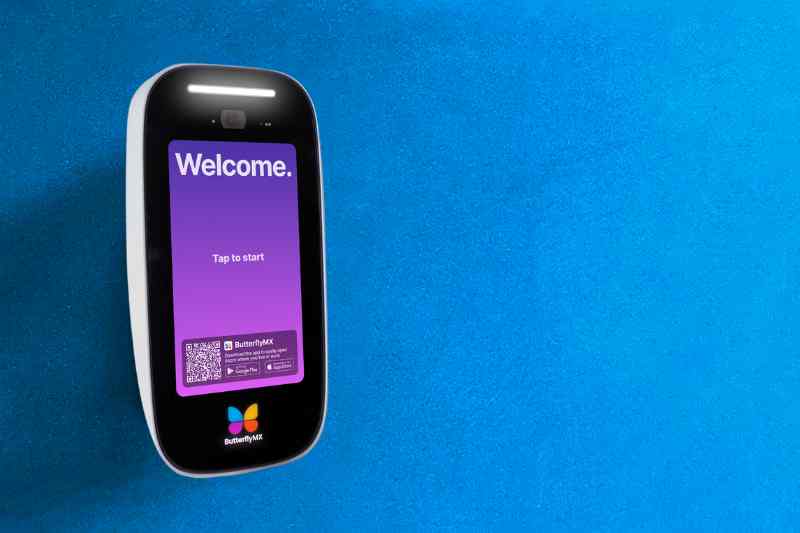
An intercom system for business is really a decision about how people enter a property. A front door, loading gate, parking entrance, and shared lobby can all create different questions: Who should answer? How should the visitor be verified? Who is allowed to unlock the door? What happens after hours or during an outage?
A business intercom system enables two-way communication and visitor verification at an entrance, and it may allow an authorized person to release a compatible door or gate. It is not the same as an access control system, which manages credential-based entry for employees, tenants, residents, vendors, or other approved users. In many buildings, the two work together.
The right intercom system for your commercial property is not the one with the longest feature list. It is the one that fits the property’s traffic, staffing, infrastructure, safety requirements, integrations, and budget. This guide explains how business intercoms work, how the main types differ, what implementation issues to check, and when ButterflyMX may belong on the shortlist.
This guide will answer:
- What is an intercom system for business?
- How a business intercom system works
- Core components and system boundaries
- Types of business intercom systems
- Match the system to property and workflow
- Integrate intercom with access control and cameras
- What to evaluate before choosing a system
- How much a business intercom system costs
- Installation and network readiness
- Security, safety, and operational resilience
- When ButterflyMX may fit the shortlist
- FAQs
Watch how ButterflyMX works:
What is an intercom system for business?
An intercom system for business is an entry communication system that lets a visitor contact someone inside, at a security desk, or responsible for the property. That person can speak with the visitor, use audio or video to help verify the reason for the visit, and, when the system is configured for it, release a compatible door or gate.
Modern commercial intercom systems often do more than place a call. They may include directories, call routing, mobile answering, remote door release, visitor records, and connections to access control or package operations. Those added functions are useful only when they match how the property is actually staffed and used.
The distinction between an intercom and access control matters. An intercom supports communication and visitor verification at the moment someone arrives. An access control system decides whether a credential, such as a card, fob, mobile credential, or code, is allowed to operate an entry. A door entry system may use both, but one does not automatically replace the other.
It also helps to set the right expectations early. An intercom is not a complete physical-security program by itself, and remote release or access-control integration is not available in every configuration. Treat the intercom as one part of the larger entry plan.
How a business intercom system works
Most business intercoms follow a simple call-to-entry sequence. The details change by product, network, answering method, and door hardware, but the basic path is similar.
- A visitor starts a call at an entry station, directory, keypad, gate pedestal, or similar interface.
- The system routes the call to a receptionist, security desk, fixed substation, phone, or mobile app based on the directory and escalation rules.
- The recipient uses audio, video, or an established visitor process to decide whether entry is appropriate.
- If access is approved, an authorized recipient may trigger a compatible door or gate release.
- Where supported and configured, the system keeps call or access events for operational review.
That sequence sounds straightforward, but the routing rules often determine whether the system works well in daily use. A staffed lobby can rely on a person at a desk. A hybrid office, mixed-use building, or gated community may need calls to reach different people at different times of day. If no one answers, the system needs a clear escalation path or fallback procedure.
Video can add useful context, especially at entries where staff cannot see the visitor in person. Still, video is not proof of identity or authorization. It gives the recipient more information for a release decision; it does not remove the need for policies, credentials, staffing rules, and physical security practices.
Core components and system boundaries
Two proposals can both say business intercom and mean very different things. Knowing the main parts helps buyers compare what is actually included and what remains separate.
- A door station is the device at the entrance. It usually includes a microphone and speaker and may include a camera, keypad, directory, or call button.
- An answering endpoint is where the call goes. It can be a fixed substation, desk phone, security-console endpoint, telephone, or mobile app.
- Management software controls directories, routing rules, permissions, administration settings, and records. Depending on the system, software may be cloud-managed or run on premises.
- Door-release hardware controls the physical opening. Common examples include electric strikes and magnetic locks. A fail-safe lock releases when power is removed, while a fail-secure lock stays locked when power is removed. The right choice depends on the door, use case, access-control design, and life-safety review.
- Adjacent systems include access control, cameras, visitor management, and package-management tools. They may connect with an intercom, but they still have their own compatibility, administration, and support requirements.
This is where many projects become more complex than expected. A door station must work with the answering method, the lock, the access-control path, the network, and the people who will manage the system after installation. Not every station works with every controller, lock, camera, or software platform.
Start with each entrance, not with a product label. A lobby door, service door, parking gate, and package room may need different hardware, routing, records, or release behavior. The complete entry condition should shape the system design.
Types of business intercom systems
Business intercom types are best understood as design choices, not as one-size-fits-all categories. A property might use a video intercom system connected by Ethernet, route calls to both a front desk and mobile devices, and manage a multi-tenant directory from software. The table below compares the major approaches by use case, benefit, tradeoff, and planning question.
Audio versus video is mainly a verification, privacy, and cost decision. Wired versus wireless is an infrastructure and reliability decision. IP-based equipment does not automatically mean wireless, and cloud-managed software does not eliminate on-site hardware, power, door hardware, or a local operating plan.
The answering model matters just as much as the device at the door. Fixed substations can work well where a receptionist or security officer is always present. Mobile answering can fit hybrid teams, distributed property staff, or residents who need to receive visitor calls directly. Either model can fail if the call routing, escalation path, and after-hours process are poorly defined.
Single-tenant systems usually route calls to one organization or household. Multi-tenant intercoms must keep directories accurate and route calls among multiple occupants or organizations. That administrative work should be evaluated alongside the hardware because outdated directory data quickly becomes an operational problem.
Match the system to property and workflow
The right architecture follows the property’s operating model. Before comparing vendors, map the entrances, traffic patterns, visitor types, answering owners, escalation paths, delivery process, and after-hours needs.
Offices and commercial properties
An office intercom system should account for reception coverage, hybrid schedules, employee credentials, contractors, vendors, and deliveries. A staffed lobby may prioritize a fixed answering station and clear handoff rules. A workplace without continuous front-desk coverage may need mobile answering, call forwarding, and a written process for missed calls.
Commercial properties also need to decide where the intercom ends and the access control system begins. Employees may use credentials for daily entry, while visitors use the intercom. Vendors and delivery drivers may need a different path, especially after hours or at service entrances.
Multifamily and mixed-use properties
Multi-tenant intercoms need strong directory administration because occupants change, visitors arrive for different residents or tenants, and shared entrances serve many people. Mixed-use buildings may need separate rules for residents, commercial tenants, service providers, package carriers, and property staff.
Package management can also influence the intercom decision. If deliveries go to a package room, lobby, loading area, or another controlled space, the property should define who can grant access, when access is allowed, and how the event is recorded.
Industrial sites and gated communities
Industrial facilities and gated communities should evaluate vehicle and pedestrian entrances separately. Outdoor conditions, noise, gate locations, remote coverage, and traffic flow can affect the placement and reliability of the system. The intercom and access-control technology should also be distinguished from the mechanical gate operator, which is a separate part of the entry system.
Across property types, the most useful questions are practical: Who needs to be reached? How quickly? What information does that person need before granting access? What happens if the primary recipient does not respond? And how will visitor, vendor, and delivery activity be handled when staffing changes?
Integrate intercom with access control and cameras
An intercom can integrate with access control, cameras, and visitor systems, but compatibility depends on the products, interfaces, configuration, and installer design. In an integrated entry process, a visitor calls from the entrance, an authorized person verifies the visitor, a compatible access-control path triggers the release, and connected systems may record the event.
This integration can make the entry process easier to manage, but it also creates more questions. Which system stores the record? Who manages users and directories? What happens if a camera, controller, network connection, or software subscription changes later? Those ownership questions matter because the intercom is often only one layer in the entry stack.
Two standards are useful to understand during interoperability discussions. The Security Industry Association describes Open Supervised Device Protocol, or OSDP, as a standard for communication between access-control readers and controllers. ONVIF Profiles define interoperability specifications for supported IP-based video and access devices.
OSDP and ONVIF can help buyers ask better questions about compatibility and long-term ownership. They do not guarantee that every device, feature, firmware version, or workflow will work together. Ask providers to document supported devices, required licenses, data access, export options, upgrade responsibility, service ownership, and what happens if one connected platform is replaced.
What to evaluate before choosing a system
A good buyer checklist turns a broad product search into a clear scope. Use it before requesting proposals so each vendor is pricing the same set of entrances, users, integrations, and support expectations.
- Document visitor volume, arrival patterns, staffed and unstaffed hours, call routing, escalation, and after-hours coverage.
- Define how employees, tenants, residents, visitors, vendors, and delivery carriers should enter. Note where mobile credentials or remote answering would solve a real operating need.
- List required connections to access control, cameras, visitor management, directories, package operations, gates, and door hardware.
- Inspect each entry condition, including lock type, door or gate condition, available power, cable pathways, mounting limits, and network availability.
- Compare support ownership, service response, software administration, subscription obligations, data portability, interoperability, and upgrade responsibilities.
- Ask about authentication, role controls, software updates, event retention, network dependencies, outage behavior, and fallback procedures.
This checklist helps reveal tradeoffs that a feature comparison can hide. A mobile app intercom may be useful for distributed teams, but it still needs reliable connectivity, clear permissions, and an outage plan. A fixed station may be better for a staffed security post, but it needs coverage for breaks, nights, and emergencies.
Do not treat every criterion as equally important for every property. A small office, a mixed-use building, a gated community, and an industrial yard will weigh verification, durability, directory management, delivery access, and support differently. The shortlist should reflect those differences.
How much a business intercom system costs
There is no reliable universal price for a commercial intercom system. Cost changes with the number of entrances, type of entry hardware, locks, power, cabling, network work, installation labor, integrations, software, and support model. Published examples can be useful for understanding a specific configuration, but they should not be treated as market-wide pricing.
Upfront costs can include entry stations, controllers, electric locking hardware, power supplies, cabling, switches, mounting, installation labor, permits, and professional services where applicable. Retrofit projects can change quickly when existing doors, gates, wiring, or locks need work. Multiple entrances, remote gates, package rooms, and access-control integrations can also expand the scope.
Recurring costs may include software subscriptions, connectivity, support, maintenance, directory administration, and replacement planning. Compare total cost of ownership using the same assumptions for hardware, installation, support term, software, upgrades, and who is responsible for ongoing administration.
The office intercom buying guidance from Swiftlane also emphasizes that system design and installation choices affect budgeting. Treat examples like that as configuration-specific context, not as a universal price range for every business, region, or property type.
Installation and network readiness
Facilities, security, and IT teams should review the site before equipment is ordered. Start with the basics: entry points, cable pathways, available power, door and gate hardware, mounting conditions, controller locations, and who owns each part of the installation.
Power over Ethernet, commonly called PoE, can provide compatible devices with network connectivity and power over Ethernet cabling. It can simplify some deployments, but the device, cabling, and network switch must support the required power and connectivity. PoE also does not replace the need to confirm door-release power and the full access-control design.
VLAN segmentation is a network-design option for separating device traffic from other network traffic. IT should decide whether it is appropriate for the property, along with firewall requirements, remote-support access, authentication, monitoring, backups, and update ownership. These choices affect both security and support after the system goes live.
Test bandwidth, WiFi or cellular coverage where used, and network uptime at every intended entry point. WiFi dead zones and missed-call routing are practical risks to test before commissioning, not problems to discover after a tenant, vendor, or delivery driver is waiting at the door.
Before launch, assign responsibility for configuration, monitoring, software updates, escalation, local fallback, incident response, and service. A working demonstration is not the same as a complete plan for a missed call, network interruption, power issue, or entry hardware failure.
Security, safety, and operational resilience
An intercom can support visitor verification and controlled release, but it cannot prevent tailgating by itself. Video may give the recipient more information before granting access, but it should not be treated as proof of identity or as a guaranteed tailgating control.
Cloud-based calling, remote management, and remote-unlock functions may depend on connectivity unless the deployment includes suitable local fallback or failover design. Ask what remains operational during an internet, service, power, or network outage. The answer should cover local door behavior, cached permissions where applicable, backup connectivity, call escalation, and recovery steps for the exact configuration.
UL Solutions describes UL 294 as covering access-control system units, including construction, performance, tamper resistance, and standby-power considerations. UL 294 status for a component does not make an entire installation code-compliant or secure by itself. It is one part of a larger design and review process.
Door-release design also requires life-safety review. The cited 2021 International Building Code provision for electromagnetic locks in means of egress includes release conditions involving power loss, fire-alarm activation, and manual release for qualifying installations. Local adoption, amendments, and the applicable edition matter, and IBC section numbering changed in later editions.
A qualified access-control or life-safety professional and the authority having jurisdiction should confirm the locally applicable requirements. The same caution applies to lock behavior, egress needs, emergency procedures, software administration, event records, and long-term support ownership.
When ButterflyMX may fit the shortlist
After the property’s requirements are clear, ButterflyMX may be worth evaluating for managed properties that need video visitor communication and distributed answering. ButterflyMX video intercoms let residents receive visitor calls and grant access from their smartphones, while property teams can remotely manage residents, visitors, credentials, and access.
That fit is strongest when the property needs more than a call box at one door. ButterflyMX can support access needs beyond a main entrance, which may matter for properties with shared spaces, multiple controlled areas, visitor access, mobile access, or package-related entry needs. Those capabilities should still be matched to the specific site plan, doors, network, and support model.
ButterflyMX can also be a modern alternative for properties replacing legacy telephone-entry hardware because its video intercoms do not rely on traditional POTS telephone lines. That does not make it the universal choice. Fixed-station, on-premise, audio-only, or other architectures may fit some staffing models, sites, budgets, integrations, or resilience needs better.
Before deciding, validate the property type, entry count, network readiness, door hardware, integration requirements, support model, outage behavior, and total cost for the exact configuration. If the access plan fits, see whether ButterflyMX fits your property access workflow and request a property-specific quote.
Frequently asked questions
What happens if the internet goes down?
Some cloud calling, remote management, or remote-unlock functions may stop or work differently during an internet outage. Ask the provider what happens to local door operation, cached permissions where applicable, backup connectivity, call escalation, and recovery procedures for the exact hardware, software, lock, and network design.
Can a business intercom prevent tailgating?
No. An intercom can support visitor verification and controlled release, but it cannot stop another person from following an authorized entrant. Video can provide more context for a release decision, but it should not be treated as proof of identity or a guaranteed tailgating control.
How can a buyer reduce vendor lock-in?
Buyers can reduce lock-in risk by reviewing supported standards, device compatibility, data export, directory ownership, service access, replacement options, contract terms, and upgrade responsibilities. OSDP and ONVIF can support interoperability, but they do not guarantee compatibility across every device, feature, version, or platform.
Who should approve an electrically locked door release design?
A qualified access-control or life-safety professional and the local authority having jurisdiction should review the design. Confirm the locally adopted code edition and local amendments because egress requirements are jurisdiction-specific and code provisions can change between editions.
The best business intercom is the one that fits the real entry process: who arrives, who answers, how verification happens, how access is released, and what the property does when something does not go as planned. Compare systems by those needs first, then by hardware, integrations, safety requirements, support, and total cost.
For managed properties that need smartphone visitor calling and remote access management, ButterflyMX may be worth evaluating alongside other suitable architectures. Get a quote for your property after confirming the scope and operating requirements that matter most.

Get your free quote!
Fill in the form below, and we'll email you right back.
Want a free quote?
Fill in the form below, and we'll email you right back.
You’ll be redirected shortly...