
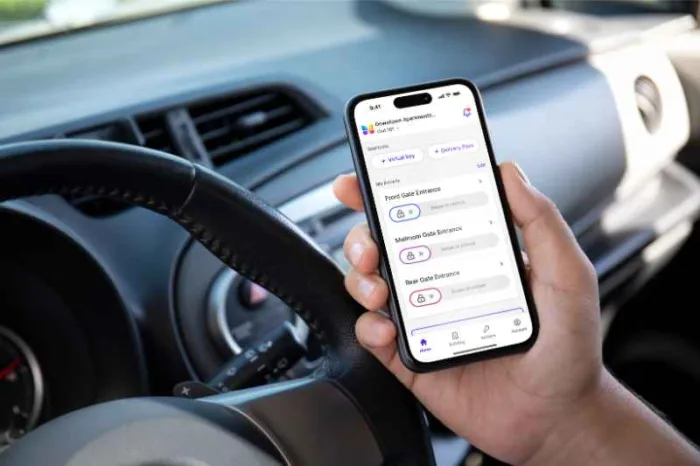





Key takeaways:
- A gated community video intercom can route visitor calls to residents through cellular service or an IP and internet connection instead of a dedicated in-unit landline station.
- Video intercoms give residents visual visitor verification, while audio-only telephone entry systems generally rely on a standard voice call.
- The best fit depends on gate connectivity, resident fallback needs, installation scope, recurring costs, and separate automated-gate safety requirements.
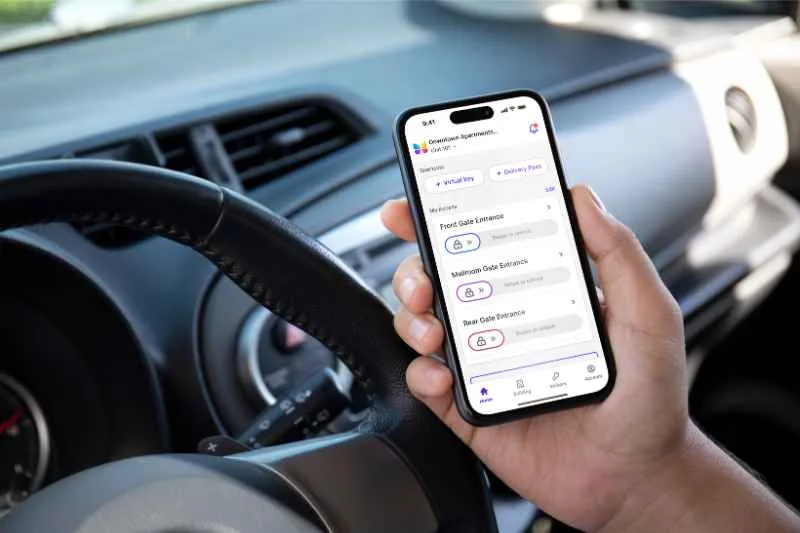
When a visitor pulls up to a gated community entrance, the access question is simple: how do they reach the right resident, and how does that resident open the gate from a phone? A gated community video intercom that calls residents’ phones answers that question with an entry panel, a resident directory, a call-routing connection, and a gate-release relay.
The details matter because not every phone-based gate system works the same way. Some gate systems place ordinary calls over cellular service. Others use an IP network, an internet connection, and a mobile app to support two-way video. The right choice depends less on a brand claim and more on what is actually available at the gate: power, signal, network access, gate-operator integration, resident accessibility needs, and a clear plan for missed calls and outages.
This guide will answer:
- What is a gated community video intercom that calls resident phones?
- How a call reaches a resident phone
- Telephone entry and video intercom compared
- Cellular and IP intercom options
- Missed calls, multiple residents, and privacy
- Installation, integration, and gate safety
- Costs and recurring fees
- How to evaluate a system for your community
- FAQs
Watch how ButterflyMX works:
What is a gated community video intercom that calls resident phones?
A gated community video intercom is an entry system that lets a visitor call a resident from a gate panel. The panel typically includes a camera, resident directory, call-routing connection, management software, and a relay that sends an authorized access command to the gate operator. When video is supported, the resident can see and speak with the visitor before deciding whether to grant entry.
The call can reach the resident in more than one way. Depending on the system, it may ring a mobile app, a standard phone number, or another configured destination. That distinction is important because a system that calls a resident’s phone is not automatically the same as a smartphone video intercom. Some phone-entry systems are audio only, while many IP video intercoms use an app to deliver the video call and remote-release controls.
Visitor calling is also different from resident access. Mobile access, PINs, RFID credentials, QR codes, and license plate recognition can make repeat resident or approved visitor entry faster, but they do not replace the need for an uncredentialed guest, delivery driver, vendor, or caregiver to request access at the gate.
ButterflyMX video intercoms do not rely on traditional POTS telephone lines. Residents can receive visitor calls and grant access through their smartphones, while property teams can remotely manage residents, visitors, credentials, and access.
How a call reaches a resident phone
The technology behind the call may be cellular or IP-based, but the visitor-to-entry sequence is usually easy to understand:
- A visitor uses the entry panel directory to find and select a resident.
- The panel sends the call request through cellular service or through the site IP network and internet connection.
- The system alerts the configured destination, such as a resident app, ordinary phone number, or other supported endpoint.
- The resident answers. If the system supports two-way video, the resident can see and speak with the visitor.
- The resident decides whether the visitor should enter.
- An authorized release command triggers a relay connected to the gate operator, and the gate operator performs its own opening cycle.
Put simply, the phone does not directly run the gate motor. The intercom or access-control system sends an access command, and the gate operator handles the gate movement. That separation matters for installation, troubleshooting, and gate safety.
Residents do not always need an app. Some cellular telephone-entry configurations can dial ordinary phone numbers. IP video intercoms commonly use an app because the app can show live video and provide remote-release controls. Before purchasing, ask the vendor to demonstrate exactly what rings, what the resident sees, how the release command works, and what happens when the call is missed.
Supported systems may also keep access events, but logs, notifications, call routing, and video features vary by product. Treat those details as demonstration items, not assumptions.
Telephone entry and video intercom compared
Telephone entry and video intercom systems overlap because both can let a visitor call a resident from the gate. The difference is how much information the resident gets before granting access. Audio-only telephone entry depends on a voice conversation. A video intercom adds visual verification when the system supports live video.
The comparison should not be read as a simple old-versus-new ranking. A basic phone workflow may still suit some properties. Other communities may want remote directory management, visitor credentials, mobile credentials, event records, multi-user ringing, or app-based video. Those capabilities are product-dependent, so the safer buying question is not whether a system is modern. It is whether the system supports the exact resident and visitor experience your community needs.
Landline reliance is also worth revisiting. In late 2023, roughly three-quarters of US adults lived in wireless-only households and roughly 1% lived in landline-only households, according to the CDC National Center for Health Statistics wireless-substitution estimates. That data does not make every telephone-entry system unsuitable, but it does show why many communities are reviewing how residents prefer to receive gate calls.
For more background on the legacy category, see this gate telephone entry system comparison.
Cellular and IP intercom options
The first connectivity question should be practical: what reliable connection is available at each gate? A main entrance with dependable network infrastructure may call for a different design than a remote service gate with strong cellular signal but no easy network path.
A cellular intercom uses an embedded mobile module and carrier service. That can reduce dependence on the property’s data network, which is useful when trenching or network cabling would be difficult. However, cellular does not mean infrastructure-free. The gate still needs power, a suitable mounting location, reliable signal, a service plan, and relay integration with the gate operator.
An IP video intercom uses local network infrastructure and an internet connection. Many IP video systems use a resident app for two-way video, so the quality of the call depends on more than the intercom panel. Network path, router reliability, internet service, power, and any backup design all matter.
Before a board approves a proposal, test the intended cellular signal and network connection at every entrance, including secondary and service gates. Ask what happens during a carrier outage, internet outage, router failure, or power loss. Also ask whether failover, backup power, guard procedures, or other fallback processes are part of the proposed design. Neither cellular nor IP is automatically outage-proof.
Missed calls, multiple residents, and privacy
A gate call is not a complete access plan unless the community knows what happens when the resident is unavailable. Missed calls, household routing, delivery access, and privacy settings often shape the day-to-day resident experience more than the panel hardware does.
- Ask whether several household members can receive the same visitor call, and whether calls ring at the same time or in a set order.
- Confirm what happens when nobody answers. Depending on the system, the call may end, route to a backup contact, go to a guard, use voicemail, or create a message.
- Test caller ID, voicemail greetings, and number-masking behavior so residents understand whether personal contact details could be exposed.
- Plan alternatives for deliveries, vendors, caregivers, and regular guests, such as temporary visitor credentials, QR codes, PINs, or staffed escalation when supported.
- Provide an option for residents without compatible smartphones. Product-dependent options may include ordinary phone calls, physical credentials, keypad codes, in-unit hardware, or staff assistance.
The point is not to find the system with the longest feature list. It is to write down the community’s real access scenarios and require vendors to demonstrate them. A system that works well for a small community with one staffed entrance may not answer the same problems as a multi-gate property with heavy delivery traffic and residents who need non-app alternatives.
Communities considering a camera-equipped call box can also review these gate call box with camera pitfalls before finalizing the visitor-calling plan.
Installation, integration, and gate safety
Installation planning should start at the physical entrance. Review power availability, cellular signal, network paths, trenching needs, mounting location, weather exposure, camera sightlines, and backup-power expectations for each gate. Cellular service may reduce the need for site-network cabling, but it does not remove the need for power or gate integration. IP systems commonly need a suitable network path in addition to power and relay wiring.
The existing gate operator is another major checkpoint. A qualified gate and access-control installer should confirm that the proposed intercom relay can integrate with the operator and that the installation scope assigns responsibility for networking, software administration, updates, support, outage response, directory migration, and resident onboarding. A transition period may be useful when old credentials and new credentials need to work while residents are being added to the system.
Gate safety is a separate responsibility
A video intercom does not itself satisfy automated-gate safety requirements. UL 325 entrapment protection concerns the automated gate operator and its safety devices, independently of the intercom technology used to send an access command. Review UL guidance on external entrapment protection devices and have a qualified installer define the gate operator safety scope. An intercom purchase alone should never be presented as gate-safety compliance.
Costs and recurring fees
A board-ready budget should separate one-time project costs from ongoing operating costs. The supplied pricing research does not provide a complete, reliable range for this article, so communities should request property-specific quotes rather than rely on a single published estimate.
Replacing a POTS-dependent intercom may remove the expense of that legacy phone line. It does not remove every recurring expense. Cellular service, internet service, cloud software, support, maintenance, and administrative work can still affect total cost of ownership.
Site conditions can change the budget just as much as the intercom model. Gate count, trenching, power work, networking, installer labor, resident onboarding, and support requirements should all be part of the proposal review. Treat staffing savings or property-value effects as possible outcomes only when the community has property-specific evidence to support them.
How to evaluate a system for your community
A useful evaluation process starts with the gate and ends with the resident experience. Before comparing proposals, document the conditions at each entrance and the call behavior residents actually need.
- Measure cellular signal and assess the network connection at every gate before choosing cellular, IP, or a mixed design.
- Document household count, directory capacity, entrances, peak visitor and delivery traffic, vehicle traffic, and any guard workflow.
- List must-have resident options, including app-based video, ordinary phone-call support, multi-user ringing, accessibility alternatives, and personal-number privacy.
- Require a live demonstration of call setup, missed calls, backup routing, outage behavior, temporary visitor access, and remote gate release.
- Confirm gate-operator relay compatibility, installation scope, UL 325 safety responsibilities, support ownership, and the migration plan.
- Compare total costs, resident accessibility, management workload, scalability, access records, credential options, and optional vehicle-access or license plate recognition integrations.
That checklist keeps the discussion focused on fit rather than a universal best system. A rural entrance, a staffed luxury community, a large HOA with several gates, and a community replacing legacy telephone entry may all need different answers to the same basic question: can a visitor reliably reach the right resident, and can the resident make an informed access decision?
ButterflyMX can be evaluated alongside other options for smartphone video calling, mobile and visitor access, remote management, and broader property access needs. Explore ButterflyMX for gated communities if those requirements match your evaluation criteria.
After you have documented gate conditions and resident fallback needs, discuss your access requirements with a ButterflyMX access expert.
Frequently asked questions
Does a resident need an app to answer a gate intercom call?
Not always. Some cellular telephone-entry systems can dial ordinary phone numbers, while many IP video intercoms use a resident app to support live video and remote-release controls.
What happens if the resident does not answer?
Missed-call behavior depends on the system. The call may end, ring another household member, route to a backup contact or guard, go to voicemail, or create a message, so buyers should require a demonstration before rollout.
What can residents use if they do not have smartphones?
Options vary by product and may include ordinary phone calls, physical credentials, keypad codes, in-unit hardware, or staff assistance. Communities should define this fallback before choosing an app-based system.
Can a video intercom work with an existing gate operator and LPR?
It may, but relay integration and license plate recognition are separate compatibility questions for the installer and manufacturers. Neither feature replaces the gate operator safety controls required for the installation.
A gate video intercom can make visitor access clearer by routing calls to residents’ phones and, where supported, adding live video before remote release. The strongest choice is the one that fits the connection available at each gate, the existing gate operator, the community’s resident fallback needs, and the full cost of ownership.
If your community is moving beyond a POTS-dependent telephone-entry system, request a ButterflyMX demo to see smartphone video calling and remote access management in action.

Get your free quote!
Fill in the form below, and we'll email you right back.
Want a free quote?
Fill in the form below, and we'll email you right back.
You’ll be redirected shortly...