





Key takeaways:
- A camera label alone does not tell you whether a system provides a live feed, a snapshot, recorded video, or a time-stamped audit photo.
- Choose connectivity after testing the actual gate location for signal, power, obstructions, and outage behavior.
- Compare total ownership cost, including installation, trenching, power, service, subscriptions, and maintenance, rather than panel price alone.

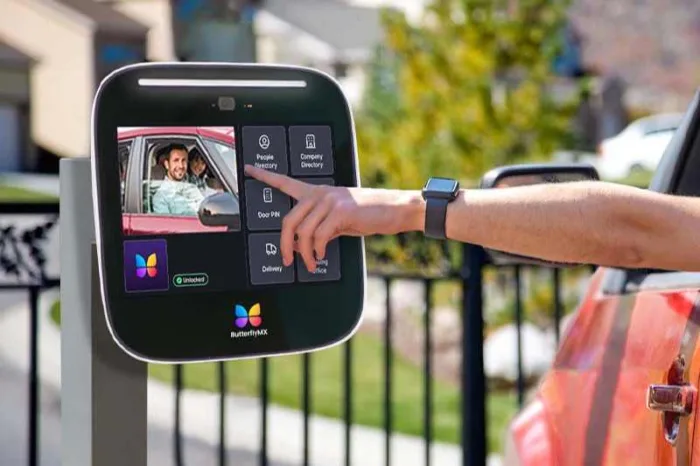
A gate call box with a camera is an outdoor entry panel that lets a visitor call a resident, staff member, or office while providing some form of visual identification. The system routes the call to an answering device and sends an approved release signal to the gate operator. But a camera does not automatically mean live video on a phone, recorded footage, or reliable remote access.
Before buying or upgrading a system, define what the camera must show, how the panel will connect at the gate, what should happen during an outage, and whether the panel can work with the existing operator and safety equipment. Those details determine whether a repair, retrofit, or full replacement makes sense.
This guide will answer:
- What is a gate call box with a camera
- How a camera gate call box opens an automated gate
- What the camera can actually show
- How legacy and current systems differ
- How to choose connectivity and plan for outages
- Where to place the camera and controls
- Plan operator compatibility, safety, emergency access, and security
- What a gate call box with a camera costs
- When to repair retrofit or replace the system
- Where ButterflyMX may fit a managed property
- FAQs
Watch how ButterflyMX works:
What is a gate call box with a camera
A gate call box with a camera combines visitor calling with visual identification at a vehicle or pedestrian entrance. It usually includes an outdoor panel, camera, audio hardware, call button or directory, communication link, answering device, power source, and a relay connection that can request a gate release from the gate operator.
The terms gate call box, gate intercom, telephone entry system, and video intercom overlap, but they do not always describe the same system. A call box may emphasize the outdoor panel. A telephone entry system may emphasize call routing. A video intercom emphasizes audio and visual communication. For broader context, readers can review gate call box basics and types.
What matters most is the specification, not the label. Features can vary by model, generation, service plan, and configuration. A camera can be part of a separate surveillance setup, a still-image feature, a live call, or an event log. Ask exactly what the person answering the call can see, where they can see it, and whether anything is stored.
How a camera gate call box opens an automated gate
A camera call box commonly follows this five-step call-to-release process:
- A visitor selects a resident or destination, enters a code, or presses a call button.
- The entry system routes the call through its configured phone line, network, radio, cellular service, or local connection.
- The resident, employee, or attendant answers on a supported phone, app, indoor station, or monitor and uses the available audio and visual information to identify the visitor.
- The answering party authorizes access if appropriate.
- The entry panel sends its configured release signal, often through a dry-contact relay or another approved interface, to the gate operator.
The distinction in the last step is essential. The entry panel authorizes access; it does not physically move the gate. The gate operator, sensors, entrapment protection, and related equipment control movement and safety. Before installation, confirm the operator input, relay logic, contact behavior, and any proprietary interface with a qualified installer. A useful comparison of gate intercom, video, telephone, and cellular arrangements is available from Gate Openers Unlimited.
What the camera can actually show
The word camera can hide major differences. A system may provide one or several of the capabilities below, and each one has its own viewing, storage, permission, and subscription rules.
Swipe to compare →
Current reseller listings describe a mix of still images, video calls, clips, event records, and cloud-managed features, which is why buyers should evaluate the individual product rather than assume a category-wide feature set. Review the claims and current documentation behind available intercom and videocom products before treating any feature as standard.
One-way video is not necessarily a limitation. It can give the answering party a view of the visitor without automatically sharing return video. ButterflyMX states that its video calls begin with one-way video, residents can enable two-way video, and the system can create time-stamped audit photos. Those are product-specific behaviors described in the ButterflyMX video intercom specifications, not assumptions to apply to every camera call box.
Questions to ask before you buy
- Who can see the visitor, and can the visitor see the person answering?
- Does video appear on a phone, app, monitor, indoor station, or a separate surveillance system?
- Is the image live, stored, or both?
- Which event triggers a snapshot, clip, or audit photo?
- How long is media retained, who can export it, and are storage or video features tied to a plan?
- What privacy, consent, and footage-permission rules does the property need?
How legacy and current systems differ
Older call boxes often rely on a traditional telephone line, local programming, or a fixed indoor answering point. Newer products may use wired networking, Wi-Fi, cellular service, cloud management, apps, video calling, and event records. That does not make every new system cloud-connected or video capable, and it does not make every older system unusable. It means the buyer must document what the installed system can do today and what the property needs next.
Legacy POTS service deserves special attention. The Federal Communications Commission describes an ongoing transition away from copper networks and notes that replacement services may need backup power. There is no single nationwide shutdown date. Owners of landline systems should ask their provider about local service plans, ask their installer about equipment compatibility, and document what happens when commercial power fails.
Wireless communication also does not remove site work. The panel may still need stable power, a pedestal or wall mount, conduit, an antenna location, weather protection, and a compatible operator connection. Treat cellular as a communication method, not as proof of live video, remote management, or dependable operation in every outage.
How to choose connectivity and plan for outages
Connectivity should follow the site survey, not the other way around. A gate at the edge of a large property can face different conditions than a building entrance: long runs, vegetation, terrain changes, steel enclosures, weak carrier coverage, and limited access to power or conduit.
Swipe to compare →
Test Wi-Fi or cellular service at the exact panel and antenna position, not at the office or curb. Metal posts and enclosures can affect signal, and terrain, buildings, and vegetation can change it across a property. Site-survey guidance from Swiftlane on gate intercom systems similarly emphasizes wiring, power, installation conditions, and total project planning.
Write down desired failure behavior before choosing a system. Decide what should happen to calls, video, credentials, logging, and authorized release during an internet, carrier, or utility-power outage. Then size backup power and operational procedures around those choices. For a remote gate that crosses a fire apparatus access road, emergency access also needs early planning rather than an afterthought.
Review your gate site and access requirements with a ButterflyMX specialist if you need help defining the questions that a site survey and installation plan must answer.
Where to place the camera and controls
Placement determines whether a camera is useful at the moment a visitor calls. The camera should be aimed for the expected stopping position and driver window, while buttons, directory controls, and credential readers must be reachable by their intended users. These can be separate design problems, especially at a site with both vehicle and pedestrian entrances.
Plan for lane width, vehicle approach, sun angle, headlight glare, backlighting, low light, rain on the lens, landscaping, and the enclosure itself. Wide dynamic range can help a camera handle bright and dark parts of a scene, but it does not replace sound placement, adequate lighting, or commissioning tests. Do not use a universal pedestal height, setback, or camera angle. An installer should review the lane geometry and the manufacturer installation guidance for the chosen equipment.
For covered operable parts on accessible routes, the U.S. Access Board guide to operable parts discusses unobstructed reach ranges, one-hand operation, and operating-force criteria. That guidance is a planning reference for applicable accessible spaces and routes, not a driver-window mounting rule. Local accessibility scoping and site conditions control the final design.
Commission the system in real conditions
- Test the view and audio during the day and at night.
- Test with headlights pointed toward the panel.
- Check the image after rain, glare, or changing shadows.
- Test calls and releases with the panel installed inside its final enclosure.
- Test signal at the final antenna location, not only before mounting.
- Confirm the expected experience for drivers, pedestrians, staff, and emergency responders.
Plan operator compatibility, safety, emergency access, and security
Before selecting an entry panel, inventory the gate operator input, required relay behavior, contact rating, normally open or normally closed logic, and any proprietary interface. A dry-contact relay can be part of an integration, but a relay alone does not guarantee compatibility with every operator.
Keep access authorization separate from safe gate movement. The call box can signal a release request, while the operator and its safety devices remain responsible for moving and protecting the gate. Where a security gate crosses a fire apparatus access road, IFC 2024 Section 503.6 is a useful planning reference for approval and maintained emergency operation. Its applicability depends on the locally adopted code, amendments, site scope, and the authority having jurisdiction. The provision references gate-operator and gate-construction standards, but final code decisions belong with local reviewers and qualified professionals.
Connected entry systems also need an operating plan. Use unique credentials, remove default passwords where applicable, limit administrative access, define firmware responsibility, control who can view footage, keep directories current, and revoke credentials promptly when access changes. CISA has urged manufacturers to eliminate risks created by static default passwords in its secure-by-design alert on default passwords. Property teams should translate that principle into clear account and access-management practices.
What a gate call box with a camera costs
The panel price is only one line item. A useful comparison separates equipment from the site work and ongoing services that make the system usable over time.
Power availability, trenching, connectivity, and property scale can create more cost variation than the panel itself. Vendor estimates and reseller prices are not durable market averages. If you use a current listing to build a budget, record the date, identify what is excluded, and compare all options across the same ownership period. The cost categories described in current gate-intercom buying guidance can help structure that comparison, but project quotes should reflect the actual site.
When to repair retrofit or replace the system
Start with an inventory: communication line, panel condition, available power, conduit, camera support, lighting, relay connection, operator input, credentials, emergency-access equipment, and service dependencies. This prevents a camera upgrade from becoming a narrow fix for a larger infrastructure problem.
Repair
Repair may be the practical choice when the current architecture still meets the property needs for calling, visual verification, reliability, administration, and service availability. Confirm that needed parts and the underlying communication service will remain available.
Camera retrofit
A camera retrofit can work when the existing panel and site support the desired video behavior. Check power, bandwidth, viewing location, lighting, camera input or mounting options, and whether the property wants live viewing, stored media, or both. Adding a camera will not automatically correct legacy connectivity, weak administration, operator incompatibility, or poor outage planning.
Replacement
Replacement is worth evaluating when obsolete communication service, unavailable parts, limited management controls, inadequate camera behavior, or incompatible infrastructure prevents the existing system from meeting documented requirements. Preserve only the components that have passed compatibility, safety, and emergency-operation review.
Readers comparing camera behavior at other entry points can also review this guide to a telephone entry system with a camera. The same central question applies: define the visitor workflow and the required visual record before choosing the hardware.
Discuss whether a video-first access system fits your property after you have documented the current equipment and the access experience you need.
Where ButterflyMX may fit a managed property
For a managed property that needs app-based visitor handling, visual verification, and auditability, ButterflyMX may be one option to evaluate. Its published video-intercom information describes one-way video at the start of a call, an option for residents to enable two-way video, time-stamped audit photos, and dry-contact relays for gate-release integration.
Those capabilities can be relevant where residents need to answer visitor calls from smartphones and property teams need to manage residents, visitors, credentials, and access remotely. ButterflyMX video intercoms do not rely on traditional POTS telephone lines, which may matter to properties planning around legacy telephone-entry hardware.
Fit still requires project-level confirmation. Before selection, verify supported connectivity at the gate, required accessories, available power, operator compatibility, subscriptions, installation conditions, and behavior during network or utility outages. Do not assume native cellular gate connectivity or universal compatibility from a video-intercom feature list alone.
Frequently asked questions
Can visitors see me when I answer a video call from the gate?
It depends on whether the system uses one-way or two-way video. Some systems show the visitor to the answering party without returning video, while others support two-way video when enabled. Behavior varies by model and configuration; ButterflyMX states that its calls begin one way and residents can enable two-way video.
How far can a wireless gate call box be from the house or office?
There is no reliable category-wide distance. Evaluate the exact product, terrain, buildings, vegetation, antenna position, enclosure material, and tested signal at the gate. Published ranges are product examples, not performance guarantees.
Will an old landline gate call box stop working when copper service is retired?
It may need a replacement service or equipment change, but timing varies by provider and area. Confirm local service plans, replacement options, equipment compatibility, and backup-power needs with the provider and installer. There is no single nationwide cutoff date.
How do firefighters get through a gate with a call box?
Emergency operation is a separate project requirement from visitor calling. Gates across fire apparatus access roads may need approval and a maintained approved method of emergency operation. Applicability depends on locally adopted code, amendments, site scope, and authority review.
Is a gate call box with a camera the same as a video intercom?
The terms overlap, but they emphasize different things. Gate call box describes the gate-entry application, video intercom emphasizes audiovisual communication, and telephone entry system can describe the call-routing function. Manufacturers use the terms inconsistently, so specifications matter more than the label.
Does a cellular gate call box work when property internet is down?
It may avoid dependence on the property internet, but operation still depends on cellular service, signal, power, system architecture, and configuration. Cellular describes a communication path, not guaranteed camera features or outage performance.
The right gate call box with a camera is the one that delivers the visual verification, calling workflow, outage behavior, and operator compatibility your site actually requires. Begin with the camera behavior and site survey, then evaluate connectivity, safety, emergency access, and total ownership cost together. For managed properties considering a video-first access platform, schedule a ButterflyMX demo to discuss whether the system fits your gate and property requirements.
Get your free quote!
Fill in the form below, and we'll email you right back.
Want a free quote?
Fill in the form below, and we'll email you right back.
Redirecting you in 5 seconds.