
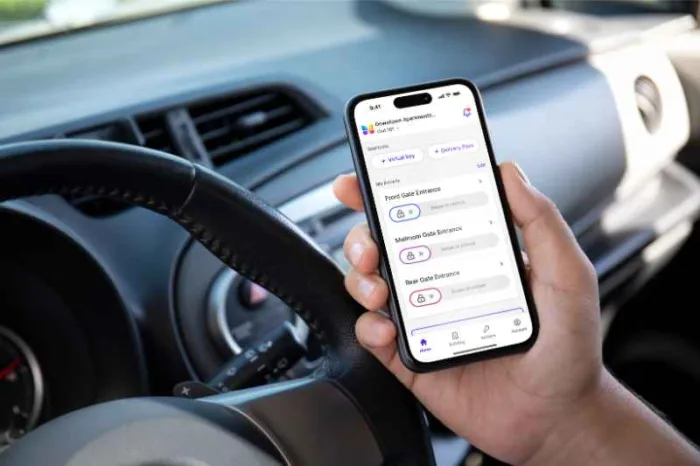





Key takeaways
- Residential gate access management combines hardware and software to control and track who enters and exits a gated community.
- Modern systems use digital credentials like mobile access, PIN codes, key fobs, and license plate recognition to replace or reduce reliance on physical keys and manual processes.
- Property managers can add, update, or revoke access through a centralized dashboard, allowing near real-time control over resident and visitor permissions.
- Access systems improve security and operations by logging entry activity, limiting unauthorized access, and reducing manual guard check-ins.
- Credentials can be customized with rules for timing, location, and user type, making it easier to manage residents, vendors, and guests efficiently
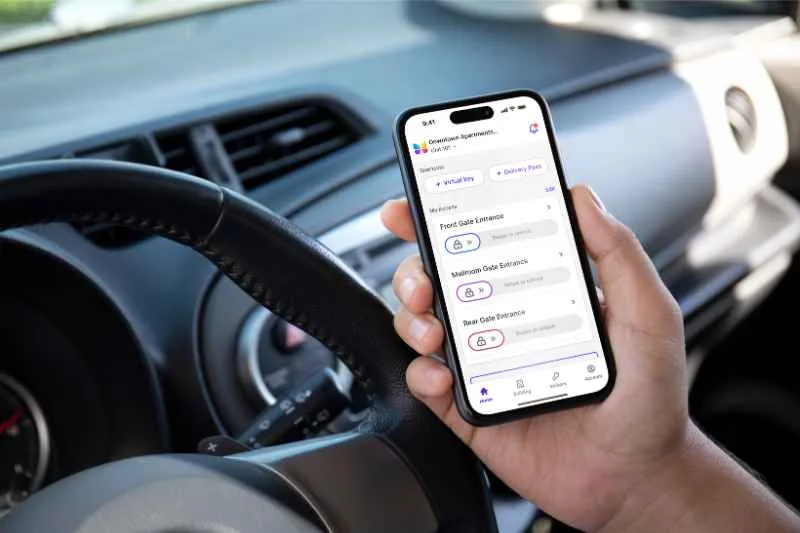
Residential gate access management is the system and process used to control who can enter and exit a gated community. It includes the tools, software, and procedures that property managers use to grant, monitor, and revoke access credentials for residents, staff, vendors, and guests.
For property managers, effective gate access management is not just about convenience. It is about maintaining security, improving operational efficiency, and ensuring residents have a smooth entry experience without compromising control over who comes onto the property.
This guide explains what residential gate access management is, how it works, and how to add credentials in a modern access control system setting.
Navigate this guide:
- What is residential gate access management?
- How residential gate access management works
- Why residential gate access management is important
- Types of gate access credentials
- How to add credentials in a gate access system
- Installation and maintenance considerations
- Common challenges in gate access management
- Residential gate access management FAQs
What is residential gate access management?
Residential gate access management is the system used to control who can enter and exit a gated community. It combines hardware and software to manage access at vehicle and pedestrian gates, replacing or supporting traditional methods like physical keys, remotes, and manual guard check-ins.
Most modern gate access systems include a motorized gate, digital credentials such as mobile apps, PIN codes, key cards, or license plate recognition, and a centralized management platform that property staff use to issue, update, and revoke access permissions. These systems also maintain activity logs that track entries and exits for security and reporting purposes.
The purpose of residential gate access management is to help property managers maintain secure property access while making entry convenient for residents, staff, vendors, and approved visitors.
How residential gate access management works
Gate access management systems work by verifying credentials at the point of entry and then triggering the gate to open if access is approved. The system is typically made up of three main layers: the user layer, the verification layer, and the control layer.
Here how gate access for residents works:
- User layer: who is requesting access
- Verification layer: checking credentials
- Control layer: opening and logging entry
User layer: who is requesting access
This includes residents, guests, delivery drivers, contractors, and staff. Each user is assigned a type of credential depending on how frequently they need access and what level of permission they require.
Common credentials include:
- Mobile app credentials
- PIN codes or keypad entry codes
- RFID cards or key fobs
- Temporary guest passes
- License plate recognition for vehicles
Verification layer: checking credentials
When someone approaches the gate, the system verifies their credential against the access database. This may happen in real time through cloud-based software or locally through on-site controllers.
For example:
- A resident uses a mobile app to trigger the gate
- A contractor enters a PIN code at a keypad
- A camera reads a license plate and checks it against an approved list
If the credential matches an authorized entry, the system sends a signal to open the gate.
Control layer: opening and logging entry
Once access is approved, the gate controller activates the gate mechanism. At the same time, most systems log the event, recording the time, user identity, and entry method.
This log helps property managers:
- Track activity at entry points
- Investigate security incidents
- Monitor vendor or contractor access
- Maintain compliance records when needed
Many modern systems integrate with broader access platforms such as ButterflyMX, which centralize access control for gates, doors, and other entry points in a single interface.
Why residential gate access management is important
Residential gate access management helps property managers maintain secure and organized entry into gated communities. Without a reliable system in place, it can be difficult to control who enters the property, manage credentials, and respond to security concerns quickly.
A gate access management system improves security by ensuring only authorized residents, staff, vendors, and guests can access the community. It also helps reduce the risks associated with lost keys, shared gate codes, and unauthorized entry attempts.
Beyond security, gate access management improves daily operations for property staff. Managers can add or revoke credentials remotely, monitor entry activity, and manage multiple access points from a centralized platform. This reduces manual work and helps staff respond to resident requests more efficiently.
Modern systems also improve convenience for residents. Mobile access, PIN codes, and vehicle-based entry methods can make it easier for residents and approved visitors to enter the property without relying on physical keys or remotes.
For gated communities of all sizes, residential gate access management supports both security and operational efficiency while helping create a smoother access experience for everyone entering the property.
Types of gate access credentials
Different gated communities use different combinations of credentials depending on size, budget, and security needs.
- Mobile credentials. Mobile-based access allows residents to open gates using a smartphone app. The system verifies identity through secure login and sends a signal to the gate controller.
- PIN codes. PIN codes are commonly used for guests or short-term access. A code is entered at a keypad near the gate, and if it matches an active credential, the gate opens.
- Key cards and fobs. RFID cards or fobs are assigned to specific users. When tapped against a reader, the system verifies the credential and grants access.
- License plate recognition. Some systems use cameras to identify approved vehicles by reading license plates. If the plate matches an approved list, the gate opens automatically.
Comparison of residential gate access management credentials
How to add credentials in a gate access system
Adding credentials is an important part of managing access in a gated community. Most modern systems allow property managers to manage residents, visitor passes, and delivery access through a centralized admin dashboard.
Here are the five easy steps to adding credentials to your access system:
- Log into the admin dashboard
- Add a resident or user
- Assign access credentials
- Configure access permissions
- Save and activate access
1. Log in to the admin dashboard
Property managers can access the management platform through a web browser or mobile app.
Once logged in, the dashboard displays important property management tools, including:
- Tenants
- Access management
- Visitor passes
- Delivery authorizations
- Access logs and door releases
From here, managers can add residents, update permissions, and manage credentials.
2. Add a resident or user
Navigate to the Tenants tab and select Add Tenant.
Enter the residents’:
- First name
- Last name
- Email address
- Phone number
- Unit number
If the unit number is not listed, it can usually be added manually. Some systems also allow managers to customize how resident names appear in the directory.
3. Assign access credentials
Once the resident profile is created, the system can assign credentials such as:
- Mobile access linked to the resident’s phone number or email
- Visitor passes with QR codes and PINs
- Delivery PINs for carriers and vendors
- Key fobs or cards, depending on the property setup
Many systems allow multiple credentials for the same resident.
4. Configure access permissions
Property managers can determine how and when credentials work.
Permissions may include:
- Full-time resident access
- Temporary visitor access
- Delivery access with unique PIN codes
- Zoned access for specific areas of the property
This helps ensure users only access approved areas.
5. Save and activate access
After credentials and permissions are added, click Save to activate access. Residents may then receive registration or activation emails to complete setup and begin using the system.
Discover how ButterflyMX works:
Operational considerations for property managers
Managing residential gate access is not only about issuing credentials. It also involves ongoing oversight and maintenance. Consistency is important. Even small delays in revoking access can create security risks, especially in larger communities with high turnover.
Key considerations include:
- Keeping resident data updated during move-ins and move-outs
- Reviewing access logs for unusual activity
- Ensuring contractor access is time-limited and regularly audited
- Training staff on how to manage credentials properly
- Coordinating with security teams if the property uses on-site personnel
Installation and maintenance considerations
Installing a residential gate access management system involves assessing existing gate hardware and adding the necessary components, such as readers, cameras, and a control panel connected to a centralized platform. Older systems may require wiring updates or compatibility upgrades to support digital credentials.
Device placement is also important. Keypads, cameras, and readers should be installed where they are easy to use and provide reliable performance. For example, license plate recognition cameras need a clear view of approaching vehicles, while entry devices should be positioned for convenient resident access.
After installation, ongoing maintenance helps ensure consistent performance. This includes checking hardware for damage, keeping devices clean, applying software updates, and confirming that all components are properly connected to the system.
Common challenges in gate access management
Modern cloud-based platforms help address many access management challenges by centralizing control and automating updates.
Here are a few challenges property managers face similar challenges when overseeing gated access systems:
- Managing multiple credential types across different user groups. Property managers often need to oversee mobile credentials, PIN codes, key fobs, and guest passes for residents, staff, vendors, and visitors.
- Handling lost or stolen key fobs or access cards. Lost credentials must be deactivated quickly to help prevent unauthorized property access.
- Coordinating temporary access for vendors and deliveries. Vendors and delivery drivers usually need short-term access that should expire automatically after use.
- Ensuring systems remain updated across all entry points. Every gate and access point should sync with the latest user permissions and credential updates.
- Reducing reliance on manual entry logs or guard check-ins. Digital access systems help reduce paperwork and minimize the need for manual visitor tracking.
Residential gate access management FAQs
- How quickly can gate access be updated for a resident?
- What happens if a resident loses their access credential?
- Can gate access be limited to specific times or areas?
How quickly can gate access be updated for a resident?
In most modern systems, updates take effect almost immediately after they are saved in the admin dashboard. This allows property managers to grant or remove access without delays, which is especially useful during move-ins, move-outs, or urgent security changes.
What happens if a resident loses their access credential?
If a resident loses a credential, such as a key fob, PIN code, or mobile access, property managers can revoke or deactivate it through the dashboard. A replacement credential can then be issued while the old one is immediately blocked from use.
Can gate access be limited to specific times or areas?
Yes. Many systems allow property managers to set rules that restrict access by time of day, date range, or specific entry points. This is often used for contractors, vendors, or guest access to ensure controlled entry without full-time permissions.
Get your free quote!
Fill in the form below, and we'll email you right back.
Want a free quote?
Fill in the form below, and we'll email you right back.
You’ll be redirected shortly...