





Key takeaways:
- Security system integration connects systems so they can share events or data, but a connection does not always allow two-way control.
- Verify exact ONVIF profiles and OSDP Secure Channel support instead of relying on a general compatibility claim.
- Before connecting systems, define the workflow, assign maintenance ownership, and review cybersecurity, privacy, and life-safety risks.
Security system integration connects separate security and building systems so they can exchange events or data, display information in a shared interface, and sometimes trigger coordinated actions. The connection may use a common platform, an application programming interface, a software development kit, a network protocol, or a device standard.
For example, a door-access event might travel from a reader or controller to an access platform, where a rule makes relevant video available for review or sends an alert. That does not automatically mean the camera system, access system, and platform can all control one another. The depth of the connection matters. For property teams, the practical task is to define the workflow first, then verify compatibility, security, ownership, and failure behavior before security systems are connected.
This guide will answer:
- What security system integration means
- Property systems and workflows that can connect
- Integration depth and capability
- How to verify compatibility with ONVIF and OSDP
- Whether to retrofit or replace existing systems
- Pre-integration risk checklist
- Project roles, ownership, and cost
- How ButterflyMX can fit managed property workflows
- FAQs
Watch how ButterflyMX works:
What security system integration means
Integrated security systems do more than place several devices in the same building. They create a defined path for information to move between systems. A camera, intercom, access-control panel, alarm, property management system, or elevator interface can send an event to another system or receive approved information from it.
A typical flow has four parts: a device records an event, a network or API carries the event to a platform, a rule or operator evaluates it, and the platform presents information or takes a supported action. Depending on the design, the outcome may be an alert, a video view, a credential update, or a permitted command. A video management system, or VMS, a physical access control system, or PACS, and a physical security information management system, or PSIM, can each serve as a central interface or rule engine.
Technical integration is not the same as security convergence. Integration concerns the systems and their connections. Security convergence also brings physical security, IT, cybersecurity, facilities, and governance teams into the same planning and operating model. The CISA and Interagency Security Committee guidance on security convergence describes why connected physical-security and operational-technology devices require that broader coordination.
The key question is not simply whether two products integrate. Ask what data moves, which system is allowed to act on it, and what still works if the network, cloud service, or connection is unavailable.
Property systems and workflows that can connect
Managed properties often connect access control, video intercoms, cameras, intrusion or alarm systems, smart locks, visitor credentials, elevators, and property management software. Relevant building systems may also be part of the design. Each connection should be tied to a specific operating need rather than added because a vendor directory lists it.
Start with the workflow
A move-in workflow might pass approved resident information from property management software to an access platform so access can be granted at the appropriate time. A move-out workflow may support revocation of access when a resident record changes. An investigation workflow might let an authorized operator review relevant video alongside an access event, if the particular systems and implementation support that use case.
Other examples include visitor entry, delivery access, mobile or wallet credentials, and elevator permissions. These are useful categories for planning, but an integration listing alone does not establish whether data flows one way or both ways, whether commands are supported, or how exceptions are handled.
Before comparing products, write down the trigger, the data that must move, its direction, the people who can take action, the audit record required, and the desired behavior when a system is offline. Teams evaluating the camera and access pairing can also read more about integrating access control with video surveillance.
Integration depth and capability
The words integrated and unified are often used differently by different vendors. Genetec describes integrated systems as linked independent systems and unified systems as more deeply interconnected. That framing is useful for evaluation, but it is not a universal industry definition. The following categories can overlap in one property.
Swipe to compare →
As Genetec explains in its comparison of unified and integrated security, more connections can also create more upgrade dependencies. Select the minimum integration depth that supports the workflow. Then document data direction, permissions, service ownership, and safe behavior during a connection failure.
How to verify compatibility with ONVIF and OSDP
Compatibility claims need proof. For video, ONVIF states that only registered products with profile conformance are conformant, and that profile conformance is the basis for compatibility between ONVIF products. Check the exact camera or software model and the relevant profile in the ONVIF profile information, rather than relying only on a datasheet that says a product is ONVIF compatible.
Profile matching is not a guarantee that every feature in a camera, VMS, or access-control workflow will work together. It does not prove licensing, configuration, cybersecurity posture, regulatory compliance, or unified management. It helps answer a narrower but important question: whether the exact products support the needed standardized functions.
For reader-to-panel communications, the Security Industry Association describes the Open Supervised Device Protocol, or OSDP, as an open standard. Its Secure Channel capability supports AES-128 encryption and two-way communication when the reader and panel support it and it is enabled and configured correctly. The Security Industry Association overview of OSDP is a useful starting point for comparing OSDP with legacy Wiegand connections.
In practical terms, verify the reader model, panel model, firmware, wiring, protocol version, and whether Secure Channel is actually active. Do not assume that a reader labeled OSDP ready is operating with the security features your project expects. Profile availability and protocol details can change, so recheck current ONVIF registry information and OSDP documentation before purchase or publication.
Whether to retrofit or replace existing systems
Existing cameras, readers, panels, and software may be reusable, but only if their protocols, registered conformance, wiring, firmware, licenses, support status, cybersecurity condition, and required integration depth align. A site assessment should determine that before a property commits to retaining or replacing equipment.
Build an inventory before selecting a platform
- List cameras, readers, panels, controllers, servers, software versions, and active licenses.
- Record network connections, credential types, cabling, power dependencies, and ownership of each component.
- For cameras, confirm the exact ONVIF product and profile needed for the intended workflow.
- For access control, inspect reader-to-panel wiring and determine whether OSDP and Secure Channel can be supported or whether legacy Wiegand limits the plan.
- Identify who provides updates, replacement parts, technical support, and security patching.
A phased migration can reduce disruption when some equipment remains supportable and compatible. Replacement may be the clearer path when legacy hardware cannot meet the needed workflow, security, or maintenance requirements. New construction offers more flexibility because network design, controller locations, cabling, and interface responsibilities can be planned before walls are closed.
Do not promise reuse based on a model family or a general compatibility label. Test the proposed workflow with the actual devices and software versions, preferably before finalizing a large retrofit scope.
Pre-integration risk checklist
Connecting systems can improve visibility, but it also expands the set of accounts, networks, vendors, and devices that must be managed. Use this checklist before approving an integration.
- Define the required workflow and integration depth. Document the trigger, data fields, supported commands, users, audit needs, and fallback behavior.
- Review network exposure. Address segmentation, remote access, service accounts, credential management, logging, patching, backups, and incident-response ownership.
- Assign governance. Physical security, IT, cybersecurity, and facilities teams should agree on maintenance responsibilities, availability expectations, escalation paths, and service agreements.
- Set privacy and access-governance rules. Decide who may view entry records, photos, and video; how long data is retained; and how access is audited.
- Obtain qualified review for electronic locking, egress, elevator, and alarm interfaces. Door behavior depends on the adopted code, occupancy, door location, system design, and the authority having jurisdiction.
- Check procurement and equipment requirements. The FCC Covered List addresses specified telecommunications and video-surveillance equipment within defined national-security-related scopes. It is not a blanket statement that named equipment is prohibited at every private property, so verify requirements for the use case, funding source, sector, and jurisdiction.
- Test failures. Confirm what happens during loss of network, power, platform access, or the integration itself, then document who responds and how the system is restored.
Guidance from the federal security-convergence context is not a private-property legal requirement. Still, its emphasis on shared accountability is a sound operating practice. Similarly, NFPA discussion of egress door locking arrangements reinforces why teams should not make universal claims about door release or alarm behavior without applicable-code and authority review.
Project roles, ownership, and cost
A security systems integrator may handle assessment, design, installation, configuration, testing, and support. An installer, consultant, manufacturer, IT provider, and code specialist may each cover part of that work. The labels overlap, so scope should be confirmed in writing rather than assumed from a job title.
A practical six-stage project process
- Assess the property, existing equipment, network, workflows, and risks.
- Define requirements and system design, including architecture, compatibility assumptions, responsibilities, and acceptance criteria.
- Install or prepare devices, network connections, software, licenses, and interfaces.
- Connect and configure systems, permissions, rules, and logging.
- Test normal use, exceptions, and failure scenarios before acceptance.
- Complete training, handover, documentation, recurring tests, and ongoing maintenance.
Ask for a record of device and software inventories, configuration ownership, support contacts, warranties, change-control rules, credentials, and recovery procedures. A security systems integrator project overview from Pelco similarly describes assessment, design, installation, integration, testing, and ongoing support as connected parts of the work.
Costs vary with the property and should be evaluated as categories: hardware, software or subscriptions, licenses, networking, design, labor, integration work, testing, training, maintenance, and future upgrades. Compare itemized proposals against the required workflow and the lifetime cost of maintaining each connection. Avoid choosing an architecture solely because it appears simpler at the start; a single-vendor approach may reduce point connections, while a multi-vendor approach may preserve flexibility but require more coordination.
How ButterflyMX can fit managed property workflows
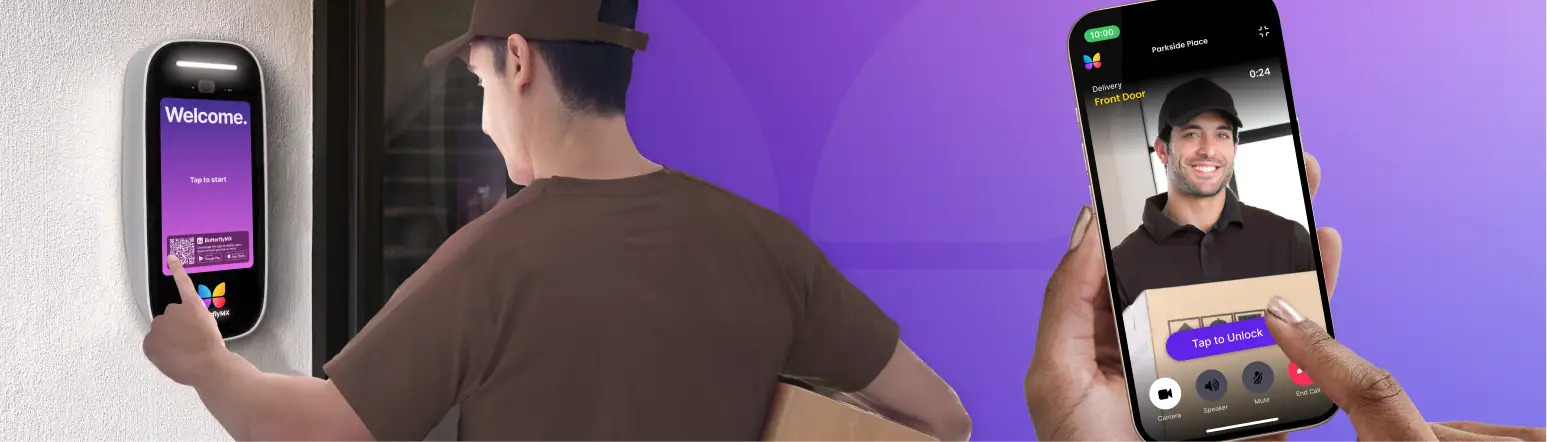
After the workflow and compatibility requirements are clear, ButterflyMX can be evaluated as one managed-property option. Its documented ecosystem includes video intercoms, cloud access control, cameras through Camera Gateway, property management software connections, smart-lock and wallet-credential categories, elevator-control connections, and an open API or SDK.
A clear example is property management software integration that can support granting and revoking access around move-in and move-out workflows. ButterflyMX also documents connections across lock, credential, elevator, video, and property-management categories. Readers can explore ButterflyMX integrations to identify current supported connections.
That directory is a starting point, not a substitute for technical review. For the specific integration you need, confirm current availability, required devices, licensing, data direction, supported commands, user permissions, failure behavior, and maintenance responsibility. The same questions should be applied to every vendor and every platform under consideration.
Frequently asked questions
Do I need to replace my cameras to connect them to access control?
Not necessarily. Reuse depends on the exact camera model, needed ONVIF profile, VMS or platform support, firmware, licenses, network design, security condition, and intended workflow. Verify the exact products and run a proof-of-concept test before deciding whether to retain or replace cameras.
What is OSDP, and why is it considered more secure than Wiegand?
OSDP is an open reader-to-panel communication standard. The Security Industry Association describes OSDP Secure Channel as supporting AES-128 encryption and two-way communication, which can offer security and management advantages over legacy Wiegand connections. Those protections depend on compatible equipment and correct Secure Channel configuration.
What does ONVIF conformant mean, and how can I check it?
ONVIF conformant means the exact registered product has profile conformance. Search official ONVIF registered-product information for the precise model and required profile, then confirm that the profile supports the features your camera, VMS, or access-control workflow needs. A general compatible label is not the same as registered profile conformance.
Can integration automatically remove access when a resident moves out?
It can, when a documented property management software integration supports access provisioning and revocation for that workflow. Confirm the property software, timing, data source, exceptions, audit records, and exact integration behavior before relying on automation.
How much does security system integration cost?
The cost depends on hardware, software or subscriptions, licenses, design, labor, networking, integration, testing, training, maintenance, and future upgrades. Request itemized proposals and compare lifecycle responsibilities rather than relying on a per-door estimate that may not reflect your existing systems or required workflows.
Are Hikvision or Dahua cameras banned in the United States?
Do not assume a blanket ban applies to every private property. The FCC Covered List and related rules have defined scopes involving specified equipment and services. Check current requirements for your funding source, sector, procurement rules, and jurisdiction before making an equipment decision.
A successful security system integration project begins with a precise workflow, not a list of devices. Verify the depth of every connection, prove compatibility with the exact equipment, assign ongoing ownership, and bring code and cybersecurity reviewers into the process early. If your property is evaluating managed access, intercom, video, or property-management workflows, request a ButterflyMX demo after you have defined the systems and outcomes that matter most.
Get your free quote!
Fill in the form below, and we'll email you right back.
Want a free quote?
Fill in the form below, and we'll email you right back.
Redirecting you in 5 seconds.