





Key takeaways:
- Smart locks can work in apartment buildings without internet when they use local access methods such as Bluetooth, keypad PINs, Z-Wave, Zigbee, cards, fobs, or stored credentials.
- Offline locks can handle many daily entry needs, but remote unlock, live alerts, real-time monitoring, cloud syncing, and some integrations usually require internet somewhere in the system.
- The best setup depends on the door type, building connectivity, staff workflows, resident expectations, and whether the property needs local unit access, connected building entry, or both.
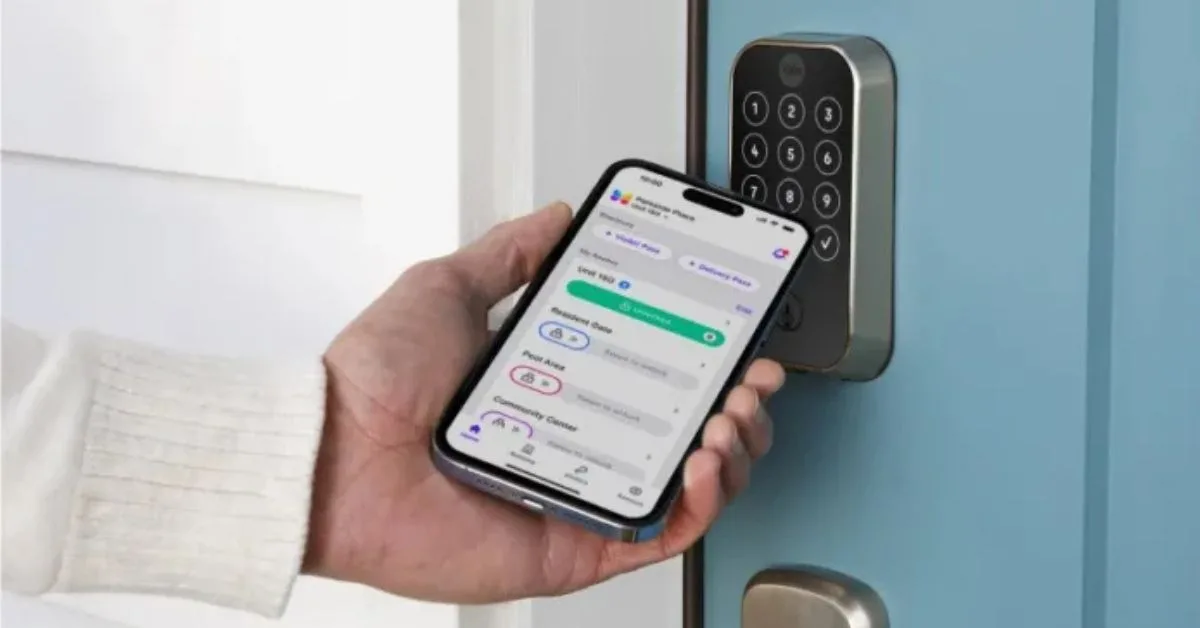
A lack of building-wide WiFi does not automatically rule out smart locks. Many smart locks for apartment buildings without internet can still lock, unlock, and verify approved users through local methods such as keypad PINs, Bluetooth Low Energy, cards, fobs, Z-Wave, or Zigbee.
The catch is that “works without internet” does not mean “keeps every smart feature.” A unit door lock may work perfectly well offline for a resident who enters a PIN at the door. But remote unlock, real-time alerts, live audit visibility, visitor access, and some property management software integrations usually need internet connectivity somewhere in the access system.
That distinction matters for property managers because unit doors, front entrances, package rooms, parking gates, and staff-only areas do not all have the same access needs. The better question is not simply whether a smart lock can work offline. It is which doors should work locally, which doors need connected control, and how those choices affect residents, staff, vendors, and future upgrades.
This guide will answer:
- Do smart locks need internet to work?
- How smart locks work without WiFi
- Offline vs. online smart lock features
- How to choose a setup without building-wide WiFi
- Implementation considerations for property managers
- Where ButterflyMX fits in an offline or hybrid access strategy
- FAQs
Watch how ButterflyMX works:
Do smart locks need internet to work?
No, not always. Smart locks without WiFi can still perform core access functions when they are designed to verify credentials locally instead of checking a cloud system every time someone opens the door.
An offline smart lock is a lock that can make an access decision at the door without a live internet connection. It may accept a keypad PIN, read a card or fob, use a stored mobile credential, or communicate directly with a nearby phone through Bluetooth. Some locks also use Z-Wave or Zigbee to connect to a local hub or gateway rather than connecting directly to WiFi.
WiFi, internet, and local connectivity are often used as if they mean the same thing, but they do not. WiFi is one way for a device to connect to a network. Internet access lets that network reach cloud software for remote commands, live syncing, and dashboard updates. Local connectivity lets the lock communicate with something nearby, such as a phone, keypad, reader, hub, or stored credential.
So, a lock can work locally without having internet at the door. What changes is the management experience. A lock that works offline for resident entry may not offer the same remote control, reporting, or integration options as a connected system. Property teams should separate basic door access from centralized management before choosing hardware.
How smart locks work without WiFi
Smart locks for apartment buildings without internet usually rely on one of two ideas: the credential is stored at the lock, or the lock communicates with a nearby device instead of the cloud. That keeps the access decision local, which can be useful in older buildings, retrofits, and properties with unreliable WiFi coverage.
Bluetooth Low Energy
Bluetooth Low Energy, often called BLE, allows a phone to communicate directly with a nearby lock. A resident can approach the door, use an approved phone credential, and unlock at short range if the lock and app support that behavior.
This can give residents mobile access without requiring WiFi at every unit door. But it is still local access, not remote access. If a manager wants to unlock a vacant unit from another location or update permissions instantly across many doors, a Bluetooth-only setup may be too limited unless the property adds connected components elsewhere in the system.
Z-Wave and Zigbee
Z-Wave and Zigbee are low-power wireless protocols used by some smart locks and access systems. Instead of connecting each lock directly to WiFi, the lock may communicate with a hub or gateway over a local wireless network. When that hub has connectivity, it may sync information with management software, depending on the system design.
The advantage is that a property may not need strong WiFi at every unit door. The tradeoff is added planning. Hubs and gateways have to be placed, powered, supported, and checked for dead zones. A hub-based system can be a smart middle ground, but it is not the same as having no supporting infrastructure at all.
Keypads, cards, fobs, and stored credentials
Keypads, cards, fobs, and stored credentials are often the simplest offline access methods. If the lock already knows that a PIN or credential is valid, it can unlock without asking the cloud for permission.
This approach can work well when a property wants keyless apartment entry but does not want to extend network connectivity to every unit. The operational burden does not disappear, though. Someone still has to assign credentials, remove old ones at move-out, plan staff and maintenance access, and maintain a backup entry method if the primary credential fails.
Hub-based versus hubless setups
A hubless lock handles entry through its own keypad, local credential reader, or short-range phone connection. A hub-based setup adds a device that helps locks connect to software or other building systems. Neither model is automatically better. Hubless systems tend to be simpler. Hub-based systems can offer more structure and upgrade potential, but they add another layer to manage.
This is where audit trails need careful review. Some offline-capable locks can store entry events locally and upload them later when they reconnect to a hub, gateway, or management platform. That can provide useful records, but it is not the same as live monitoring. If your team expects to see access events in real time, confirm that the lock, hub, software, and internet path all support it.
Unit locks are different from building entry systems
Unit doors and building entrances solve different problems. A resident unit lock may only need reliable local entry and a clean turnover process. A front entrance may need video calling, remote release, visitor access, mobile entry, and centralized administration.
Treating every door the same can lead to the wrong purchase. Some properties overcomplicate unit doors by chasing cloud features they rarely use. Others underbuild the main entrance by choosing a lock-only approach when staff really need connected access control and visitor management. A good access plan starts by mapping the door type to the access need.
Offline vs. online smart lock features
Feature sets vary by brand, model, and configuration, but the table below shows the practical difference between offline, online, and hybrid smart lock approaches.
Offline smart locks often support the resident-facing features that matter most day to day:
- Keyless entry through a keypad PIN or stored credential
- Short-range mobile entry on supported Bluetooth systems
- Cards, fobs, or other local credentials on compatible hardware
- Some audit logging stored at the lock and synced later
- Basic unit access without constant internet service
Internet connectivity is usually needed for higher-level management features, including:
- Remote unlock from another location
- Real-time alerts and live event visibility
- Instant cloud sync across multiple users or doors
- Some property management software and access control integrations
- Centralized dashboards for multi-door administration
- Remote visitor access and connected building-entry tools
The main tradeoff is local independence versus centralized control. Offline locks can keep working when internet service is unreliable, but administrators usually lose some live visibility. Connected systems make multi-door management easier, but they depend more on network design, gateways, or cloud access.
That is why many multifamily properties land on a hybrid model. Unit doors can use offline or low-power wireless locks where simple local access is enough. Main entrances, package rooms, amenity spaces, and visitor-facing doors can use connected access control where remote administration matters more.
In that kind of design, ButterflyMX is most relevant at the connected-entry layer. ButterflyMX does not manufacture unit smart locks. It supports building entry, mobile access, visitor access, and smart lock integrations where those capabilities fit the property’s access plan.
How to choose a setup without building-wide WiFi
The right setup depends less on the phrase “no internet” and more on where connectivity exists, which doors need live control, and how your team manages access changes.
Start with the building’s actual connectivity
Some properties do not have building-wide WiFi, but they do have internet in leasing offices, telecom rooms, lobbies, or other common areas. Others have dead zones that make direct WiFi locks unreliable at unit doors. Those are different situations.
Before choosing a lock category, map where the property has internet, where it does not, and which openings actually need real-time management. A building may not support WiFi-connected locks at every apartment door, yet still support hubs, gateways, or connected entry hardware in selected locations.
Separate unit-door needs from common-area needs
Unit doors, package rooms, side entrances, parking areas, gates, and main lobbies do not need identical technology. A unit door may only need secure local entry, resident credential changes, and a clear turnover process. A main entrance may need visitor calling, video verification, remote release, mobile access, and centralized permissions.
Once you separate those needs, the decision becomes easier. You may decide that unit locks should stay simple while shared entrances get connected tools. Or you may decide that a larger property needs more connected management across more doors. Either way, the decision should follow the door’s role, not a one-size-fits-all product list.
Match the system to property size and staffing
A small retrofit with limited staff may benefit from straightforward offline locks that do not require extensive infrastructure. A larger multifamily property may need more centralized control because there are more residents, more doors, more vendors, and more temporary access decisions.
Property type also matters. Student housing may place more weight on mobile credentials and frequent turnover. Senior living may need simpler user flows and dependable backup access methods. Mixed-use properties may need one approach for residential units and another for commercial or shared areas. New developments can plan hubs, gateways, entry systems, and future expansion earlier than older retrofits can.
Check compatibility before you buy
If you expect locks to connect later with access control software, property management software, visitor tools, or building-entry systems, verify compatibility early. Some locks can work with hubs or gateways. Others have more limited upgrade paths. Some platforms support only certain credential types or selected integrations.
This matters if you are considering ButterflyMX as part of a larger access plan. ButterflyMX fits conversations about connected front-door entry, mobile access, visitor management, and selected smart lock integrations. But integration behavior varies by system and configuration, so review the exact use case before assuming every unit-lock feature will work the same way.
Do not confuse connectivity with security quality
An online lock is not automatically more secure than an offline lock. An offline lock is not automatically safer just because it uses less networking. Connectivity affects how the lock communicates and how administrators manage it. Security quality also depends on the physical hardware, credential controls, door compatibility, installation, and product certifications.
Standards and certifications such as UL and ANSI/BHMA belong in the evaluation because they relate to lock testing and grading. They are separate from whether the lock uses Bluetooth, Z-Wave, Zigbee, WiFi, or another connection method.
A practical decision checklist
- Confirm where internet access exists on the property and where dead zones remain.
- List which doors need local entry only and which doors need remote or visitor-related functions.
- Define must-have features, such as PIN access, mobile credentials, audit trails, remote release, or live alerts.
- Review how staff will handle resident turnover, maintenance entry, vendors, tours, and after-hours support.
- Check door and hardware compatibility before choosing a lock category.
- Verify whether future integrations or upgrades require hubs, gateways, or internet connectivity.
- Decide whether an offline, online, or hybrid design fits the property instead of forcing one approach everywhere.
Implementation considerations for property managers
A smart lock rollout succeeds or fails in the details after installation. Offline and hybrid systems both need clear rules for credentials, residents, staff, batteries, and backup access.
Access code and credential administration
If a lock works offline, access still has to be managed. Your team needs a process for assigning resident credentials, removing old credentials at move-out, setting staff access rules, and handling temporary users. Some properties prefer keypad PINs because they are familiar and easy to explain. Others use cards, fobs, or mobile credentials where the hardware supports them.
The more local the system is, the more discipline the process needs. Decide who owns code updates, how often credentials are reviewed, how move-outs are handled, and what happens if a resident loses a device or forgets a PIN.
Maintenance, vendors, and tours
Maintenance teams, vendors, and self-guided tours put extra pressure on access planning. If your team cannot rely on live remote unlock, scheduled access has to be planned before someone arrives at the door. Depending on the system, that may involve time-limited codes, staff-issued credentials, or a check-in process that grants access only during approved hours.
Walk through the sequence before rollout. Who approves entry? Who issues the credential? How is the entry documented? What happens if the credential does not work? A simple answer to those questions is more valuable than a feature list your staff cannot use consistently.
Resident onboarding and support
Residents need to know what their lock does and what it does not do. A Bluetooth-enabled lock may let them use a phone at the door without building-wide WiFi, but it may not offer the same remote app features they expect from a consumer WiFi lock. A keypad lock may be easier to learn, but residents still need instructions for code changes, guest access, and backup entry.
Good onboarding reduces avoidable support calls. Explain which credentials work, when residents need to be near the door, what happens during internet outages, and who to contact for battery or credential issues.
Battery and failure planning
Battery-powered locks need a replacement process, not just a low-battery warning. Offline locks still need regular checks, and connected locks still need someone responsible for maintenance. Define who monitors battery status where available, who replaces batteries, how replacements are documented, and how staff respond if a lock loses power.
Also confirm the backup path. Depending on the lock and property policy, that may involve a physical key override, another credential method, or a staff escalation process for lockouts. These details are especially important in properties with frequent service calls, student housing, senior living, or any building where access issues can quickly become urgent.
Upgrade planning
Some properties start with offline or hub-based locks and move toward more connected management later. That can be a practical path for retrofits and phased renovations, but only if the original hardware and platform support the next step.
Before deployment, ask whether the chosen locks can work with future gateways, hubs, entry systems, access control software, or property management software. Planning for that now can help the property avoid buying hardware that works at a few doors but becomes difficult to manage across the whole building.
Where ButterflyMX fits in an offline or hybrid access strategy
ButterflyMX fits best in this conversation when a property wants connected control at the building entrance, even if every unit lock is not cloud-connected. That is a common multifamily need: residents want convenient entry, staff need manageable permissions, and visitors need a clear way to request access.
In a hybrid design, connected perimeter entry can handle the doors that most often need remote administration, mobile access, video calling, and visitor management. Unit locks can then be chosen based on the door hardware, turnover process, resident needs, retrofit limits, and how much local versus remote control the property actually needs.
ButterflyMX is also relevant when a property is evaluating smart lock integrations as part of a wider access plan. The scope matters. ButterflyMX is not the smart lock itself, and not every integration supports identical features. Its role is to support connected building entry, mobile access, visitor access, and integrated administration where those capabilities match the property’s design.
If your property lacks building-wide WiFi, that does not mean you have to choose between old mechanical keys and fully cloud-connected locks at every door. The smarter design may be selective: use connected access where central control matters most, and use offline or low-power wireless locks where local entry is enough.
Frequently asked questions
Do smart locks work without WiFi?
Yes. Many smart locks work without WiFi by using Bluetooth, keypad PINs, Z-Wave, Zigbee, cards, fobs, or other local credential methods. WiFi or another internet path is usually needed for cloud-based features such as remote unlock, real-time alerts, and live syncing.
What is the difference between offline and online smart locks?
Offline smart locks make access decisions locally, while online smart locks connect to internet-enabled software for remote control and live visibility. The tradeoff is usually simpler infrastructure and local independence versus richer remote management.
Can residents use mobile access without building WiFi?
Sometimes. Some locks support short-range mobile access through Bluetooth or another local method, so residents can use a phone near the door without building-wide WiFi. Remote credential delivery and cloud-based app features may still require connectivity somewhere in the system.
Can you upgrade from offline to online smart locks later?
Often, yes, but not always. Some properties add hubs, gateways, or connected entry systems later, while others find that the original hardware has limited upgrade options. Compatibility should be checked before purchase.
Smart locks for apartment buildings without internet can be practical, but the best choice depends on what each door needs to do. A unit door may only need reliable local entry, while a main entrance may need connected access control, visitor access, mobile credentials, and remote administration.
For many multifamily properties, the answer is a hybrid access strategy: keep unit locks aligned with the building’s infrastructure and daily operations, then use connected entry tools where live control matters most. If you are evaluating that kind of setup, talk to ButterflyMX about how connected entry, mobile access, visitor management, and smart lock integrations can fit your property.

Get your free quote!
Fill in the form below, and we'll email you right back.
Want a free quote?
Fill in the form below, and we'll email you right back.
You’ll be redirected shortly...