
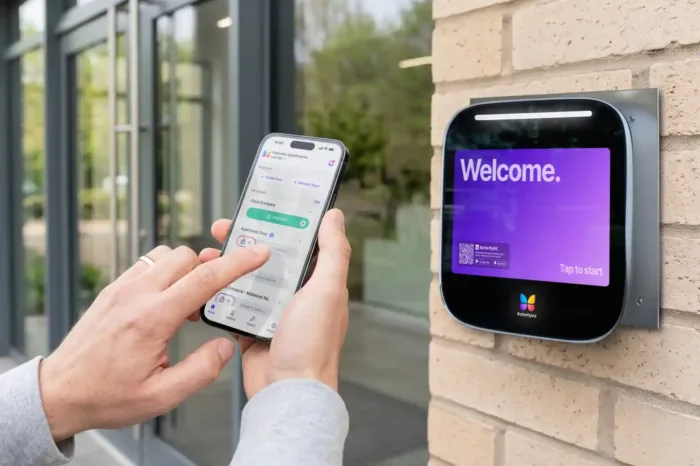





Key takeaways:
- A residential telephone entry system lets a visitor call a resident or staff member from an entry panel, then releases a connected door or gate after approval.
- The biggest technical choice is the call path: POTS, cellular, IP or VoIP, or a video-enabled design. That choice affects infrastructure, outages, service costs, and administration.
- Aging POTS systems deserve proactive review because copper retirement, parts availability, release hardware, local code review, and total cost all affect whether to repair or replace.
A residential telephone entry system is often the first piece of access technology a visitor uses at an apartment lobby, gated community, student housing property, or managed residential entrance. The basic job is simple: a visitor uses an entry panel to call a resident or staff member, and the recipient can approve a connected door or gate release.
The harder question is which system belongs at the property. A lobby with existing wiring, a remote HOA gate, and a high-turnover apartment building may all need different call paths, release hardware, outage plans, and directory-management tools. An older landline call box may still work today, but it may also be tied to service, parts, and carrier plans that are changing.
This guide explains how residential telephone entry systems work, how POTS, cellular, IP, VoIP, and video-enabled options differ, what costs to look for, and how to decide whether to repair, replace, or move toward a modern video intercom.
This guide will answer:
- What is a residential telephone entry system?
- How a telephone entry system works
- Types of telephone entry systems
- How much does a telephone entry system cost?
- How the POTS transition affects legacy entry systems
- Installation readiness, outages, and release hardware
- How to choose a system by property type
- Telephone entry system versus video intercom
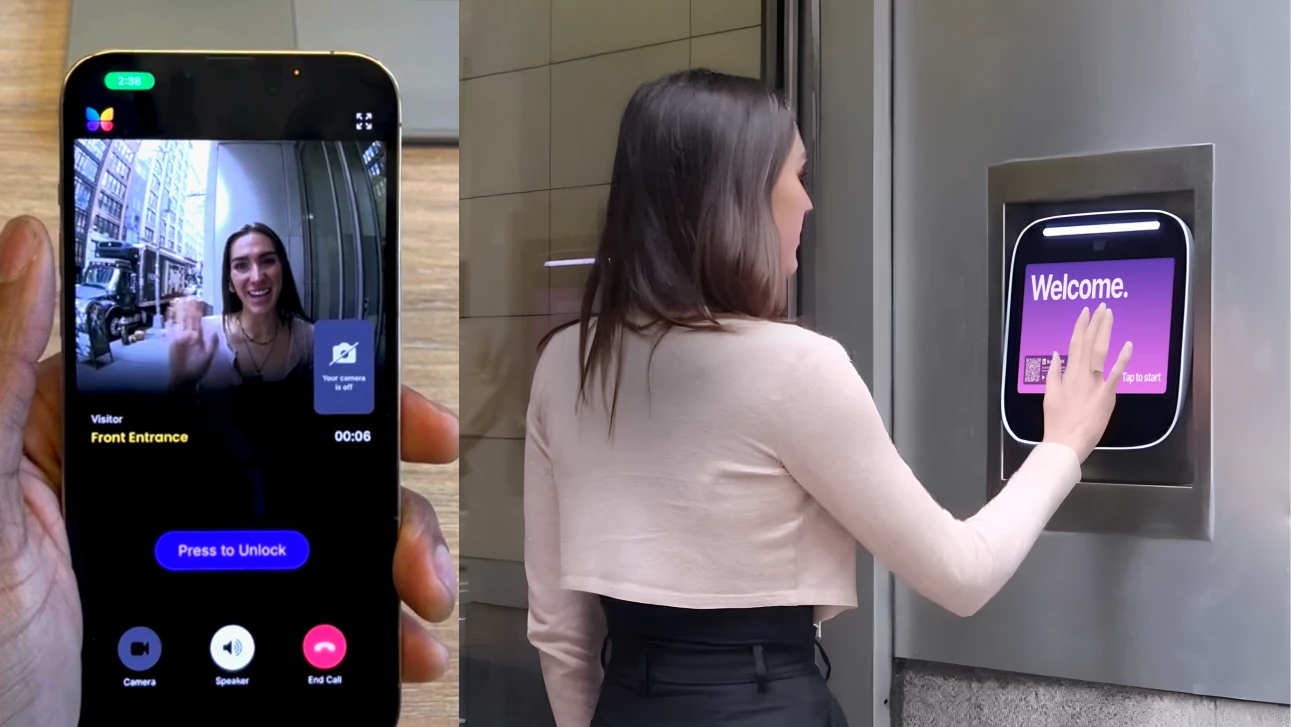
Watch how ButterflyMX works:
What is a residential telephone entry system?
A residential telephone entry system connects a visitor at an entrance with a resident, staff member, or other approved recipient. After speaking with the visitor, the recipient can approve access, and the system sends a release signal to a connected door, gate, or barrier.
People often use terms like call box, apartment intercom, gate entry system, and telephone entry system to describe overlapping products. Still, the distinctions matter. A telephone entry system usually routes a call to a phone or another compatible endpoint. A traditional hardwired apartment intercom often calls a dedicated in-unit station. A video intercom adds a camera so the recipient can see the visitor before deciding whether to unlock the entrance.
The most important decision is not the label on the product. It is how the system communicates and what the property needs from visitor verification. Calls may travel over POTS, cellular service, or an IP-based network, and some systems add video on top of that communication path.
How a telephone entry system works
Most telephone entry systems follow the same basic call-and-release sequence, even though the panel, receiver, and unlock commands vary by model.
- The visitor finds a resident in the directory, enters a unit or directory code, or presses a call button on the entry panel.
- The panel routes the call through its configured communications path, such as a traditional phone line, cellular service, or an IP-based network.
- The resident or staff member answers on a compatible phone, app, or in-unit endpoint and decides whether the visitor should be admitted. Audio-only systems allow a conversation, but they do not show who is at the entrance.
- If access is approved, the recipient sends the unlock command supported by that system.
- The panel or connected controller activates a relay tied to an electric strike, magnetic lock, gate operator, or other compatible release device.
That short sequence depends on several parts working together: the entry panel, resident directory, communications path, receiving endpoint, power supply or Power over Ethernet, backup-power equipment where included, and the door or gate release hardware. If one part is poorly matched to the site, the whole experience can suffer.
The release signal is also only one piece of the access system. It does not prove that the opening meets code, that egress is handled correctly, or that another person will not follow an approved visitor through the entrance.
Types of telephone entry systems
The call path is the most important technical difference among telephone entry systems. It determines what infrastructure the property needs, which service bills may apply, what happens during an outage, and how much room the system has to support features such as remote administration or video.
Do you need a landline? No. Cellular and IP or VoIP systems do not require a traditional POTS line. They simply replace that dependency with other requirements, such as carrier service, network readiness, power, support, and a service plan. DoorKing documentation on telephone entry systems and other manufacturer materials show why the exact panel model and site design must be checked before choosing a call path.
POTS or landline systems
POTS stands for plain old telephone service, the traditional copper-based telephone network. A POTS telephone entry panel uses a compatible phone line to place calls from the entry panel to a resident or staff member.
A landline system can still make sense when the property has dependable service, available parts, reasonable line costs, and modest feature needs. But it should be reviewed with a longer timeline in mind. Copper retirement and changing carrier plans mean that a system that is simple to maintain now may become harder to support later.
Cellular systems
Cellular telephone entry systems use a carrier network instead of a traditional landline. They are often considered for remote gates, detached entrances, or sites where running new communications cable would be difficult.
The tradeoff is that cellular reliability is local. A general coverage map is not enough. The property should test the proposed carrier at the exact panel location, with the planned enclosure and antenna arrangement in mind. A signal that looks acceptable near the clubhouse may not be strong enough at the gate.
IP and VoIP systems
IP entry systems communicate over a data network. VoIP, or voice over internet protocol, and SIP, or session initiation protocol, are common terms tied to IP-based calling, but systems do not all use the same protocols or support the same endpoints.
Power over Ethernet, or PoE, can carry data and electrical power through one Ethernet cable when the equipment supports it. Depending on the product and site, network planning may also involve bandwidth, VLAN segmentation, quality of service, cybersecurity responsibility, and clear ownership for future support.
Video-enabled systems
Video is best understood as a verification feature, not a universal fourth call path. A video intercom adds a camera so the recipient can see the visitor before deciding whether to release the entrance. Many modern video systems rely on cellular or IP connectivity, but the exact design depends on the product and property.
Video can add useful context, especially when audio alone is not enough. It does not eliminate impersonation, tailgating, or the need for sound access-control practices.
Do not treat the table as a list of winners and losers. Use it to rule out options that do not fit the site. Then compare verification needs, directory workload, outage exposure, integration requirements, vendor support, and total cost.
How much does a telephone entry system cost?
There is no reliable universal price for a telephone entry system. The real cost depends on the panel, the site, labor conditions, communications design, release hardware, integrations, and service agreement. A better question is whether the proposal separates the full project cost from the ongoing operating cost.
- Hardware can include the entry panel, controller, directory capacity, mounting equipment, camera, credentials, and model-specific certifications or features.
- Installation can include wiring, trenching, network work, electrical work, mounting, release-hardware changes, gate or door compatibility work, and integration with other systems.
- Recurring service can include telephone, cellular, or internet service, plus cloud or software service, support, and routine maintenance.
- Lifecycle costs can include backup power, repairs, replacement parts, directory administration, and a future migration away from obsolete infrastructure.
Reseller pricing can help compare a specific model at a specific time, but it should not be treated as a permanent market range. Labor, region, equipment availability, and existing site conditions can change the total quickly.
Ask each vendor or integrator to spell out what is included: the communications plan, backup-power plan, commissioning, directory setup, warranty, support responsibilities, and assumptions about existing door or gate hardware. That level of detail makes proposals easier to compare and reduces the risk of choosing the cheapest bid without understanding what it leaves out.
How the POTS transition affects legacy entry systems
Copper retirement is not one national shutoff date. It is a carrier-by-carrier and location-specific transition, so properties should confirm their own service availability, notices, and carrier plans rather than assume that every POTS line will end on the same schedule.
The Federal Communications Commission requires advance notice to affected customers when carriers retire copper facilities. The FCC also explains the network-modernization and notice framework, and its March 2026 action streamlined parts of the copper-retirement process. These rules and procedures can change, so they should be rechecked before a project is finalized.
Carrier plans also vary. In 2024, AT&T publicly stated a target to retire most of its copper network across most of its incumbent footprint by the end of 2029, as reported by USA Today. That reported target is not a deadline for every carrier, property, or customer location.
Repair or replace a legacy call box
A working POTS call box does not automatically need immediate replacement. Repair may be reasonable when local service remains available, parts can still be sourced, the system has been reliable, and the property is comfortable with audio-only verification and manual administration.
Replacement planning becomes more urgent when a carrier notice affects service, line costs are rising, failures are recurring, parts are scarce, or the property needs capabilities the current system cannot provide. Those capabilities may include video verification, smartphone visitor calls, remote directory administration, or a broader access-management setup.
The practical choice is not repair versus replace in the abstract. It is the cost and risk of one more repair compared with the time needed for a planned migration. A scheduled transition gives the property time to confirm connectivity, release hardware, resident communications, access-control compatibility, and outage behavior before a failure forces a rushed decision.
Installation readiness, outages, and release hardware
Good system selection starts at the entrance, not in a product catalog. Before choosing equipment, document the panel location, power source, communications path, door or gate hardware, and every system that may need to connect to the project.
- For cellular systems, test the selected carrier at the precise installation point. Confirm signal quality, antenna placement, enclosure effects, service ownership, and the proposed backup approach.
- For IP or VoIP systems, confirm the available Ethernet or approved wireless path, PoE compatibility where applicable, network capacity, VLAN and QoS requirements, cybersecurity ownership, and who will support the network after installation.
- For every system type, map each outage separately: utility power, backup power depletion, internet outage, carrier outage, local-controller failure, and release-hardware failure. The property should know which calling and unlocking functions remain available in each case.
- Before committing to a design, confirm compatibility with electric strikes, maglocks, gate operators, access-control panels, elevator-related workflows, and other controlled openings.
This review matters because the same product can behave differently from one property to another. A cellular panel depends on signal at the exact mounting point. An IP system depends on the quality and support of the network. A release device depends on power, wiring, controller compatibility, and the rules that apply to that opening.
Fail-safe and fail-secure release hardware
Fail-safe hardware unlocks when power is lost. Fail-secure hardware remains locked from the secured side when power is lost, although a properly designed opening may still provide required egress by another means. These labels describe power-loss behavior. They do not, by themselves, determine whether an opening meets egress or life-safety requirements.
The permitted configuration depends on the specific opening, its use, and local requirements. Review the final design with a qualified installer and the authority having jurisdiction. NFPA guidance on permissible egress door locking arrangements and Allegion guidance on fail-safe and fail-secure hardware provide general educational context, not site-specific code approval.
How to choose a system by property type
The best choice starts with the same questions for every property: Where are the entrances? What wiring, power, cellular signal, and network capacity already exist? How many residents need to appear in the directory? How often will the directory change? Is audio verification enough? Which doors, gates, elevators, or access-control systems must be considered? What outage tolerance, warranty, support response, and total cost are acceptable?
Once those basics are clear, property type can sharpen the decision.
Multifamily and student housing
High-turnover properties should look closely at directory administration. Move-ins, move-outs, roommate changes, visitor calls, and multiple entrances can create more work than the entry panel itself suggests. A system that is easy to install at one lobby may become frustrating if staff must update several panels by hand.
For these properties, the question is not only whether visitors can call residents. It is whether staff can keep resident information current, whether residents can answer calls in a way that fits daily use, and whether the system can support the number of entrances the property actually operates.
HOAs and gated communities
At a remote gate, the communications path often drives the decision. The property should assess distance from available power and data, cellular conditions at the gate, gate-operator compatibility, and who will manage resident records. A cellular system can avoid a long communications cable, but only if signal testing confirms that the carrier works at the installed panel location.
Senior living and usability-sensitive settings
In senior living and similar settings, test the resident and visitor experience before assuming that the system with the most features is the best fit. Directory readability, call flow, response options, and the steps required to grant access can matter as much as connectivity type.
Manufacturers such as DoorKing, Kantech, Mircom, Linear or Nice, and Security Brands represent different parts of the entry-system market. Rather than ranking brands broadly, compare verified specifications, supported connectivity, release-hardware compatibility, service requirements, warranty terms, and local integrator support for the exact models under consideration.
Telephone entry system versus video intercom
A conventional audio telephone entry system can still be the right fit when the property has manageable directory needs, reliable infrastructure, acceptable audio verification, and a supportable operating model. Not every entrance needs video, smartphone calling, or cloud administration.
A video intercom becomes more relevant when the property wants visual verification, smartphone visitor calls, remote directory administration, or a broader access-management experience. The advantage is not that video makes access risk disappear. It is that the person approving entry has more context than a voice call alone can provide.
ButterflyMX is one non-POTS video-intercom option for properties that value smartphone visitor calls, visual verification, cloud administration, and broader access management. Residents can receive visitor calls and grant access from smartphones, while property teams can manage residents, visitors, credentials, and access remotely. That can be a strong fit for properties moving beyond legacy call-box limitations, but it is not the right answer for every site and does not remove the need to plan for connectivity, hardware, support, and recurring costs.
Whether the property keeps a conventional telephone entry system, repairs a legacy call box, or evaluates video entry, the decision should come back to the same practical tests: infrastructure, operations, security goals, outage planning, code review, compatibility, support, and lifecycle cost.
Evaluating whether to repair a call box or move to video entry? Talk with ButterflyMX about your property needs.
Frequently asked questions
Do I need a landline for a telephone entry system?
No. Cellular and IP or VoIP systems can avoid a traditional POTS line, but they have their own signal, network, power, and service requirements. Confirm which communications options the exact panel supports and which options are available at the property.
What happens if the power, internet, or cellular service goes down?
System behavior depends on the communications path, local controller, release hardware, and backup-power design. Document which calling and unlocking functions remain available in each outage scenario, and do not assume continued operation without a verified design and tested backup plan.
Can a telephone entry system work with existing access control or gate hardware?
Sometimes. Integration may be possible through relay outputs, controllers, or supported interfaces, but the panel, release hardware, credentials, gate operator, elevator-related workflow, and management platform should be evaluated together. Compatibility is model- and site-specific.
Should a legacy call box be repaired or replaced?
It depends on service availability, line cost, parts availability, recent reliability, desired features, and migration timing. Repair may be reasonable for a dependable system that still meets the property’s needs, but recurring failures, carrier notices, scarce parts, or a need for video and remote administration can make replacement planning the safer path.
A residential telephone entry system should fit the property as well as the entrance. Start with the call path, then verify power, connectivity, release hardware, outage behavior, administration needs, and total cost before deciding whether to keep, repair, or replace the system.
For properties that prioritize smartphone visitor calls, visual verification, cloud administration, and broader access management, ButterflyMX is one modern video-intercom option to evaluate. Ready to assess a modern video intercom for your property? Get a free ButterflyMX quote.

Get your free quote!
Fill in the form below, and we'll email you right back.
Want a free quote?
Fill in the form below, and we'll email you right back.
You’ll be redirected shortly...