





Key takeaways:
- A valid credential opens a garage gate, giving another vehicle a chance to follow before it closes.
- Gate timing, physical barriers, vehicle analytics, and live monitoring can all help. Choose controls based on the entrance layout, traffic, and staffing.
- Plan for safe gate operation, visitor access, credential management, and how staff will respond to suspected tailgating.

When a driver enters a commercial parking garage, another vehicle can sometimes slip in behind them before the gate closes. This is called vehicle tailgating. A valid credential authorizes the first driver, but the way the gate operates determines how much time a second vehicle has to follow.
Depending on the building layout, someone who enters the garage may also be able to reach storage areas, stairwells, or elevators without separate access controls. This guide explains how to assess tailgating, compare controls, and manage visitor vehicle access while keeping traffic moving safely.
In this guide:
- Why commercial garage tailgating happens
- Review gate timing and everyday operating practices
- Compare ways to prevent, detect, and respond to tailgating
- Manage credentials and visitor access
- Choosing anti-tailgating vehicle access for commercial garages
- Budget for the complete entrance
- Protect safety, emergency access, and plate data
- Put your plan into practice
Watch how ButterflyMX works:
Why commercial garage tailgating happens
At a typical garage entrance, the access controller checks a credential and signals the gate to open. The gate closes after the authorized vehicle passes. If the system checks credentials without counting vehicles, its records may show one approved entry even when a second vehicle follows through.
A gate can give drivers time to follow when it opens too early, closes slowly, or receives a signal to stay open. The opportunity can last beyond the programmed hold-open delay. Watch a full cycle at your entrance to see how the equipment and driver habits contribute.
Understand tailgating, piggybacking, and exit leakage
Tailgating generally means following another vehicle without the authorized driver’s permission or cooperation. With piggybacking, the authorized driver knowingly lets someone else in. People sometimes use the terms interchangeably, but the distinction helps you choose a response. Gate timing and layout can make following harder, while tenant rules can address intentional gate holding.
A driver can also follow another vehicle out to avoid paying for parking, a practice sometimes called exit leakage. Staff can match exit events with payment or authorization records to spot potential unpaid exits and investigate them under the property’s enforcement process. Plate and video records can support an investigation, subject to privacy and enforcement rules. Physical exit controls determine whether a vehicle can leave.
Check pedestrian routes as well. Someone on foot can walk behind a car or around a barrier arm, so pedestrian routes into the garage or building need separate attention.
Know the difference between the access controller and gate operator
The access controller checks whether a registered license plate, tag, or other credential is authorized. The gate operator opens and closes the gate or door, with detection and safety devices helping control its movement. A reader upgrade can improve how drivers request access. The closing sequence and vehicle counting depend on the rest of the system.
Review the operator and its controls alongside the vehicle access control system and credentials. This can help you trace the problem to permissions, gate movement, or timing. A qualified installer can check whether the existing operator will work with updated equipment.
Review gate timing and everyday operating practices
Watch the entrance during peak arrivals and quieter periods. Do drivers open the gate before they reach it? How long does it stay open after a car passes? Do visitors stop because they’re unsure how to get in? Use what you observe to decide whether to review the reader, gate settings, or arrival instructions before investing in larger changes.
Check how long the gate stays open and how it closes
Hold-open time is the delay before the gate starts to close. Closing travel is the time the gate takes to move from open to closed. Shortening the delay starts the movement sooner. Depending on the entrance, a second vehicle may still get through while the gate is moving.
Silva Consultants gives 8–10 seconds after passage as an example of a hold-open period. The appropriate setting depends on the site. Have a qualified installer review vehicle clearance, traffic patterns, the operator, and safety devices before adjusting the sequence.
The exact sequence depends on the equipment and its programming. A typical gate cycle follows these steps.
- The controller approves a credential and signals the gate to open.
- The gate opens so the authorized vehicle can pass.
- Detection equipment confirms that the vehicle has cleared the relevant area.
- If the system uses a hold-open delay, it runs before the gate starts closing.
- The operator closes the gate while the safety devices remain active.
Vehicle detection loops sense when cars occupy particular parts of a lane. With the right placement and programming, a close-on-clear setup can start closing the gate once a vehicle passes. Keep all loops, beams, edges, and other protective devices active so the gate responds safely throughout its movement.
Improve visibility and encourage safer driver habits
Good lighting and clear sightlines help drivers and monitoring staff see who’s approaching. Check whether dumpsters, landscaping, or other objects block the view. Drivers using radio remotes should be able to see the entrance before opening it. If they routinely open it from too far away, ask an installer whether adjusting the range would help.
During tenant onboarding, ask drivers to let each vehicle enter on its own authorization. Post signs showing visitors how to request entry and telling drivers where to report suspected tailgating.
If you ask drivers to wait for the gate to close behind them, first confirm there’s room to stop clear of the gate’s movement and detection zones without blocking traffic. Ask drivers to report suspected tailgating and leave any intervention to designated staff.
Before setting penalties for intentionally holding the gate open, review the commercial leases, property rules, owner’s authority, available evidence, and applicable law. A fine permitted in a condominium may be subject to different rules at a commercial garage. Share the rules and reporting process before enforcement begins.
Compare ways to prevent, detect, and respond to tailgating
Compare controls by what they do at the entrance. Some give a second vehicle less time to follow. Others control how vehicles pass, flag suspected unauthorized entries, or give staff a chance to respond.
Swipe to compare →
If the gate stays open longer than necessary, start with a timing review. Managed credentials help keep permissions current, and analytics and monitoring help staff identify and respond to suspicious entries. If the property needs more physical separation, check whether the entrance can accommodate extra barriers without pushing traffic into an unsafe area.
Faster doors, interlocked barriers, and sally ports
A faster door gives a second vehicle less time to follow. Confirming one vehicle per authorization requires a way to count vehicles and match them to approvals. Barrier arms can also move quickly, although pedestrians may be able to walk through the space around them.
In an interlocked system, one barrier’s position determines when another can move. Silva Consultants describes an arrangement with barrier gates on either side of an overhead entrance. A two-gate sally port uses a controlled area between its gates. Both designs need site-specific engineering to control how vehicles pass through.
Before adding barriers, check how much room drivers have to wait, turn, and clear the entrance, as well as the available headroom and emergency access routes. Longer vehicles may not fit between two gates, and lines during peak hours could back up into other lanes or the street. Any design must allow people and vehicles to move safely during normal operation and emergencies.
Use vehicle analytics to flag possible tailgating
intuVision VA Security compares vehicle passages with access events and can trigger an alarm when two vehicles enter on a single authorization. The company’s example uses Axis I/O and exacqVision. Confirm compatibility with your cameras, video management software, and access-event connections.
Before choosing analytics, decide what the cameras need to capture, where alerts should go, and who will respond. Some integrations can activate a buzzer or signal a secondary gate. Any gate movement still requires proper safety engineering. Test detection at your entrance to see which events it reliably flags.
Add live monitoring when staff need to respond
Overwatch Technologies offers proactive video monitoring. Operators can watch camera feeds and speak through a speaker to issue what’s known as a voice-down warning. Check that the camera layout gives operators a clear view of approaching vehicles as well as the plate images the site needs.
Decide who receives alerts, what operators can do, and when they should contact the property team or emergency services. Response speed and effectiveness vary by service and situation. Live monitoring allows staff to intervene, while physically stopping a vehicle requires separate controls.
Manage credentials and visitor access
Decide how to enroll users, remove permissions, and verify access when someone’s usual entry method fails. At a multi-tenant garage, specify who approves access, which entrances each administrator manages, and who removes credentials when employees or contractors leave. Access records identify the credential used. Verifying who was inside the vehicle requires other information.
Choose between LPR, RFID, mobile access, and intercoms
License plate recognition (LPR) lets drivers use their registered license plate as a credential, so the property does not need to issue a separate tag. How well it works depends on plate condition, camera placement, lighting, and weather. Radio-frequency identification (RFID) uses a physical tag, which staff must issue, position correctly, and deactivate when access ends.
When comparing license plate readers versus RFID gate readers, consider both the conditions at the entrance and the work involved in managing credentials. LPR eliminates the need to issue tags, while RFID requires a process for tracking them. Neither method, on its own, verifies the driver’s identity.
Mobile access lets authorized users request entry from a device, while an intercom gives visitors a way to contact someone who can approve their arrival. Choose methods that work for the people using your garage, and make sure there is a backup verification process. These systems manage entry requests, but a second vehicle may still follow through an open gate.
Plan how tenants, visitors, and vendors will enter
Plan how employees, guests, service providers, and contractors will enter and what they should do if their usual method fails. Set expiration dates for temporary credentials. The examples below show how vehicle access control features for visitors can fit into the plan, depending on the system you use.
Swipe to compare →
Set expiration dates so temporary credentials end when access is no longer needed. For example, a cleaning company might have permission on Tuesday evenings, and a repair contractor might have access for one approved visit. Assign someone to manage both kinds of schedules and remove permissions when they expire.
Document how staff should respond when a plate can’t be read, a tag is lost, an intercom call goes unanswered, or the system is unavailable. Keep the gate’s protections active and follow an approved backup verification method or emergency procedure.
ButterflyMX for vehicle credentials and visitor administration
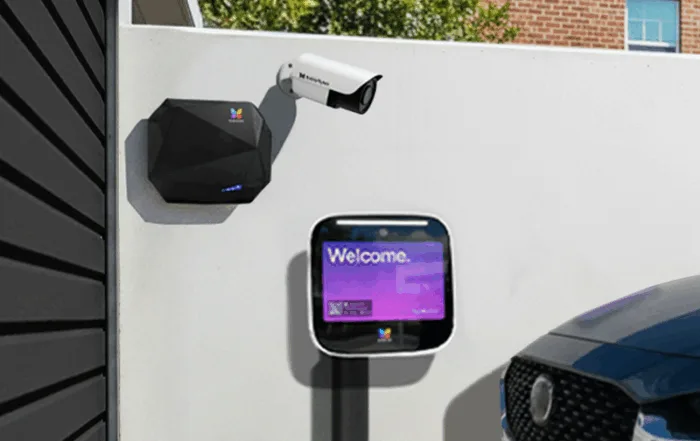
ButterflyMX Vehicle Access Control offers license plate recognition and a Vehicle Reader that works with passive UHF Windshield Tags. Both connect to the ButterflyMX Access Controller. A separate gate operator opens and closes the gate. Property managers can enroll users, update permissions, and review timestamped access records from a central system.
Visitors without a registered plate or tag can request entry through the Video Intercom or use a Visitor Pass for a planned visit. Managers can revoke individual tags when an employee or contractor leaves. Compatible property management integrations may simplify this work. Confirm which permission changes each integration supports.
ButterflyMX helps manage who can request entry and how visitors get in. Physical gate controls address whether a second vehicle can follow through. For a residential example of how driver procedures and intercoms work alongside gate controls, see the guide to reducing tailgating at gated community entrances.
ParqEx for parking access and enforcement workflows
ParqEx Access+ and Access+ Premium (LPR), with Enforcer and GuestParq, provide tools for managing garage entry and parking. Access+ supports entry through an app, while Access+ Premium (LPR) allows plate-based authorization. Enforcer tracks parking violations, and GuestParq helps manage guest parking.
These tools may suit properties that manage garage entry, parking enforcement, and guest spaces together. Assign staff or an enforcement partner to follow up on violations. Use physical entrance controls if you need to limit vehicles from following through an open gate.
Choosing anti-tailgating vehicle access for commercial garages
The right combination of controls depends on your garage’s traffic patterns, layout, and staffing. Use the examples below as a starting point, then consider what will work at your specific entrance.
Swipe to compare →
At a lightly used office garage, adjusting an unnecessarily long closing delay may be a useful first step. A busy public garage may benefit more from clearer visitor instructions and a way to review unpaid exits. In either setting, adding barriers only makes sense if there is room for waiting vehicles and the design accommodates emergency access.
Start with the basics and add controls as needed
Start by reviewing gate timing, sightlines, driver instructions, access permissions, and visitor backups. If tailgating continues, have the property’s security lead review when and how it happens. Use those findings to decide whether detection or monitoring would help and whether the risk warrants adding barriers that could affect traffic.
At mixed-use properties, set separate permissions for parking and for restricted areas such as residential elevators and tenant storage.
Budget for the complete entrance
Separate equipment and installation costs from recurring expenses such as software, monitoring, maintenance, and staffing. A faster door changes how quickly the entrance closes. Analytics and monitoring come with their own costs for flagging incidents and responding to them.
Swipe to compare →
Silva’s undated figures give a rough sense of what the described upgrades may cost. Get current installed prices for your site, since the barrier estimate covers a specific arrangement. To compare total project costs, ask each contractor whether the quote includes electrical work, construction, integration, and commissioning.
Separate setup fees from the full project cost
The table shows one-time setup fees in U.S. dollars from ParqEx’s January 2024 pricing page, viewed November 20, 2026. Each fee applied to one Access+ device controlling three access points. Every plan included a one-month pilot.
Swipe to compare →
The higher-priced plans included more onboarding time, and Enterprise and Concierge carried longer contract terms. Budget separately for gate hardware, LPR cameras, installation, and recurring charges. Use the figures as a historical reference and request a current quote for the full cost of each lane.
Decide what equipment to keep, replace, or check
Make a list of the equipment and work involved at each entrance. Mark what you plan to keep or replace and what needs a compatibility check. This gives contractors the same scope to price.
- Gate or door, operator, controller, and readers.
- Vehicle detection, safety devices, cameras, and communications.
- Electrical, network, and civil work.
- Integrations, commissioning, training, and ongoing support.
Ask contractors to specify exclusions and price the same number of entrances and the same service term. Coordinate the garage work with your commercial building access control planning so it’s clear who manages tenant permissions and secure entry into the building.
Protect safety, emergency access, and plate data
The entrance must detect obstructions, operate safely, and allow emergency access even when someone appears to be following another vehicle through the gate. If you collect plate or video records, assign someone to manage them.
Have a qualified installer assess the entire entrance
UL 325 covers gate operators, while ASTM F2200 addresses the construction of automated vehicular gates. Which requirements apply depends on your equipment, type of gate or door, local jurisdiction, and adopted editions. Ask your installer to identify the relevant standards and the protections needed to prevent entrapment.
Ask the installer to verify that vehicle detection loops work alongside all required safety devices and that the design accommodates emergency access and larger vehicles, especially if you add interlocked barriers. Review compliance across the complete entrance, including the credential equipment.
Set rules for plate records and video access
Establish why you collect license plate and video records, who can access them, how long you will keep them, and what notices visitors or drivers may need. Limit access to authorized staff and review the privacy and enforcement requirements in your jurisdiction.
Set your retention period based on the requirements that apply to your property. Rules for using license plate recognition vary by jurisdiction, and the system’s storage capacity is a separate consideration.
Put your plan into practice
Assign responsibility for the controls and decide who will approve access. Use the steps below to carry your assessment through installation and daily operation.
- Watch arrivals during busy and quiet periods, including visitor delays and confirmed tailgating.
- Record the existing equipment and how the entrance opens and closes.
- Choose controls that address the problems you observed and work together.
- Decide who manages tenant access, removes permissions, and responds to alerts.
- Have qualified personnel commission and test the entrance before using the new sequence.
- Share arrival instructions, backup procedures, and reporting steps with users.
- Review tailgating incidents, traffic backups, failed credentials, and alert responses during regular operation.
Test everyday arrivals and unexpected situations
Have qualified personnel test authorized entry, visitor access, vehicle detection, alarm delivery, and safety features during commissioning. Use controlled conditions that keep staff, drivers, and vehicles safe.
Document the response to unreadable plates, unanswered visitor calls, outages, and emergency entry requests. Make sure landlord and tenant administrators know who handles permission changes and who receives each alert. Review recurring incidents together and assign someone to follow up.
Start by watching what happens after an authorized driver opens the gate. Use what you see to choose controls that fit your garage layout, traffic, visitor needs, and staffing. Credentials manage who can request entry. Gate equipment, detection, and monitoring help you manage the passage itself.
Have a qualified installer assess the entrance, then document how staff should change permissions, admit visitors, and respond to alerts. If you’re considering ButterflyMX, review how its vehicle credentials and visitor tools would fit with your gate controls and operating procedures.

Get your free quote!
Fill in the form below, and we'll email you right back.
Want a free quote?
Fill in the form below, and we'll email you right back.
Redirecting you in 5 seconds.