





Key takeaways:
- An apartment buzzer system connects an entrance panel, resident endpoint, communication path, controller or relay, power supply, and door-release hardware.
- The right system depends on the building’s wiring, entrances, lock compatibility, verification needs, network resilience, accessibility requirements, and total cost of ownership.
- Diagnose the failed component before choosing repair, retrofit, or replacement, and confirm any proposed reuse of wiring or door hardware through an on-site assessment.
When an apartment buzzer stops working, the visible symptom rarely tells the whole story. A dead handset could be an isolated station problem. A door that won’t release could point to the relay, power supply, wiring, lock, or even door alignment. And an older telephone-entry system may fail because the network it depends on has changed.
At its core, an apartment buzzer system is an entrance intercom with remote door release. A visitor calls a resident from an entry panel; the resident answers through an in-unit station, telephone, or app and can send a command to release the entrance lock for a limited time.
Understanding that call-and-release path makes the next decision much clearer. Instead of treating every fault as a reason to replace the entire system, owners, boards, and managers can identify what failed, determine what infrastructure is still usable, and compare repair, retrofit, and replacement on realistic terms.
This guide will answer:
- What is an apartment buzzer system?
- How an apartment buzzer system works
- Main types of apartment buzzer systems
- How residents and visitors use apartment buzzers
- Phone connection options for owners and renters
- Common apartment buzzer problems and likely causes
- When to repair, retrofit, or replace
- How much an apartment buzzer system costs
- Network changes and outage behavior
- Door locks, power loss, and safe egress
- Legal and accessibility requirements
- How to choose an apartment buzzer system
More than 100K, 5-star ratings!
Video Intercoms
Open doors, gates & garages from anywhere.

QR Code Intercom
Smartphone-based visitor access.
Access Control
Fob, key cards, PINs, and mobile apps.
Security Cameras
Visibility throughout your property.
Vehicle Access
Hands-free access for gates & garages.
Package Room
Receive, store, and manage deliveries.
Smart Locks
Connect to all major brands and models.
Elevator Controls
Unlock key-fobbed elevators for anyone.
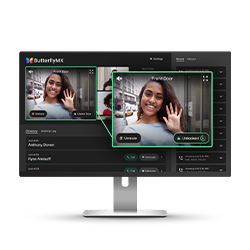
Front Desk Station
See all your doors and cameras in one place.
What is an apartment buzzer system?
An apartment buzzer system, also called an apartment intercom system, lets a visitor contact a resident from a building entrance. It connects an entry panel and directory to a resident endpoint, such as a wall handset, telephone, or smartphone app. Power, controls, and locking hardware complete the path so the resident can trigger a door release.
The name can be misleading. Some older systems produce a literal buzzing sound, while others place a telephone call or send an audio or video call to an app. What defines the category is visitor communication paired with controlled entry, not a particular sound or screen.
An intercom is also different from resident access control. The intercom handles a visitor call and remote release. Access control manages the credentials that residents and staff use to enter, such as keys, fobs, cards, PINs, or mobile credentials. The two systems can work at the same entrance, but they solve different problems.
How an apartment buzzer system works
Equipment and button names vary, but most apartment buzzer systems follow the same five-step sequence:
- The visitor selects a resident from the entrance directory or enters the assigned unit or call number.
- The system sends the call through dedicated wiring, a telephone or cellular connection, or an IP network to the resident endpoint.
- The resident speaks with the visitor or, on a video intercom, views the caller.
- If the resident approves entry, the endpoint sends the configured release command to a controller or relay.
- The relay changes the door-release circuit for a set interval. The visitor opens the door, which then returns to its normal secured state.
The relay is the electrical control point; it doesn’t physically swing the door open. Depending on the entrance, it may control an electric strike, electromagnetic lock, or another compatible locking arrangement. The communication path and release circuit are connected, but they aren’t the same circuit. That distinction explains why a resident may be able to speak with a visitor even when the door won’t release, or why the lock may work with a resident credential even when intercom calls fail.
A complete system can include the entry panel and directory, resident endpoints, communication wiring or network service, a power supply, a controller or relay, and electric locking hardware. Guides to apartment intercom systems illustrate how these parts form a call path and a separate release path.
Main types of apartment buzzer systems
System labels overlap, and one installation may combine more than one category. The most useful comparison is functional: how residents answer, how the call travels, what wiring remains necessary, which network services the system needs, and what ongoing costs it creates.
A wired system isn’t automatically outdated, and a wireless system isn’t free of wiring. Wireless communication may avoid some runs to apartments, but the entrance panel, power supply, controller, and lock still need dependable connections. Likewise, an app-based video intercom and a telephone entry system can both reach a mobile phone, yet one sends an internet-based app call while the other routes an ordinary carrier call.
Existing wiring can change the project substantially. Older analog systems often use dedicated conductors between the entrance and each unit. Compatible replacement equipment may sometimes reuse those runs, as this intercom equipment guidance explains. Reuse still depends on conductor condition, topology, available wires, voltage, controls, and lock compatibility. It can’t be assumed building-wide without an inspection.
Building size alone doesn’t determine the best category. A small property with damaged wiring and a need for remote visitor calls may have more reason to replace its system than a large building with sound risers and straightforward audio needs. Entrances, verification needs, accessibility, outage tolerance, privacy, administration, and recurring fees all matter.
How residents and visitors use apartment buzzers
The basic process is simple, but clear instructions matter because directories, release commands, and resident endpoints differ from one system to another.
For visitors
- Find the resident in the directory or enter the assigned unit or call number.
- Start the call and identify yourself when the resident answers.
- Wait for the release signal before trying the door.
For residents
- Answer through the in-unit station, telephone, or app.
- Verify the caller before granting entry.
- Use the release button or programmed command provided for that system.
Some telephone-entry systems use a number-key command to release the door, but there is no universal command. Properties should give residents instructions for the installed equipment rather than relying on a commonly used key.
Visitor calls and resident credentials may operate side by side. A delivery person might use the directory to call a resident, while that resident enters later with a fob or mobile credential. Repeated or indiscriminate calls, sometimes called buzzer bombing, exploit the visitor-call process by pressuring someone to grant entry without verification. Audio or video can give the resident more context, but it doesn’t guarantee that only an authorized person enters.
Watch how ButterflyMX works:
Phone connection options for owners and renters
Yes, an apartment buzzer can connect to a cell phone, but the method depends on the system. Telephone entry can route a visitor call to a mobile number. A cellular call box can use supported carrier service. An app-based intercom can send a visitor call to a smartphone app. Some legacy systems may also accept a compatible add-on if the building approves it and the existing equipment supports it.
These paths aren’t interchangeable. Forwarding an ordinary telephone call doesn’t automatically provide video, mobile credentials, app-based visitor access, or remote directory administration. Owners and boards should begin by inventorying the shared panel, riser wiring, controller, power supplies, lock hardware, and current resident process. That reveals whether phone access calls for a small integration, a retrofit, or a broader replacement.
Renters have a narrower path. They should confirm compatibility and obtain permission before attaching a device to an in-unit station or altering shared entry equipment. An add-on that works with one legacy buzzer may not work with another, and a device inside an apartment can still affect common building infrastructure.
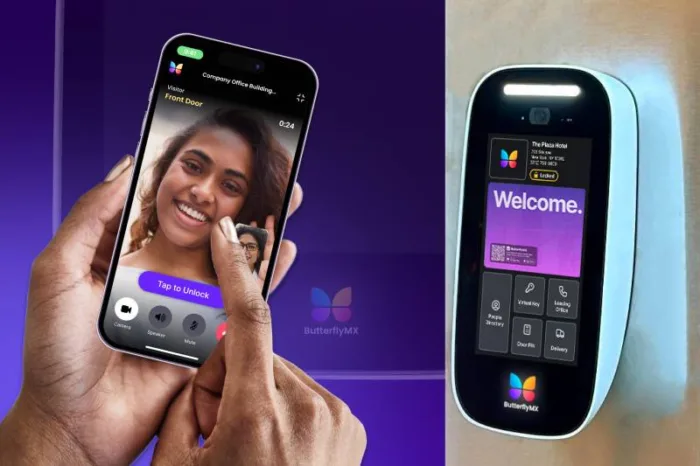
ButterflyMX’s guide to smart apartment buzzer options explores these distinctions in more detail. For property teams seeking a smartphone-centered video intercom, ButterflyMX is one option that can let residents receive visitor calls and grant access from their smartphones while authorized property staff manage access information remotely. Whether it fits depends on the entrance configuration, door hardware, connectivity, and administration requirements.
Renting? Share this guide with your property manager before changing shared entry equipment.
Common apartment buzzer problems and likely causes
Start by defining the scope of the failure: one apartment, one entrance, or the whole building. That single distinction can separate an endpoint problem from a shared power, panel, riser, controller, network, or door-hardware problem.
These are diagnostic leads, not remote diagnoses. One failed handset has a very different repair scope from a failed common power supply, damaged riser, obsolete entrance panel, or misaligned door. A local guide to intercom repair in New York City makes the same practical distinction between a limited repair and system replacement, though its troubleshooting and pricing shouldn’t be treated as universal.
Before calling for service, record every affected unit and entrance, whether the call connects, which direction audio fails, whether the release works, whether the fault is intermittent, and whether anything recently changed with power or connectivity. Renters should report shared-system failures instead of opening panels or working on release circuits. Shared wiring, electrical components, locks, and fire-rated doors require qualified professionals.
When to repair, retrofit, or replace
Repair makes sense when the existing system still meets the building’s needs and the fault is isolated to a serviceable station, power component, relay, panel part, or door component. It preserves familiar equipment and limits disruption, although repeated failures or unavailable parts can make continued repair less practical.
A retrofit updates selected parts while keeping usable infrastructure. An apartment buzzer can sometimes be upgraded without rewiring, but only when an inspection confirms that the conductors, topology, power, controls, panel openings, and lock hardware are compatible and in serviceable condition. If they aren’t, the project may require new cable runs, control equipment, power work, or door hardware.
Replacement becomes more reasonable when failures are widespread, parts or network technology are obsolete, or the property needs capabilities the old system wasn’t designed to provide. Those requirements might include video calls, smartphone visitor access, remote administration, or coordination with resident access control.
The decision is only part of the project. Owners and boards also need a cutover plan covering resident notice, temporary visitor-entry procedures, directory setup, phased work where appropriate, and testing at every affected unit and entrance. Renters can document failures and request action, but they shouldn’t modify shared infrastructure without approval. Smaller properties facing this decision can also review ButterflyMX’s guide to replacing a broken buzzer in a small apartment building.
Planning an intercom upgrade? Discuss your entrances, existing hardware, resident needs, and access goals with ButterflyMX.
How much an apartment buzzer system costs
There is no useful single price for an apartment buzzer system. Cost depends on what failed, how many entrances and units are involved, whether wiring is accessible, what door hardware is installed, which system category is being considered, and what the local labor and permit requirements are. Carrier plans, cellular service, cloud subscriptions, and administration can also add recurring costs.
The $150 to $250 figure comes from a NYC installer and should be treated only as a local benchmark for accessible, limited repair work. A separate 2026 NYC intercom upgrade guide uses different per-door and per-unit estimates for audio, video, and IP projects. Those figures represent different scopes, not a single market-wide range.
No independent national cost survey is established here, so avoid treating local vendor numbers as typical pricing. Ask each bidder to separate equipment, labor, concealed wiring, power work, lock or door work, permits, carrier or cellular service, cloud subscriptions, and ongoing administration. Also confirm the date, geography, unit basis, and included work behind every estimate. A building-specific assessment is more useful than a headline price.
Network changes and outage behavior
A mechanically sound entry system can still fail when the communications service behind it changes. POTS, or plain old telephone service, historically carried calls for many telephone-entry systems. As networks move away from legacy copper infrastructure, a property may need to migrate that connection and reassess how calls, power backup, and outages will be handled. The FCC provides background on these communications technology transitions.
Cellular equipment has a similar lifecycle. AT&T began shutting down its 3G network on February 22, 2022, disrupting specified entry devices that hadn’t been upgraded. That shutdown is a past event, but it remains a useful warning for properties with older cellular hardware. DoorKing documents its effect on certain 3G-based entry devices. For any cellular system, confirm the supported carrier technology, including LTE or VoLTE where applicable, instead of assuming that an active account makes old hardware compatible.
A migration checklist should cover device age, supported carrier technology, call-routing numbers, backup power, lock behavior during failure, resident communication, and testing at each entrance. Don’t assume that any product will continue operating through a particular power, internet, cellular, or carrier outage until the installed configuration has been reviewed and tested.
Door locks, power loss, and safe egress
The door-release circuit needs separate attention because an intercom command affects locking hardware and life-safety conditions. A fail-safe lock unlocks when power is removed. A fail-secure lock remains locked from the secured side when power is removed. Neither term means occupants should be trapped inside; code-required means of egress must remain available.
An electric strike works with a mechanical latch in the door assembly. An electromagnetic lock, often called a maglock, is generally fail-safe and requires an appropriate release arrangement. Guidance on fail-safe and fail-secure hardware also explains why positive latching matters for fire-rated door assemblies. Fire-rated openings may require additional review under the standards and local rules governing the assembly, including NFPA 80 where applicable.
Electrical locking and access-control functions must preserve code-required exit operation. The International Code Council’s discussion of electrical locking systems in a means of egress describes the permitted arrangements and release conditions at a high level. The correct hardware still depends on the opening, occupancy, fire rating, and locally adopted rules.
Before approving work, ask a qualified door-hardware professional or local authority about strike voltage, lock fail mode, positive latching, fire rating, release devices, backup power, and entrance behavior during a power or control failure. These questions help define the project without prescribing one lock type for every building.
Legal and accessibility requirements
Apartment buildings aren’t subject to one universal intercom rule. Requirements vary with jurisdiction, building classification, construction date, occupancy, and the accessibility rules that apply to the property.
New York provides a narrow example, not a national standard. New York Multiple Dwelling Law 50-a contains voice-communication requirements for specified Class A multiple dwellings with eight or more apartments, subject to building-date and other conditions. Separate New York City rules address matters that include approved devices, placement, return signaling, and keyless exit from inside covered entrances. That doesn’t mean every New York City apartment building has the same obligation.
Accessibility is also property-specific. The 2010 ADA Standards include voice and TTY provisions in Section 708.4 where a covered dwelling-unit-to-entrance communication system is provided. Section 708.4 shouldn’t be generalized to every private apartment buzzer or every multifamily property.
Owners, boards, managers, and renters should confirm current obligations with the relevant local authority or qualified counsel. Statutory language, local rules, effective dates, accessibility coverage, and building classifications should be checked for the specific property before publication, purchasing, or construction decisions are made.
How to choose an apartment buzzer system
Begin with the building’s actual problem, not a product category. Document current failures, visitor and delivery needs, the number of entrances and units, desired resident credentials, outage tolerance, and who will maintain the directory and permissions. That record gives bidders a common set of requirements and makes proposals easier to compare.
- Have an on-site assessment confirm the condition and compatibility of wiring, power, controls, panel openings, electric strikes, magnetic locks, and other door hardware.
- Decide whether residents need audio, visual verification, telephone routing, smartphone calls, or a combination.
- Map every dependency on utility power, internet, cellular service, or telephone service, then ask about backup, failover, local operation, and testing.
- Review accessibility, privacy, weather exposure, vandal resistance, safe egress, fire-door requirements, and the needs of each entrance.
- Ask how credentials, directory changes, visitor calls, delivery access, integrations, logs, data retention, and staff permissions will be managed.
- Compare equipment and installation costs with recurring fees, administration, support responsibility, and total cost of ownership.
- Plan resident notices, temporary entry procedures, directory setup, cutover, and testing before installation begins.
For properties that prioritize smartphone-based visitor access and remote access management, ButterflyMX is one modern video-intercom option to evaluate. Residents can receive visitor calls and grant access through their smartphones, while authorized property teams can manage resident, visitor, credential, and access information remotely. Fit still depends on the building’s entrances, door hardware, connectivity, administration needs, and proposed configuration.
Video and access logs can give residents and managers more context, but they don’t guarantee that unauthorized entry will stop. People can still admit the wrong visitor or allow someone to follow them through a door. The right apartment buzzer system is the one that fits the building’s infrastructure, daily operating needs, resilience requirements, and safety obligations after a property-specific review.
Frequently asked questions
Why does my apartment buzzer keep buzzing?
Constant buzzing can come from a stuck button, failed station, wiring fault, power issue, or controller problem. Record whether it affects one apartment or the whole building, whether the door-release function changes, and whether the problem is intermittent before requesting service. Don’t open a shared panel to investigate.
Who is responsible for fixing a broken apartment buzzer?
Shared-system repairs are generally handled through the owner, manager, or association. The enforceable responsibility depends on the lease, governing documents, building classification, and local law, so renters should report the failure promptly and keep a record of it rather than altering common equipment.
Can a renter add smart control to an existing buzzer?
Sometimes, but only if a compatible add-on exists and the property approves the change. Renters should confirm compatibility and obtain written permission before attaching anything to an in-unit station or shared entry equipment. Not every legacy buzzer supports an add-on.
How can a property reduce buzzer bombing?
A property can teach residents to verify callers, clarify delivery procedures, and consider communication tools that provide more context than an unidentified audio call. Video may help a resident evaluate a visitor, but it can’t eliminate social engineering, tailgating, or mistaken entry decisions.
The best apartment buzzer decision begins with diagnosis. Determine whether the failure sits in one resident station, common wiring, the power supply, controller, communications service, release circuit, or door hardware. Then decide whether the existing system still meets the building’s needs and what an inspection confirms can be reused.
If smartphone visitor calls, video verification, and remote access management are established requirements, ButterflyMX can be considered alongside the building’s infrastructure, connectivity, life-safety needs, and ongoing costs. See whether a ButterflyMX video intercom fits your property requirements.

Get your free quote!
Fill in the form below, and we'll email you right back.
Want a free quote?
Fill in the form below, and we'll email you right back.
You’ll be redirected shortly...