





Key takeaways:
- Choose guards, security systems, or a combination based on the work required at each entrance and staffed location.
- Assign responsibility for access permissions, alerts, outages, and incident response before choosing equipment or services.
- Compare quotes using the same equipment quantities, staffing hours, service responsibilities, and one-time and recurring costs.
Commercial security in New York City can include guards, remote monitoring, access control, cameras, intercoms, and alarms. As a property owner or manager, your first decision is which combination fits your building’s entrances, users, operating hours, and response needs.
A staffed lobby doesn’t automatically cover a loading entrance after hours, and a camera can’t provide an on-site responder. This guide explains how the options work together, which New York requirements may apply, what affects costs, and how to compare proposals for your property.
This guide will answer:
- What commercial security in New York City includes
- Choose guards, technology, or a hybrid program
- How the installed security system works
- Choose credentials, management tools, and outage protection
- Which New York rules and incentives apply
- Budget for the full program and compare quotes
- Compare commercial security provider models
- Turn the shortlist into an installation and service plan
Watch how ButterflyMX works:
What commercial security in New York City includes
A commercial security program brings together people, equipment, and procedures to protect a business or building. Guards and patrols provide a physical presence. Installed systems control entry, detect events, and record activity. Managed services assign ongoing tasks, such as monitoring or equipment maintenance, to a provider.
One contract may cover several of these functions, but they still need to work together. Buying cameras, access readers, and alarms doesn’t automatically make them share information or establish who responds to an alert.
People, equipment, and response responsibilities
Each security system has a different job. Access control and locks manage entry permissions, cameras show activity, and intercoms connect visitors with someone who can approve entry. Intrusion alarms and sensors detect specified conditions. Fire alarms serve a separate life-safety purpose and need their own design and response arrangements.
Assign someone to act on the information each system provides. An administrator changes access permissions, a monitoring operator assesses alerts, and an on-site contact handles the agreed response. Our guide to commercial security systems for businesses explains the equipment that supports these tasks.
Choose guards, technology, or a hybrid program
Start by listing the work your security program must perform. Identify the hours when people need help, the entrances that need supervision, and the situations that require someone on-site. A guard-led program relies on people for those duties. A technology-led program uses controlled entry and monitoring, with designated staff or providers responsible for responding.
A hybrid program combines guards and technology. For example, you might staff busy entrances and monitor other areas remotely. That arrangement doesn’t automatically reduce staffing costs: coverage hours, response duties, and service commitments determine the budget.
When staffed posts and remote monitoring make sense
A staffed post is a location where a guard performs assigned duties, such as supervising visitors or helping people navigate a lobby. Patrols extend physical checks beyond that location. If a guard leaves a post to patrol or handle an incident, the staffing plan should explain how the entrance remains covered.
Remote monitoring lets operators observe video, use audio to address a situation where supported, and notify an on-site contact. Operators can’t physically intervene. The service therefore depends on camera coverage, the events operators are assigned to monitor, and whether someone can act when they call.
Prosegur describes a hybrid arrangement that combines staffed lobby and loading-dock posts with camera coverage of garages, service corridors, roof access, and after-hours entrances. This provider-described model illustrates how duties can be divided; it doesn’t guarantee savings or response performance.
Fire watch is a separate service with its own qualifications, duties, and documentation. Don’t assume an ordinary guard patrol fulfills a fire-watch requirement.
Match the program to the property
The following hypothetical examples show how a property’s daily activities can shape its security plan. They describe possible combinations, not required packages.
Swipe to compare →
The deciding factor is the work required at each location, not building size alone. A video intercom can support visitor approval without taking over every front-desk duty. For mixed-use properties, consider how video intercom systems in NYC fit into your visitor, delivery, and staffing plans.
How the installed security system works
Commercial security systems in New York City often combine entry control, cameras, and visitor communication. An after-hours office arrival shows how these components work together and where their responsibilities differ.
From presenting a credential to an access decision
A credential is something a person uses to request entry, such as a fob, card, or supported mobile credential. When an employee arrives after the lobby has closed to the public, the system follows this sequence:
- The employee presents a credential to the reader.
- The system checks whether the credential is recognized as valid. This is authentication.
- The system checks whether that credential has permission to use the door at that time. This is authorization.
- The controller grants or denies lock release based on those permissions.
- The system records the access event for later review.
A valid credential can still be denied entry. For example, the employee may be outside their permitted hours or lack permission to use that door. Recognizing a credential and granting access are separate decisions.
A controlled opening commonly includes a reader, locking device, door position switch, request-to-exit device, and controller, used with an authorized credential. The door position switch tracks whether the door is open or closed, while the request-to-exit device signals a request to leave. The installer specifies the arrangement for each opening. Our commercial building access control guide explains these components and door-by-door planning.
Access logs help managers review system activity, but they have limits. A record of a credential being used isn’t definitive proof of who used it, nor does it count everyone who passes through an open door.
Add video context and visitor handling
Compatible cameras can show what happened around an entry event. An intercom lets a visitor contact someone authorized to admit them. Together, these commercial building security solutions can help managers handle arrivals and review activity.
Recording and monitoring serve different purposes. Recording saves footage for later review, while active monitoring assigns a person or service to watch or assess specified events. Your contract should identify which service you’re buying and who responds when an event needs attention.
A shared interface can reduce the need to switch between systems, but linking events, reusing cameras, and storing footage depend on the proposed setup. ONVIF support helps with compatibility checks between network video products; it doesn’t guarantee that every camera feature will work. When planning security camera installation in NYC, specify camera locations, views, storage needs, and the functions you need from existing equipment.
Choose credentials, management tools, and outage protection
Decide who approves access, issues credentials, and removes permissions before choosing the equipment. In a multi-tenant building, the landlord may control shared entrances while tenants manage employee permissions. Defining that boundary helps you choose a system that supports the people who will use it.
Credentials and tenant permissions
Cards and fobs give users a physical credential that managers can issue and replace. They can be lost or shared, and their resistance to copying depends on the technology. PINs avoid the need to distribute physical items, but shared codes can make it harder to determine who entered.
Mobile credentials reduce physical card handling but require supported devices. Your plan should include an alternative for users who can’t use them. Biometrics involve privacy-sensitive data, so availability alone isn’t a reason to choose them.
Role-based permissions let managers assign access to groups, such as building staff or a tenant’s employees, rather than setting up every person separately. Assign responsibility for approving group changes and removing access when people leave. When comparing access control systems and installers in NYC, include these management tasks and credential replacement in the project requirements.
Cloud, on-premise, and managed responsibilities
Standalone access control manages an opening locally. On-premise systems use infrastructure at the property, which someone must maintain. Cloud-hosted systems support remote administration, while hybrid designs combine local and hosted functions. Choose an approach based on your management needs, available IT support, and the functions that must continue during an outage.
A managed service describes who does the work, not where the software runs. Whether your team or a provider manages the system, assign responsibility for updates, subscriptions, data access, and maintenance. Review data export and termination terms so you know what you can retain and what services end when the contract expires.
Specify behavior during four kinds of outage
A system’s ability to work offline doesn’t mean every function survives every outage. Ask each bidder to document how the proposed equipment handles these four situations, including whether existing credentials work and whether administrators can change permissions.
These checks separate continued entry from continued management. A door may still accept existing credentials while administrators can’t send it new permissions. Documenting both functions helps staff understand what they can do during an outage.
Safe exit requires a separate review. A fail-safe lock unlocks when power is lost; a fail-secure lock remains secured. Neither label alone tells you whether occupants can exit safely. A qualified professional must assess the complete opening and applicable egress, or exit, requirements. A UL 294 listing concerns access control equipment; it doesn’t approve the whole opening or establish compliance with NYC codes.
Which New York rules and incentives apply
New York requirements depend on the services you buy, the equipment you install, and how the property is used. Use this checklist to identify the agency or professional responsible for each review.
Swipe to compare →
These rules don’t apply to every property in the same way. Residential smart-access requirements don’t apply to a pure office building simply because it uses electronic credentials. The retail tax credit is a financial incentive, not a general building requirement.
Guard registration, installer qualifications, and egress review
New York’s Security Guard Act, Article 7-A of the General Business Law, generally requires people performing security guard activities to register with the NYS Department of State. The department’s security guard training requirements describe the unarmed-guard sequence:
- Eight hours of training before assignment.
- 16 hours of on-the-job training within 90 days of employment.
- Eight hours of in-service training each calendar year.
Exemptions exist, and armed assignments have additional requirements. Obtain evidence of applicable company licensing, individual registration, training, and insurance for your contract. These are separate checks, so a company’s license doesn’t replace the review of individual guards.
For installation work, confirm scope-specific licensing requirements with the Department of State rather than assuming all low-voltage projects require the same credentials. Changes to locks, exit arrangements, or fire-system connections also need qualified review before equipment choices are finalized. The responsible professional should establish the required approvals and tests, including any separate fire-watch obligations.
Smart-access privacy in mixed-use properties
NYC Local Law 63 of 2021 concerns covered class A residential multiple dwellings that use smart access. NYC Housing Preservation and Development’s tenant data privacy guidance describes requirements involving privacy policies, express consent, minimum necessary data collection, and destruction of authentication data within 90 days unless anonymized.
For a mixed-use property, counsel should determine which spaces, users, and data categories the law covers. Your system settings and provider’s data-handling practices must then support the applicable requirements. A long default record-retention period doesn’t establish residential privacy compliance.
The commercial security tax credit for eligible retailers
New York’s Commercial Security Tax Credit provides a refundable $3,000 per qualifying retail location for tax years 2024 through 2028, subject to a $5 million annual program cap. It is intended for eligible small retailers, not office landlords generally.
The program statute sets employee and spending thresholds. Businesses must have 50 or fewer employees. Qualifying spending per location must exceed $4,000 for businesses with 25 or fewer employees, or $6,000 for businesses with more than 25 employees. Participation in a community anti-theft partnership and a certificate from the NYS Division of Criminal Justice Services, or DCJS, are also required.
Cameras, registered security officers, lighting, locks, alarms, and access control are examples of potentially qualifying measures. Buying one of these measures doesn’t automatically make a business eligible. The statutory application deadline is October 31, which has passed for 2026. DCJS determines eligibility and should confirm the applicable application cycle before you count the credit toward your budget.
Budget for the full program and compare quotes
Commercial security costs depend on what your building needs covered and who performs the work. Access control is often priced by opening, video by camera and storage requirements, and guards by staffed post-hours. A staffed post-hour is one hour of coverage at an assigned location. Monitoring and managed services add recurring charges for their agreed duties.
What published planning ranges can tell you
ButterflyMX educational articles provide the following general market planning figures. These aren’t ButterflyMX product prices or verified November 2026 contractor rates. Their usefulness depends on understanding the unit and scope behind each amount.
Swipe to compare →
The per-door access figure and per-camera labor figure cover different types of costs. Adding or averaging them won’t produce a complete building budget. Guard staffing, remote monitoring, and managed access need quotes based on your coverage requirements. Door hardware, cabling, network work, backup power, integrations, and ongoing support can also change the total.
Build a door-by-door and post-by-post scope
Give every bidder the same worksheet so each proposal covers the same work. List the required quantities, schedules, charges, and responsibilities. For existing equipment, specify whether the bidder should retain it, replace it, or verify that it can be reused.
Swipe to compare →
Matching quantities and responsibilities makes quotes easier to compare. Include commissioning, meaning testing the installed system against the agreed design, and handover costs. Also request support hours, expected replacement costs, and any scheduled contract price increases. A lower upfront price may reflect excluded work rather than a lower total cost.
Compare five-year totals only after the proposals cover the same scope. Count upfront charges once, apply the actual contract schedule to recurring charges, and include documented overtime or replacement assumptions. If a subscription already includes equipment, don’t add the equipment cost again.
Compare commercial security provider models
The providers below illustrate four ways to buy commercial security, rather than a ranking of equivalent services. This guide is published by ButterflyMX. The capabilities described are provider-reported and need to be matched to your property’s requirements.
Swipe to compare →
Choose the purchasing model based on the work you want a provider to perform. Prosegur combines people and systems for properties that need staffed coverage. Avigilon offers technology delivered through installers for owners planning an access and video system. Kastle describes ongoing managed operation for owners who want to outsource system work. ButterflyMX focuses on cloud-managed entry and visitor access for properties coordinating arrivals and permissions. A technology platform may still need separate guard or incident-response services.
Prosegur for guard-led and hybrid programs
Prosegur NYC and Manhattan Security Services lists guards, concierge security, remote monitoring, and integrated systems. This model may fit a building that needs staffed posts alongside access control and video, with duties divided between on-site personnel and remote services.
Prosegur’s NYC page describes typical guard deployment in 24–72 hours. That is a provider-stated timeline, not a guaranteed start date. Establish supervisor coverage, incident reporting, escalation procedures, and the systems included in the proposal; a broad service menu doesn’t mean every function is part of your contract.
Avigilon for an installer-delivered system
Avigilon Alta Cloud Access and Unity On-Premise Access offer different hosting approaches for offices and enterprises evaluating access and video integration. The manufacturer-plus-installer model lets you plan a system around your management preferences and existing infrastructure.
Reader features and integrations depend on the selected configuration. The proposal should identify who manages permissions, maintains equipment, and provides support after installation, so those tasks don’t fall between the manufacturer and installer. Avigilon requires a quote based on project requirements.
Kastle as a managed-service example
Kastle Managed Access Control describes design, installation, 24/7 monitoring, and maintenance under a subscription. This model may suit owners who want a provider to handle ongoing system work rather than arrange each service separately.
Confirm NYC service availability before including Kastle on a local shortlist. Review equipment ownership, data export, termination terms, and the exact monitoring duties included in the subscription. Managed access doesn’t by itself provide on-site guard coverage.
ButterflyMX for cloud-managed entry and visitor access
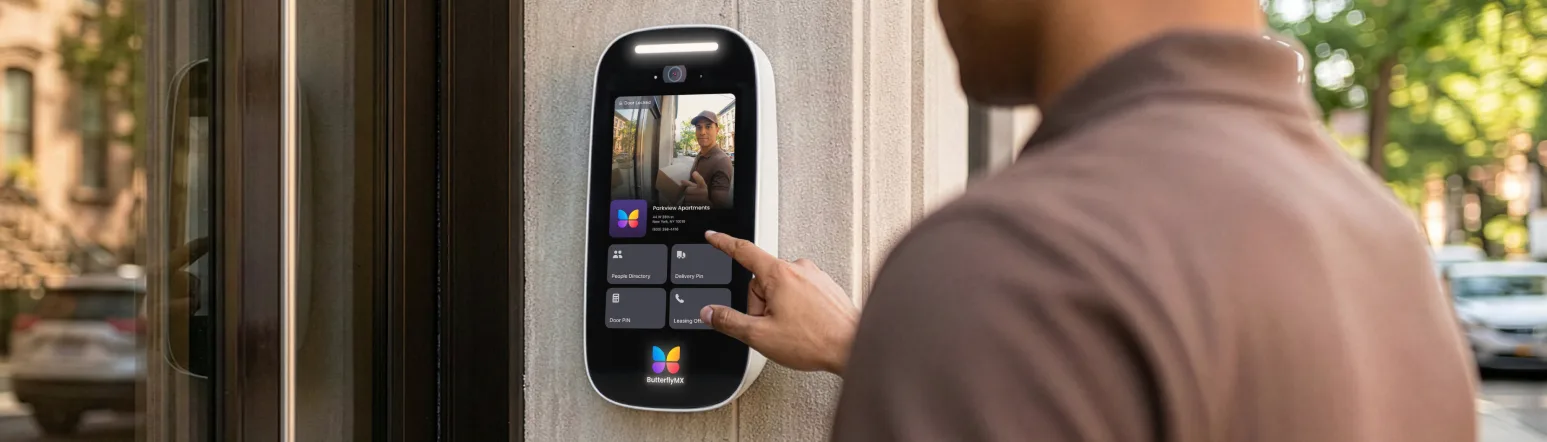
The ButterflyMX Access Control System supports smartphone, fob, key card, and PIN credentials. Combined with video intercoms and compatible connected cameras, it can help managers issue permissions, handle visitor requests, and review entry events in a multi-tenant property.
Installation requires suitable power, connectivity, and door hardware. ButterflyMX documents offline operation with backup battery support, but the proposal should specify battery runtime and which functions remain available in each outage scenario. It should also identify compatible existing devices, tenant permission controls, and supported integrations for the actual setup.
These entry-management functions don’t replace every front-desk or incident-response duty. For covered residential areas of a mixed-use property, establish the applicable data-retention requirements and available system controls before choosing how long records are kept.
Turn the shortlist into an installation and service plan
Turn your preferred security model into a written plan based on a site assessment, a common scope of work, provider checks, and acceptance testing. The plan should connect each entrance and staffed location to its equipment, operating hours, responsible people, and support arrangements.
Verify the people responsible for delivery and support
Request relevant project references, applicable licensing and registration evidence, manufacturer certification where appropriate, and insurance that matches the contract. For staffed or monitored services, review a sample incident report and the escalation procedure to understand how the provider documents events and requests help.
Name the party responsible for problems that involve more than one team, such as the guard company, installer, platform vendor, and building IT staff. Confirm support hours and who keeps the administrator list current. Before accepting a staffing start date, agree on post instructions, coverage hours, and supervision.
Plan for a phased installation
You can consider starting access control at one door, but future expansion depends on the selected architecture and equipment. Include planned future openings in the initial assessment so the installer can evaluate controller capacity, wiring, software needs, and permission management across the larger system. A standalone installation may need additional work to become centrally managed.
Test the program and document the handover
Before accepting the installation, require demonstrations of allowed and denied entry, permission changes, visitor handling, door events, monitoring escalation, and the agreed outage scenarios. Qualified professionals should handle egress and fire-system connection testing. Record results against the contracted design rather than assuming a product name proves the installation meets your requirements.
The handover should give your team the information needed to operate the program after the installation crew leaves:
- A door-by-door schedule identifying the installed equipment and planned operation.
- Staffing instructions, where applicable.
- Administrator roles, training, and support contacts.
- An inventory of retained equipment.
- Documented backup operation and outage procedures.
These records make responsibilities clear and give staff a reference when equipment, permissions, or service arrangements need attention.
The right commercial security program for your NYC property depends on which entrances need coverage, which duties require people on-site, and who will respond to incidents. Choose guards, technology, or a hybrid approach around those needs, then compare system operation, legal requirements, service responsibilities, and full contract costs.
Start with a site assessment, a door-by-door equipment schedule, and a staffing schedule that every bidder can use. If cloud-managed entry and visitor access fit your plan, discuss your building’s requirements with ButterflyMX to assess an appropriate configuration.
Get your free quote!
Fill in the form below, and we'll email you right back.
Want a free quote?
Fill in the form below, and we'll email you right back.
Redirecting you in 5 seconds.