





Key takeaways:
- A commercial access control system is more than an electronic lock; it combines credentials, readers, controllers, door hardware, sensors, and software to manage entry and record activity.
- The best system depends on each door’s users, risk level, egress role, administration needs, integrations, and outage behavior—not one universal technology choice.
- UL 294, life-safety rules, and lock behavior must be evaluated by opening, adopted code edition, and local Authority Having Jurisdiction.
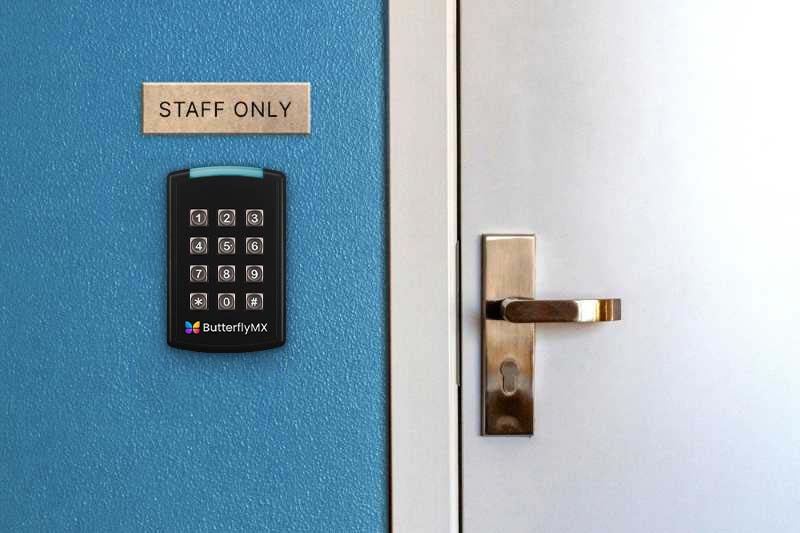
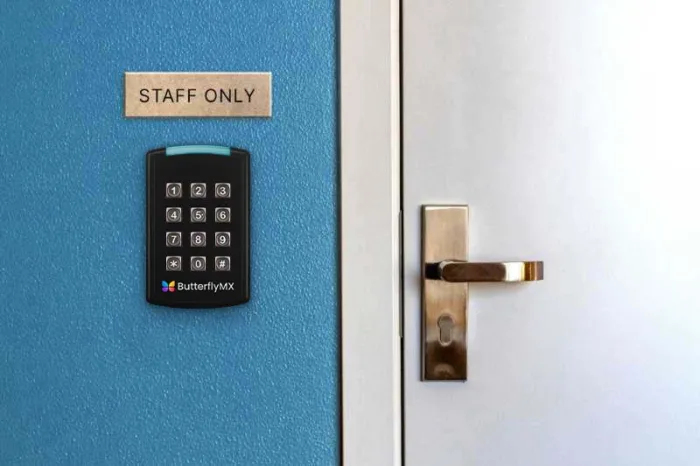
If you’re replacing keys, upgrading a lobby entrance, or trying to connect several doors under one system, the hard part usually isn’t picking a reader. It’s deciding who gets access, when that access applies, how visitors are handled, what happens during an outage, and which doors need a higher level of control.
A commercial system for access control uses credentials, readers, controllers, door hardware, sensors, and software to verify identity, check permissions, unlock or keep a door secured, and record activity. In other words, it turns access from a key-by-key task into a managed system.
This guide explains how commercial access control works, which components and architectures matter, how life-safety and UL 294 questions should be handled, what affects total cost, and how to build a door-by-door plan before you compare vendors.
This guide will answer:
- What is a commercial access control system?
- How commercial access control systems work
- Core components of a commercial access control system
- Commercial access control architectures and system types
- Credentials, permissions, and visitor access
- Standards, life safety, and door behavior
- Integrations that connect access across the property
- Planning access control by door and property type
- Reliability, cybersecurity, privacy, and outage planning
- Commercial access control costs and total cost of ownership
- Implementation steps and common mistakes
- How to choose the right commercial access control system
- Where ButterflyMX fits in a connected access strategy
- FAQs
More than 100K, 5-star ratings!
Video Intercoms
Open doors, gates & garages from anywhere.

QR Code Intercom
Smartphone-based visitor access.
Access Control
Fob, key cards, PINs, and mobile apps.
Security Cameras
Visibility throughout your property.
Vehicle Access
Hands-free access for gates & garages.
Package Room
Receive, store, and manage deliveries.
Smart Locks
Connect to all major brands and models.
Elevator Controls
Unlock key-fobbed elevators for anyone.
Front Desk Station
See all your doors and cameras in one place.
What is a commercial access control system?
A commercial access control system uses credentials, readers, controllers, lock hardware, sensors, and software to verify identity, check permissions, control entry, and record activity at business or managed-property doors. It’s different from a simple lock upgrade because it manages people, schedules, permissions, doors, and records from a central operating structure.
The scope can be small or large. A business access control system might cover one office entrance, while commercial building access control at a multi-tenant or mixed-use property may include shared entries, tenant suites, service rooms, elevators, parking areas, and restricted zones.
What makes the system commercial is the need for administration and accountability. Property teams often need to add and remove users, assign schedules, create temporary access, review an audit trail, connect visitor entry to other systems, and keep access decisions reliable across daily operations.
How commercial access control systems work
Every access decision has two parts. Authentication verifies that a credential belongs to a known person, visitor, or authorized user. Authorization decides whether that person may use a specific opening at a specific time.
- A user presents a card, fob, PIN, mobile credential, biometric identifier, or visitor credential.
- A reader or keypad captures the credential information.
- The system authenticates the identity tied to that credential.
- Permissions, schedules, locations, and other rules are checked.
- A controller or decision layer grants or denies entry.
- If access is granted, the connected lock hardware responds, and the system can log the event.
Those steps may happen in slightly different places depending on the architecture. In some designs, more logic sits locally at the property. In others, administration happens through a hosted service while door equipment remains on site. That’s why it’s important to ask how the proposed configuration handles local decisions, cached permissions, and event records when internet or local network service is interrupted.
Permissions can be role-based, location-based, time-based, or tied to a temporary need. A contractor might receive access to a service entrance only during an approved work window. A facilities employee might have broader access to mechanical areas. A denied entry can be just as useful as a granted entry because it shows where the system is enforcing a rule.
Core components of a commercial access control system
A door access control system is built from connected layers. If one layer is missing or poorly matched to the opening, the whole system can be harder to manage, less reliable, or inappropriate for that door.
- Credentials identify the person requesting entry. Common options include cards, fobs, PINs, mobile credentials, biometric identifiers, and temporary visitor credentials.
- Readers and keypads capture the credential at the door, gate, elevator, or other controlled point.
- Controllers or panels process access rules and connect the permission decision to the door hardware.
- Locking and egress hardware may include electric strikes, magnetic locks, request-to-exit devices, power supplies, and related door components.
- Management software lets administrators add users, set schedules, review events, revoke credentials, and manage permissions.
- Door-position sensors report whether a door is open or closed, which can support alerts, investigations, and basic operational checks.
These parts are related, but they aren’t interchangeable. A reader captures credential data; it doesn’t automatically make every access decision by itself. A smart lock or video intercom can be part of a useful system, but it may not provide the full set of controls, records, permissions, and integrations a commercial property needs.
Hardware also has to match the door. Door construction, existing lock hardware, traffic, power, cabling, network availability, egress role, and applicable requirements all affect the final design. That’s why commercial projects usually need both security planning and door-hardware expertise, not just a product selection.
Commercial access control architectures and system types
Architecture describes how the system is managed and where key functions live. It’s separate from credential type, wiring method, door hardware, and lock behavior. For example, a property can use mobile credentials with a cloud-hosted, on-premise, or hybrid access control model.
The same is true for wired and IP-based designs. Those describe how equipment connects and communicates, not whether the system is cloud-based or how a lock behaves during power loss. Treat each design choice as its own question.
Access control as a service, often called ACaaS, generally describes a service-based management model. It does not, by itself, tell you whether a door can make a local decision during an internet outage or how a lock behaves if power is lost.
No architecture is automatically best for every property. A small office, a multi-tenant commercial building, and a regulated facility may have very different administration, uptime, privacy, and support needs. Commercial deployments also commonly require electrical, networking, and door-hardware expertise, as described by Securitas Technology in its access control overview.
Credentials, permissions, and visitor access
Credential choice affects daily use as much as it affects security. Cards and fobs are familiar and easy to issue, but they have to be tracked, replaced, and revoked. PINs avoid a physical item, but shared codes and weak update practices can create problems. Mobile credentials can support a phone-based access experience. Biometrics can add an identity factor, but they also raise privacy, consent, retention, and governance questions.
The credential is only the way a person proves identity. The permission model decides what that person can do. Discretionary access control gives certain authorized users control over some access decisions. Role-based access control, or RBAC, assigns access by job role. Mandatory access control applies centrally defined rules and is usually associated with more formal security environments.
For most properties, the practical goal is simple: give each person the least access they need to do what they’re supposed to do. That includes thinking through enrollment, replacement credentials, revocation, accessibility, shared devices, training, and what happens when someone’s role changes.
Visitor and contractor access should be handled as a lifecycle, not a one-time door release. A complete process may include preregistration, identity checks, host approval, time-limited permissions, arrival instructions, revocation, and recordkeeping. Higher-risk spaces may also call for anti-passback, two-factor authentication, two-person authorization, or tighter schedules.
A visitor-facing entrance product can support shared-entry and guest access needs, especially at lobbies or main entrances. But it should not be treated as a universal replacement for every interior reader, controller, lock, or high-security area.
Standards, life safety, and door behavior
UL 294 is not universally required for every access-controlled door. Model codes may reference it for particular electrified-locking or egress applications, but applicability depends on the opening, the code edition adopted locally, and the interpretation of the Authority Having Jurisdiction, or AHJ.
UL Solutions describes UL 294 testing and certification as addressing access-control-system construction, performance, and safety, including four performance levels. That makes UL 294 an important entity in commercial access control discussions, but it should not be reduced to generic “UL approved” marketing language or applied as a blanket rule.
NFPA 101 and the International Building Code may address UL 294 in particular applications rather than across every access control installation. A technical explanation of those code relationships is available from iDigHardware, but project teams should verify current adopted code language and AHJ direction rather than rely on a general article or an older code discussion.
Fail-safe and fail-secure describe what a lock does when power is lost. A fail-safe lock unlocks on power loss. A fail-secure lock remains locked on power loss. Those definitions are useful, but they do not tell you which hardware belongs on a given door.
Door-specific review matters because egress role, occupancy, fire-alarm release requirements, existing hardware, and local interpretation can change the answer. Certain electrically locked egress applications must release under fire-alarm conditions, and systems that include burglar-alarm functions may also implicate UL 1076 or UL 2610. Treat these questions as part of design and code review, not as a quick product filter.
Watch how ButterflyMX works:
Integrations that connect access across the property
Access control rarely operates in isolation at a commercial property. A team may want access events connected to video surveillance for investigations, visitor entry connected to a video intercom, alarms tied to certain door events, or elevator access tied to authorized floors.
Those integrations should start with a real operating need. What event should trigger the connection? Which system is the source of record? What data needs to pass between systems? Who owns setup, support, updates, and troubleshooting?
Then verify how the integration is delivered. Native, partner-supported, and custom connections can differ in functionality, licensing, configuration, and support responsibility. The fact that two systems can connect does not mean every desired feature is included or supported in the same way.
For multi-tenant and mixed-use properties, integration planning often includes shared entrances, visitor management, elevator access control, parking access, smart lock integrations, and interior-door systems. Not every property needs all of these. The point is to document the desired access path before comparing feature lists.
Planning access control by door and property type
The best way to avoid a mismatched system is to inventory the property one opening at a time. For each door, gate, elevator, or controlled point, document who uses it, how often it is used, how sensitive the area is, whether it has an egress role, when access is needed, how visitors use it, what hardware already exists, and whether power and network connectivity are available.
That door-by-door view changes the conversation. A public-facing lobby entrance, a tenant suite door, a service room, a parking area, and a restricted storage room should not automatically receive the same equipment, credentials, or permissions.
Multi-tenant and mixed-use properties should separate shared entrances, tenant areas, service spaces, elevator paths, parking access, and visitor routes. Office access control may need different rules for employees, contractors, visitors, sensitive rooms, and after-hours use. Warehouses, industrial sites, healthcare settings, and other regulated spaces may require zone-based access, shift or schedule rules, auditability, and specialist review.
Use the inventory to assign the right architecture, credential method, hardware approach, outage plan, and integration needs to each opening. A single building-wide default can overcomplicate low-risk doors while leaving higher-risk areas underdefined.
Reliability, cybersecurity, privacy, and outage planning
Outage planning starts by naming the problem precisely. Power loss, local network failure, internet loss, hosted-service interruption, and a lost or failed credential device are different events. They can affect different parts of the same access control system.
Ask vendors and installers to document how the proposed configuration handles local decisions, cached permissions, backup power, event synchronization, manual procedures, and recovery responsibilities. Cloud-based administration does not remove the need to understand local operation during connectivity loss. Internet loss is also not the same thing as lock power-loss behavior.
This is where fail-safe and fail-secure definitions come back into the plan. Those terms describe lock behavior during power loss, but the correct approach must still be evaluated by opening, egress role, and applicable requirements.
Cybersecurity review should cover administrator accounts, privilege levels, updates, remote access, integrations, network segmentation, logs, and incident response. Privacy review is just as important when the system handles biometrics, video, mobile identifiers, or visitor records. Define who can access the data, how long it is retained, how it is secured, and which governance obligations apply.
Commercial access control costs and total cost of ownership
Commercial access control system cost depends on the number and condition of openings, selected hardware, wiring and networking, credential method, management architecture, integrations, labor, and compliance needs. A useful quote should separate the project into one-time, recurring, and lifecycle costs.
- One-time costs can include readers, controllers, locks, sensors, power supplies, cabling, network work, permits, installation, commissioning, and training.
- Recurring costs can include software or service fees, physical or mobile credentials, connectivity, support, maintenance, replacements, and administrator time.
- Lifecycle costs can include expansion, hardware replacement, integration changes, software migration, credential turnover, and decommissioning.
Numerical ranges are not very helpful unless the scope is the same. A one-door office retrofit, a multi-tenant lobby upgrade, and a portfolio-wide rollout can have very different assumptions behind the price.
To compare vendors fairly, use the same door schedule, responsibilities, assumptions, outage requirements, integration scope, support model, and acceptance-testing plan. Ask for line-item explanations so you can see what is included, what is excluded, and what may become a later cost.
Implementation steps and common mistakes
A good access control implementation turns the door inventory into a tested system. The sequence usually looks like this:
- Identify stakeholders and create the door inventory.
- Classify door risks, user groups, visitor flows, and egress roles.
- Review applicable requirements with qualified code, door-hardware, and installation professionals.
- Define the architecture, credential choices, integrations, administration model, and outage procedures.
- Compare vendors and installers against the same requirements.
- Complete retrofit discovery for door condition, lock compatibility, cabling, power, network paths, legacy credentials, and migration constraints.
- Install, commission, train administrators, and test the approved design before launch.
- Review operations after launch and update permissions, documentation, and procedures as the property changes.
Commercial-grade work often involves electrical, networking, door-hardware, commissioning, and compliance expertise. Even when the user experience looks simple, the installation behind it may not be.
Common mistakes include choosing technology before mapping doors, treating all openings alike, overlooking egress, failing to assign administration ownership, and accepting vague integration claims. Commissioning should test granted and denied access, door status, schedules, visitor flows, relevant integrations, alarm response where applicable, power loss, internet loss, and emergency procedures within the approved project design.
How to choose the right commercial access control system
Start with property requirements, not a favorite credential or vendor. Score each option against doors, users, traffic, growth plans, security tiers, egress roles, visitor access, accessibility needs, integrations, privacy expectations, and outage requirements.
Choose the management architecture and credential method separately. Then confirm that the combined system supports local operation, remote administration, updates, documentation, training, support responsibilities, and total cost of ownership.
Ask vendors to demonstrate the exact situations that matter to your property: normal entry, denied entry, credential revocation, visitor access, remote administration, video or alarm workflows, and outage behavior. A demo based on the proposed configuration is more useful than a general feature tour.
The strongest proposal is not necessarily the one with the longest feature list. It’s the one that matches each opening’s risk and use case, explains its limits, and makes installation, support, and administration responsibilities clear.
Where ButterflyMX fits in a connected access strategy
ButterflyMX may fit commercial, multi-tenant, and mixed-use properties that need connected access at shared entrances, visitor paths, mobile access points, and elevator-related access areas. It can support property teams that want remote access administration and a phone-based visitor entry experience at appropriate openings.
For example, ButterflyMX video intercoms do not rely on traditional POTS telephone lines, and residents can receive visitor calls and grant access through their smartphones. Property teams can remotely manage residents, visitors, credentials, and access where those capabilities fit the property’s design.
The key is to map ButterflyMX to the door-by-door plan developed earlier in this guide. A shared-entrance or visitor-access system can complement a broader commercial access control design, but it should not be presented as a replacement for every interior controller, reader, lock, or high-security application. Confirm how each desired integration is delivered and which system is responsible for each part of the access path.
Frequently asked questions
Can commercial access control integrate with video surveillance?
Yes. Access events and video can be connected to support monitoring and investigations. Confirm whether the integration is native, partner-supported, or custom, and verify the available functions, licensing, configuration, and support responsibilities.
How should businesses manage temporary visitor and contractor access?
Businesses should manage temporary access as a full lifecycle. That can include preregistration, identity verification, host approval, time-limited permissions, entry instructions, revocation, and recordkeeping, depending on the property’s risk level and staffing model.
Does a video intercom replace a full commercial access control system?
No. A video intercom can support visitor communication and shared-entrance release, but a full commercial access control system may also require credentials, controllers, permissions, sensors, software, and interior-door controls.
Can a commercial access control system be self-installed?
Some small components may be simple to deploy, but commercial-grade systems often involve electrical, networking, door-hardware, commissioning, and compliance expertise. Do not assume a commercial access control project is a simple do-it-yourself lock replacement.
A strong commercial access control plan starts with the property, not the product. Define each opening, understand who uses it, separate architecture from credentials and lock behavior, confirm life-safety and outage requirements, and compare total ownership responsibilities before selecting a system.
For commercial, multi-tenant, and mixed-use properties, ButterflyMX may fit shared-entrance, visitor, mobile, elevator, and connected-access needs within that broader plan. Discuss your property access requirements with ButterflyMX to see whether it fits your door-by-door strategy.

Get your free quote!
Fill in the form below, and we'll email you right back.
Want a free quote?
Fill in the form below, and we'll email you right back.
You’ll be redirected shortly...