
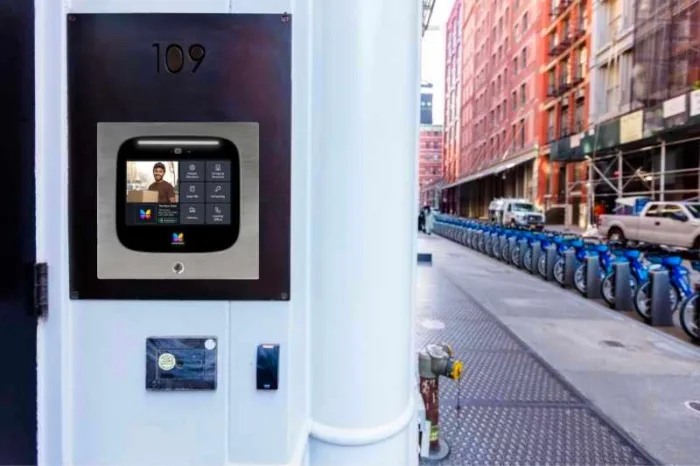





Key takeaways:
- A touchscreen intercom is defined by its interactive display, not by video calling, mobile credentials, or cloud management. Those features depend on the system.
- Outdoor-ready touchscreen intercoms should be evaluated for ingress protection, impact resistance, display visibility, wet-touch behavior, and the actual entrance conditions.
- The best choice depends on the property’s traffic, directory size, call routing, accessibility needs, integrations, installation scope, and total cost of ownership.
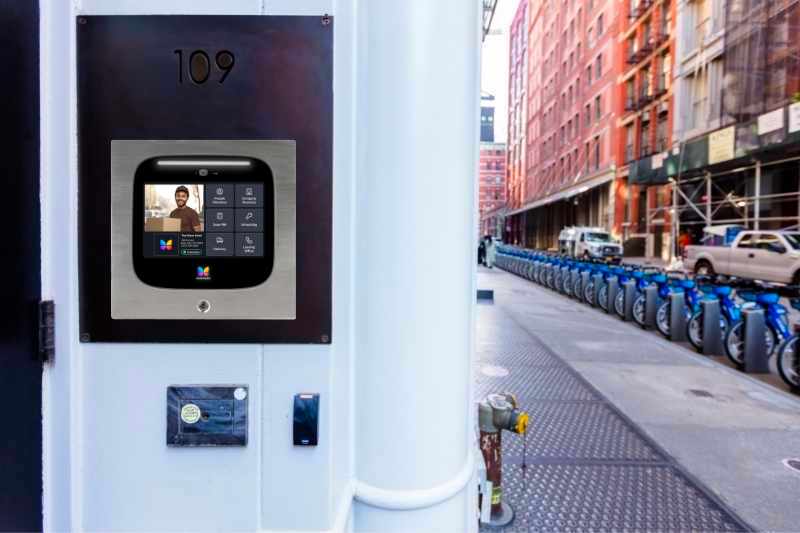
A touchscreen at the front door can make an intercom look simple. Visitors tap a name, follow prompts, place a call, or enter a code. But the screen is only the part people see. The real decision is whether the whole entry system fits the building, the users, the door hardware, and the way access is managed.
A touchscreen intercom is an entry communication intercom system that uses an interactive display for tasks such as directory navigation, visitor calling, and code entry. Video calling, mobile credentials, cloud management, and remote administration are separate capabilities that vary by product, installation, and service model.
That distinction matters when you’re comparing systems. A property with a small directory may not need the same interface as a busy multifamily entrance, commercial lobby, or gated community. This guide explains how touchscreen intercom systems work, which tradeoffs matter, and how to evaluate one before you build a shortlist.
This guide will answer:
- What is a touchscreen intercom?
- How a touchscreen intercom works
- Benefits and tradeoffs of a touchscreen interface
- Choose screen size and mounting for the entrance
- Evaluate outdoor durability and accessibility
- Compare credentials, call routing, and system architecture
- Plan power, installation, and integrations
- Match the system to the property type
- Understand total cost and lifecycle needs
- When ButterflyMX may fit a managed property
- FAQs
Watch how ButterflyMX works:
What is a touchscreen intercom?
A touchscreen intercom is an entrance communication system with an interactive display. A visitor may use the screen to search a directory, select a resident or office, place a call, enter an authorized code, or follow an on-screen access prompt. The display replaces or supplements fixed directory buttons and a traditional keypad with a configurable interface.
The most important point is that a touchscreen describes the interface, not the entire feature set. A system may have a touchscreen without a camera. A touchscreen video intercom adds a camera and video calling. A smart intercom generally refers to a connected system that may support software features such as remotely managed directories, permissions, or call routing. These categories can overlap, but they are not the same thing.
A keypad or physical-button intercom can still be practical for a simple entrance with a short directory. A touch screen intercom system becomes more useful when the property needs searchable names, changing instructions, several visitor paths, or one place for calling and access interactions. Neither interface is automatically more secure or more accessible. The result depends on placement, software design, credentials, door hardware, and how visitors, residents, staff, and vendors actually use the entrance.
How a touchscreen intercom works
Most touchscreen intercoms are built around the same basic idea: the visitor uses the display to start an access event, and the system routes that event to the right person, device, or door hardware. The exact flow changes by product and configuration, but a typical visitor call works like this:
- The visitor searches the directory or selects a destination on the display.
- The intercom places a call to a supported endpoint, such as a resident smartphone, dedicated in-unit station, reception desk, security station, or another configured destination.
- The visitor and recipient communicate by audio and, when the installed system supports it, video.
- If the recipient is authorized, they release the connected door or gate access point.
- The system may record the event, update an audit trail, or apply a visitor-access rule, depending on how it is configured.
The touchscreen is the visible interface, but it does not work alone. A complete system may include the display, microphone, speaker, optional camera, credential reader, controller or relay, network connection, and door hardware such as an electric strike or magnetic lock. Each part affects the final result. For example, a clear screen does not help if call routing is confusing, and a polished directory does not solve a door-hardware or network problem.
Software often determines whether a touchscreen intercom is easy to manage after installation. Property teams may need to update residents when people move in or out, create different call paths for business hours and after-hours use, issue temporary visitor access, or manage staff permissions. Before choosing a system, confirm how it handles directory synchronization, remote administration, call routing, event records, and software updates.
Architecture also matters. In a cloud-managed system, more administration and updates are commonly handled through provider-managed software and property-team tools. In a self-hosted design, the organization operating the system may take on more responsibility for updates, directories, remote access, and IT support. The better choice depends on staffing, connectivity, IT practices, and how much local control the property requires.
Call endpoints are another design choice. Mobile answering may work well for residents who want visitor calls on their phones. A staffed office may need calls to route to a front desk. Some properties need more than one path, especially when a resident is unavailable, a smartphone is not preferred, or a site needs a staffed fallback.
Benefits and tradeoffs of a touchscreen interface
A well-designed touchscreen can make a busy entrance easier to navigate. It can put the directory, calling controls, instructions, and access prompts in one place. Search can be easier than scrolling through a long fixed list, especially at properties with many units, tenants, offices, or frequent visitor traffic.
The flexibility can also help after installation. If the software supports it, a property may be able to update names, change prompts, adjust visitor instructions, or configure different access paths without replacing printed labels or physical directory hardware. That is useful only when the management tools are clear and the property has a process for keeping the information current.
The tradeoffs are just as real. Direct sun can make a screen harder to read. Rain, residue, gloves, cleaning practices, and wet fingers can affect touch response. A unit facing a public sidewalk may need more protection from impact or tampering than one inside a controlled lobby. The best interface on paper can feel frustrating if visitors approach with packages, a stroller, mobility equipment, or a vehicle and cannot comfortably see or reach the controls.
Security should be judged as part of the whole access-control design, not as a feature created by the screen. The useful questions are practical: Who can call? Who can enter? How are permissions issued and revoked? What happens when the network, phone, or credential path fails? How does the door hardware respond? A larger display does not answer those questions by itself.
Choose screen size and mounting for the entrance
Screen size should follow the entrance conditions, not a generic rule. Start with the directory size, visitor traffic, viewing distance, number of tasks on the screen, available wall or pedestal space, and how long people may queue at the entry. A low-traffic side door with a short directory may not need the same display or enclosure as a busy main entrance.
Mounting affects both appearance and installation scope. Flush mounting recesses the enclosure into a wall for a more built-in look, but it can require enough wall depth, opening work, and coordination with the wall substrate. Surface mounting places the enclosure on the face of the wall and may be more practical when recessing is not feasible. Kiosk or pedestal mounting can help when there is no suitable wall, but it adds foundation, conduit, approach, and exposure considerations.
Do not assume that every model is available in every mounting format. Manufacturers may offer touchscreen video intercom products in different form factors, but the exact enclosure, mounting hardware, cable entry, and service access need to be checked in the product documentation.
Retrofit projects deserve an early site walk. Document existing openings, conduit paths, cable routes, available power, network reach, wall condition, drainage, and service access. Then look at the entrance the way a visitor would: Where will people stand? Is there room for wheelchair approach? Will sunlight hit the screen? Will precipitation reach the unit? If a camera is present, does the placement capture the right view? Can technicians reach the enclosure later for commissioning, repairs, cleaning, or replacement?
Evaluate outdoor durability and accessibility
A touchscreen intercom can be installed outdoors only when the specific unit and installation are designed for the documented site conditions. Outdoor-ready marketing language is not enough. Buyers should verify the enclosure rating, installation instructions, display visibility, operating limits, drainage and sealing details, wet-touch behavior, and exposure at the actual entrance.
Two ratings often appear in outdoor product discussions, and they measure different risks. The International Electrotechnical Commission explains that IP ratings classify protection against solid-object or dust ingress and water. An IK rating classifies resistance to mechanical impact. A model can have one rating without providing the protection described by the other.
Neither rating proves complete outdoor suitability. Buyers still need to confirm the tested enclosure, mounting method, cable entry, display visibility, water-management details, operating limits, and site exposure. Capacitive touch response can also vary when the display is wet, so wet-weather operation should be confirmed for the chosen product rather than assumed from the presence of a touchscreen.
Accessibility is also site-specific. The U.S. Access Board guidance on operable parts places operable parts within a 15-to-48-inch reach range under the applicable reach conditions. For an intercom, the operable parts can include the touchscreen, call controls, access controls, and other user controls, not just the overall enclosure. That range is not a full project compliance decision. Approach, clear floor space, reach conditions, governing codes, and the complete installation still need review.
Accessible use also goes beyond mounting height. Teams should consider readable visual information, audible communication, tactile cues where applicable, and a workable path for visitors who are blind, deaf, have limited reach, or need assistance. For more planning context, see this guide to intercom accessibility for blind and deaf visitors.
Compare credentials, call routing, and system architecture
Before comparing models, define who needs access and what each person should be able to do. Potential access methods include PINs, RFID credentials, mobile credentials, wallet-based credentials, QR or temporary passes, and, on some systems, biometric methods. Product support varies, so treat this as a requirements list, not a promise that every touchscreen intercom includes every credential type.
- Residents or tenants: How are credentials enrolled, changed, revoked, and replaced after a lost device?
- Staff and vendors: Do permissions need schedules, expiration dates, or access limited to certain doors?
- Visitors and deliveries: Is a temporary credential needed, or is a live call to a resident or staff member enough?
- Administrators: Who can update directories, review permissions, change call routing, and handle exceptions?
- Fallback access: What works if a phone is unavailable, a credential is lost, network service is interrupted, or the listed recipient does not answer?
Call routing should receive the same attention as credentials. Compare mobile answering, in-unit stations, front-desk endpoints, security stations, and mixed models against the people who use the property. A smartphone-first approach may be convenient for many residents, but it should not be the only path if some occupants need a different option or if the property depends on staffed coverage.
Directory management and permission management are easy to underestimate. A touchscreen intercom is not just a panel at the door if it has to stay current across move-ins, move-outs, staff changes, delivery procedures, and visitor rules. Ask how updates are made, who approves them, whether records are visible to administrators, and how quickly a permission can be removed when someone no longer needs access.
Biometric credentials deserve separate review. They are optional, and availability, data handling, and legal obligations can vary by product, implementation, and jurisdiction. Property teams should obtain current legal and product-data review before adopting or describing a biometric access program.
Plan power, installation, and integrations
Power and cabling requirements vary by model and site, so they should be reviewed before hardware is selected. Start with available power, low-voltage pathways, network access, grounding, backup-power expectations, equipment locations, and the condition of the existing infrastructure. Some products use approaches such as PoE+, while others use different power arrangements. Do not choose a system based on an assumed architecture.
New construction and retrofit projects create different risks. New construction gives teams a chance to coordinate conduit, wall openings, network drops, power, and door hardware before finishes are complete. Retrofit work may have to deal with legacy telephone-entry equipment, occupied spaces, limited cable paths, existing mounting openings, and the need to reduce disruption. A device that looks simple on the wall can become more complex once it must connect to a lock, relay, network, and building process.
Integrations need proof, not broad language. Ask vendors to demonstrate the exact connection with any existing access-control system, property management software, smart locks, identity records, APIs, or middleware. A general integration claim does not prove that the right fields, permissions, events, or data direction will work for your property. Use representative scenarios such as a move-in, move-out, staff change, visitor call, and temporary access request.
Door hardware and egress functions should be reviewed as part of the whole entry assembly. Door strikes, magnetic locks, request-to-exit devices, emergency release, and related functions may require qualified installation and fire or life-safety review. An intercom can support an entry process, but it does not replace proper review of the door hardware and local project requirements.
Match the system to the property type
Property type can point you toward the right questions, but it should not replace a site assessment. Two buildings in the same category can have very different entrances, users, staffing, and technology needs.
Multifamily, condos, and HOAs
These properties often need to manage a large directory, resident turnover, visitor calling, delivery access, remote administration, and accessibility. Review how names and units are updated, how visitor calls are routed, how credentials change during move-ins and move-outs, and what options exist for residents with different technology preferences. Readers comparing adjacent options can also review video intercom systems for apartment buildings.
Commercial offices and coworking spaces
Office entrances may involve reception workflows, visitor destinations, employee credentials, operating schedules, and access-control compatibility. The core question is often not just who receives a call. It is which destination should receive the call at a specific time and what should happen when the building is not staffed.
Gated communities
Gate entrances add vehicle approach, network reach, weather exposure, safe placement, and call-routing concerns. The intercom and access-control equipment should be evaluated separately from the mechanical gate operator. A capable communication and credential system does not replace the need to assess the gate operator, safety devices, and physical entry design.
Student and senior housing
Student and senior housing can involve high turnover, support needs, accessibility concerns, staffing procedures, emergency planning, and fallback access. Mobile adoption may be high for some users and unsuitable as the only path for others. A shortlist should account for how occupants, families, staff, and visitors receive calls and get help when the usual process does not work.
Across property types, compare systems against the same framework: entrance conditions, traffic, directory scale, user population, call endpoints, credentials, integrations, service model, and lifecycle plan. A broader door entry intercom buyer guide can help teams compare adjacent entry-system categories before they request proposals.
Understand total cost and lifecycle needs
There is no defensible universal price for a touchscreen intercom because quotes can cover very different scopes. A hardware-only number is not comparable with a proposal that includes wall work, cabling, network upgrades, door hardware, commissioning, software, and ongoing support.
Ask each vendor to separate the cost of intercom hardware, mounting and enclosure work, power and cabling, network work, door hardware, integrations, permits, and commissioning. Then identify recurring costs that may apply, including software or licensing, connectivity, support, maintenance, replacement parts, and administrative work. This turns pricing into a total ownership discussion rather than a misleading comparison of screen prices.
For an apples-to-apples comparison, give each vendor the same entrances, user groups, integrations, service period, assumptions, exclusions, and support expectations. Ask who is responsible for installation, training, service, software updates, and future replacement planning. Use these criteria to compare your entrances, access needs, and lifecycle requirements before requesting proposals.
When ButterflyMX may fit a managed property
After a property has defined its requirements, ButterflyMX may be worth evaluating for managed properties that prioritize smartphone visitor calling, remote access administration, and an alternative to maintaining legacy POTS-based entry hardware. In that context, residents can receive visitor calls and grant access from their smartphones, while property teams can manage residents, visitors, credentials, and access remotely.
Review ButterflyMX video intercom options against the same criteria used for any system: entrance conditions, networking, power, door hardware, accessibility, resident workflow, call routing, and required integrations. The right fit depends on the property and its users, not on a universal claim of compatibility or superiority.
For a property with well-defined needs, the next step is a scope-specific evaluation. Test real scenarios before choosing a system: visitor calls, resident changes, credential updates, exceptions, and administrator tasks. That gives the property team a clearer view of whether the system fits the entrance and the people who use it.
Frequently asked questions
Do touchscreen intercoms require in-unit hardware?
No. Call endpoints vary by system and can include mobile devices, dedicated in-unit stations, desk endpoints, security stations, or a combination. Compare occupant needs, connectivity, fallback procedures, and support requirements before choosing a call model.
Can a touchscreen intercom use Apple Wallet or Google Wallet credentials?
It may, but wallet support is product-, credential-, device-, and deployment-specific. Confirm supported platforms, enrollment and revocation processes, fallback access, and the administrator workflow for the exact system under consideration.
Can a touchscreen intercom integrate with property management software?
Yes, when the specific platforms, data fields, synchronization direction, APIs, permissions, and support model are compatible. Ask for a live demonstration using representative records rather than relying on a general integration claim.
How much does a touchscreen intercom cost?
There is no reliable universal price because the scope can vary widely. Compare hardware, mounting, cabling, network work, door hardware, integrations, software or licensing, support, maintenance, and administrative labor before judging the total cost.
A touchscreen intercom can make an entrance easier to navigate and manage, but the screen is not the whole access system. The strongest choice is the one that fits the entrance conditions, accessibility needs, call-routing design, credential options, integrations, installation scope, and lifecycle plan.
For managed properties considering mobile visitor calling and remote access administration, ButterflyMX may be a relevant option to evaluate against those same criteria. Request a scope-specific quote for your property.

Get your free quote!
Fill in the form below, and we'll email you right back.
Want a free quote?
Fill in the form below, and we'll email you right back.
You’ll be redirected shortly...